tjlinzy
Inspiring
Apr 7, 2021 7:57 PM UTC
Answered

Changing the page size

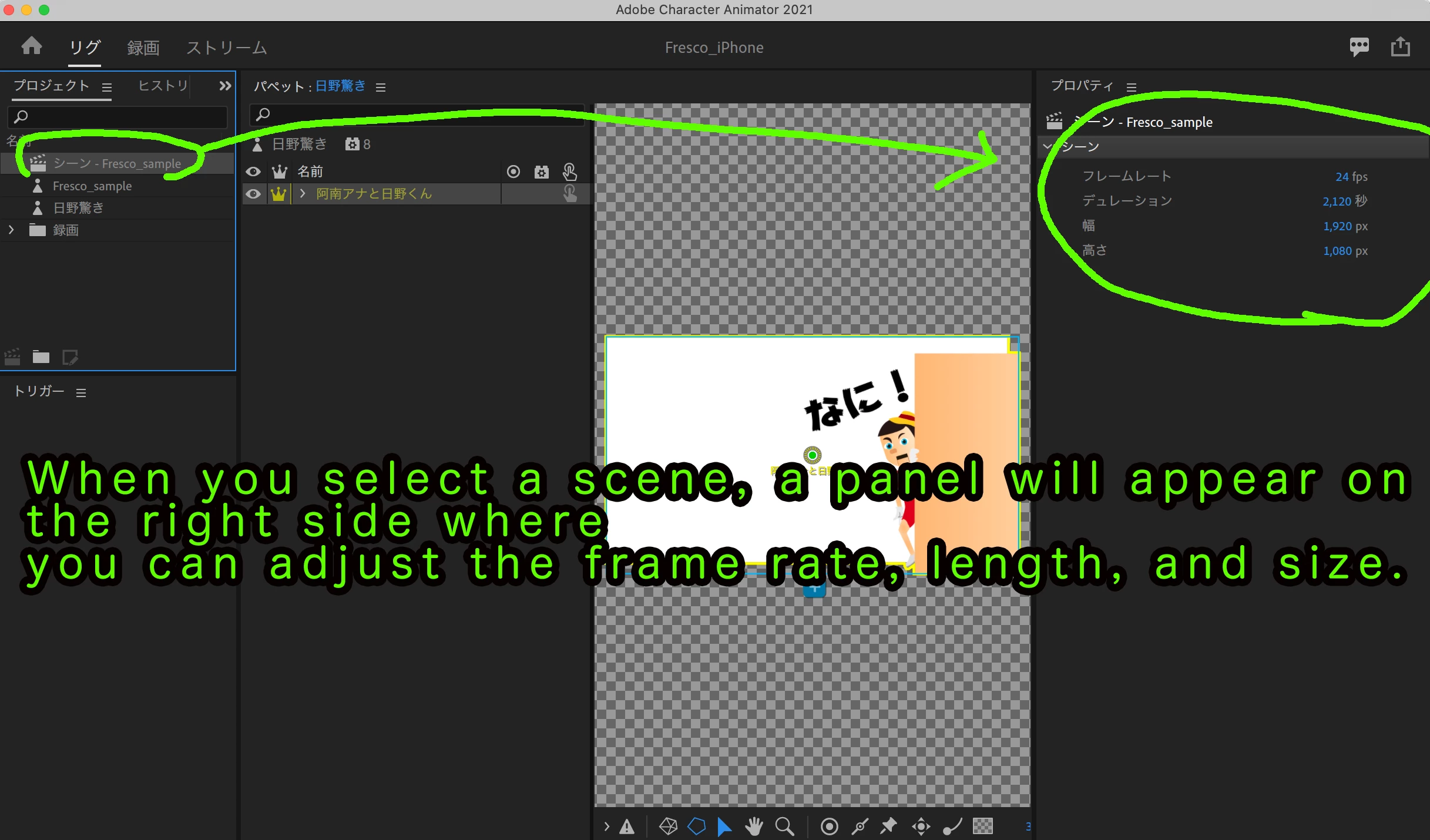
How do you change the size of a stage in Ch?  I don't want the videos to be so large and I can't find a tutorial for it.

 

This topic is closed to new replies. Start a new post to keep the conversation going.
k_oshiro
k_oshiroCorrect answer
Community Expert
Apr 7, 2021 8:04 PM UTC

When you select a scene, a panel will appear on the right side where you can adjust the frame rate, length, and size.

thank You

k_oshiro(AdobeCommunityExpert)

2 replies

k_oshiro
Community Expert
k_oshiroCommunity ExpertCorrect answer
Community Expert
Apr 7, 2021 8:04 PM UTC

When you select a scene, a panel will appear on the right side where you can adjust the frame rate, length, and size.

thank You

Translate
k_oshiro(AdobeCommunityExpert)
tjlinzy
tjlinzyAuthor
Inspiring
Apr 7, 2021 10:40 PM UTC

YOU ARE AWESOME!!!  Thanks so much for such a quick and accurate response.  


I appreciate you, stay safe.

Translate