Participating Frequently
October 10, 2018
Answered

Make character walk into a different direction

  • October 10, 2018
  • 1 reply
  • 6396 views

Hi guys.

I made a few characters and they can walk from left to right with the arrowkeys.

but how can i make him walk the other way?

greetings, cris

This topic has been closed for replies.
Correct answer alank99101739

Thanks guys for the quick answers.

i found my problem. and got another one. now it wont walk at all

so this is what maddys "views and handels" look like in CH
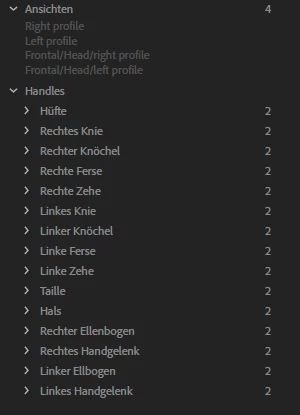
and this is what mine looks like
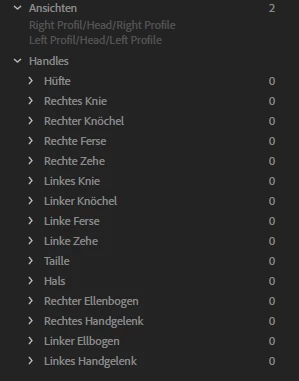
its seems like CH does not recognize my handels somehow.

i did create them and tagged them correctly i guess.

i'll upload my file tomorrow.

greetings


I think you are missing the tags on the top level profiles... oh! See you called them "Right Profil" (no "e" on the end). So that layer will not have been autotagged. Instead if found your head profiles and thought they were your body profiles! Then it looked for all the handles under the profile (which is Left Profil/Head/Left Profile in your case - a part of the head). Your handles are not under head (of course) so CH did not find them.

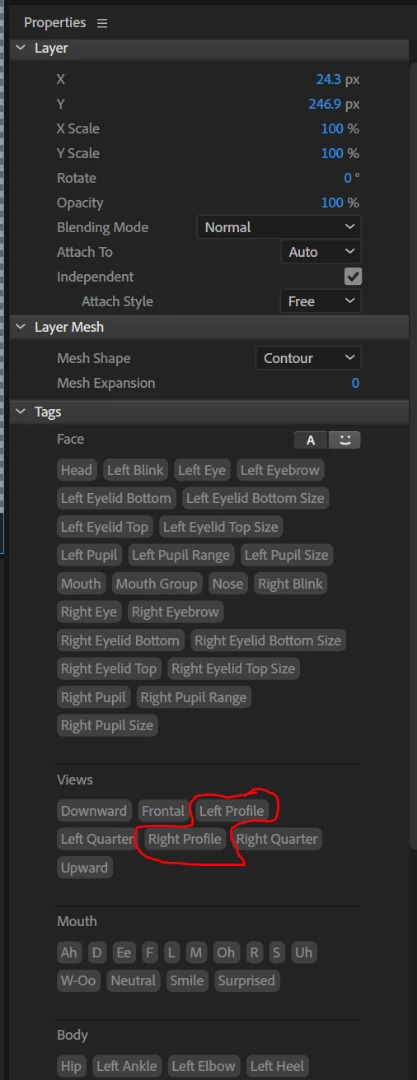
If you tag your "Right Profil" layer near the top with the "Right Profile" tag (in the Tags section of the puppet properties panel) and do the same for the left profile it will hopefully start working. (Or rename your layers so the autotagging kicks in - but that may loose any rigging under those layers.)
1 reply

KJerryK
Legend
October 10, 2018

The easiest way to get started is to look at an example puppet that can walk different ways. If you go to Character Animator Examples  and download the Maddy puppet, that will help.

cx0rAuthor
Participating Frequently
October 11, 2018

thank you.

i already made my character walk forward and it can walk backwards.

so when i add a right and left profil (which i only have for my face right now) it will automatically walk with the left profil instead of walking backwards?
and Maddy has no bones attached to her. thats quit confusing me, because i rigged my other characters.

greetings

Participant
November 16, 2018

Regarding your eyeballs for your two standing profiles, look for the Eye Gaze behavior (probably on the root of the puppet). In the properties panel there should be a “Handles” section. If you expand it it shows what eyes are bound to - is it bound to all 4 profiles? Just 2 (Left and right)?

Sometimes you need to add multiple behaviors (e.g. add a “Eye Gaze” behavior to each “Head”). The fact that two profiles work and two do not is interesting however.

The other thing is to check tagging for eyes. Its easy to make a mistake. https://extra-ordinary.tv/2018/04/21/debugging-character-animator-eyess/ Is a blog I wrote on debugging eyes (because it is such a common problem).


hey dude....

sorry i didnt answer.

im still not gettin it.

even if i add an eye gaze behave to the heads, it won't work.

somehow it will recognize only 1 profil of the 4 and a second one with only 1 eye tagged as a handle in the behaviour.

im resignating over here -_-

PS.

ok i got the second profil to work.

but somehow 2 of them still wont.

PPS:

ok sorry and thanks dude.

i tried it again, with adding an extra eye gaze behaviour. it worked fine.

thx very much again.

greetings!