Inspiring
January 6, 2019
Question

MIDI Board Basic Setup

  • January 6, 2019
  • 7 replies
  • 4470 views

This Christmas, I received a MIDI board and an Elgato Streamdeck to further fine tune my performances and puppets.  I am a self-taught designer and editor, and have done a lot of reading up on MIDI devices before this purchase, but considering I'd never heard of "MIDI" until last month I knew there would probably be a learning curve involved

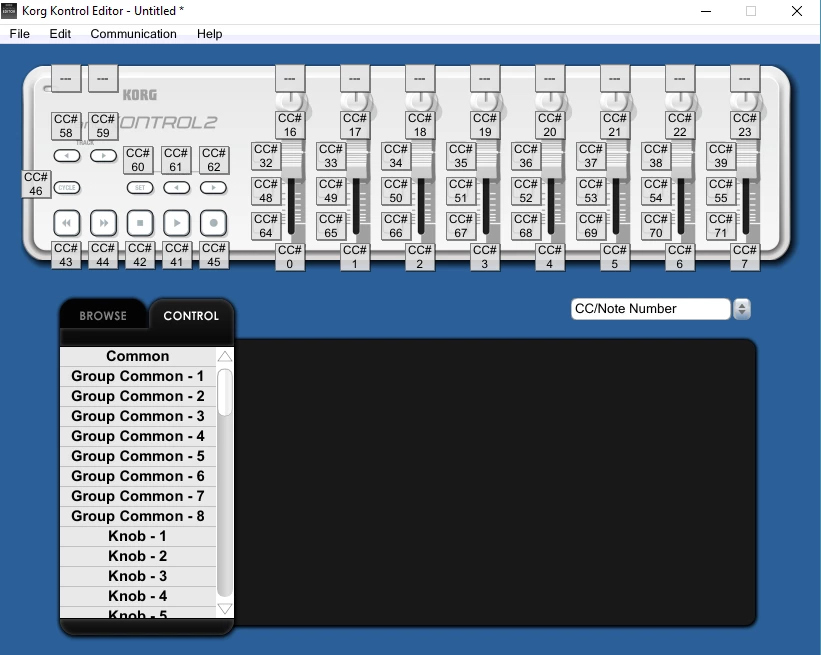
The MIDI device I have is the Korg NanoKontrol2, which has a good number of sliders and dials.  I have already installed the drivers and the KorgKontrol Editor, but I have no idea how to set it up so that Adobe Character Animator recognizes the MIDI board so that I can map certain triggers to the buttons and dials.  Despite pouring over all of the MIDI posts on this forum and all of the related Korg information and I am at a TOTAL loss!

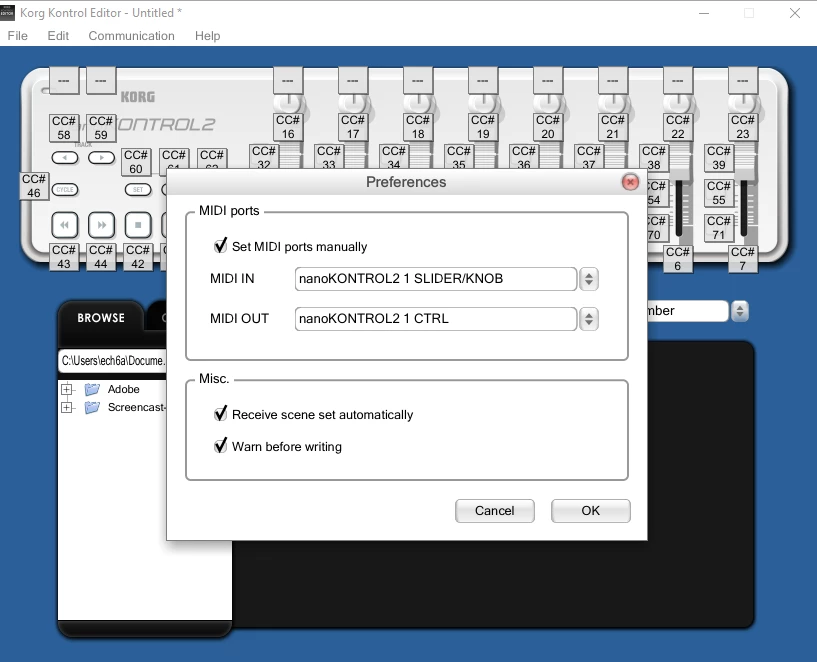
If someone would just help push me in the right direction, I would really appreciate it.  To begin, do I need to install a different type of DAW software, or is the included Korg Kontrol Editor (screenshots included below) all I need to connect to Character Animator and assign my triggers?

Thank you all so much!
https://www.korg.com/us/products/computergear/nanokontrol2/

This topic has been closed for replies.

7 replies

Participant
November 15, 2020

Wtf

alank99101739
Legend
June 9, 2019

There is no “head tilt” property that I can recall. You can use the webcam to record position data, but there are no manual controls for that behavior. You can put a dragger on instead, but then you have separate X and Y values. You *can* assign separate sliders to X and Y, I just found it painful to use in practice. Really need a joystick MIDI device.

You can also use Transform to rotate the head. But you cannot then use the webcam. Its one or the other.

I had a bit of fun playing the the MIDI support a while back. I wrote a program to use HTC Vive VR gear to turn positional data of the headset and hand controllers into MIDI events that controlled the puppet. But putting the headset on meant I could not see what I was doing!!! So not that useful in Practice.

Participant
June 10, 2019

I have this app called touchosc on my ipod, which sends x/y coordinate data to the digital audio workstation I use. I wonder if touchosc would be compatible with Character Animator.

I'm unsure how I can test if it is. I'm beta testing this character for a company, so I'm not working with the full retail version of Character Animator. Just a "player version" that has less features.

alank99101739
Legend
June 8, 2019

Theoretically yes, but remember draggers have an x and y value separately. So rotation can work, but just sliders are not that easy to use.

oh, I have not tried that device, but my midi keyboard slider works fine.

Participant
June 8, 2019

I'm just learning to use Character Animator, so I'm not familiar with the program at all.

So, you're saying a single knob or slider cannot be assigned to control, say a head tilt motion? If so, could you perhaps assign two knobs or sliders to control that movement?

ech6aAuthor
Inspiring
January 7, 2019

EXCITING UPDATE - I DID IT YOU GUYS!!!  I was able to successfully map a note onto a button, and Character Animator is recognizing and registering these buttons.

Woohooooo.  What a great day!  Thanks to KJerryK​ and alank99101739​ for your assistance here !

Participant
June 8, 2019

I have the nanokontrol 2 as well. Were you able to map the sliders or knobs to anything? I want to know if it would be possible to smoothly move the arms and tilt the head with the knobs and/or sliders.  

ech6aAuthor
Inspiring
January 6, 2019

Well, in nearly miraculous news, my sliders and knobs are now working seamlessly in Character Animator, which is REALLY exciting because that is the main reason I purchased this board!  Now I can start tweaking these control panels and have a lot more fun.

So it seems that Character Animator DID recognize the nanoKontroller.  Now I'm looking at the rest of the controller (pictured below) and I have a lot of other buttons, including a set of Stop, Record, and Play buttons.  I'd like to map them out so that when I press them, the corresponding functions are set off in Character Animator.  Is there anything I need to do within Character Animator to achieve this?  I think this is something I would set up in the Korg Kontrol Editor, but I don't know if anyone is familiar with a software like this.  It looks like I can program the board for different applications (which I think they call "Scenes"?), but I am unable to find or click on "Character Animator" in order to select it.

Also, is there any way I can use these buttons to activate triggers in Character Animator?  So that when I click on the trigger and press the button on my nanoKontrol, it will "lock" that button onto the trigger?  The buttons can be turned into "notes", which could be a key.

I think I may have to save my changes or "write the scene data" in order for these changes to take effect.  All I know is that if I press any of these buttons when my trigger is highlighted in the control panel, nothing is happening in Character Animator.

BUT as I mentioned before - my main problem has been solved!  I'm just glad I can use these toggles and sliders .  So if you guys have absolutely no idea what I'm talking about don't go overboard trying to figure it out for me.  I don't even have any idea if this Korg Kontrol Editor even resembles a DAW or any other type of recognizable software, so I thought I would get some feedback here. 

alank99101739
Legend
January 6, 2019

If you have a MIDI keyboard, when you plug it in does it control other software on your Windows box ok? This is step 1 - making sure MIDI events are arriving on your machine.

After that, there is nothing else to set up, but there are some gotchas. CH listens to all MIDI channels and all MIDI notes and control events. Some software you have to tell it what MIDI channel to listen to. CH just listens to them all - nothing to set up there.

I will try and create a little video sometime when I get a moment. It really was as simple as going into the control panel layout mode, clicking on a control to highlight it, then pressing a Midi keyboard key. It picked up the MIDI channel number and note number automatically. Then deselect it to make sure it did not get reprogrammed again by accident.

One of the gotchas is if you try to enter the MIDI note number by hand you can specify the note, but not the channel number. (Well, I could not work it out anyway.)

KJerryK
Legend
January 6, 2019

I'm not familiar with the Korg Kontrol Editor, but I have run into a problem with CH not recognizing a signal from a midi device if another app is opened before CH and is seeing the midi in. Perhaps the editor app was open before CH? When that is happening I had to restart, I'm on Win 10, and then open CH.

ech6aAuthor
Inspiring
January 6, 2019

I am also running Win10, so I will try this right now to see if I can get it to "set" to some of these other buttons.  Thank you KJerryK​!

KJerryK
Legend
January 6, 2019
ech6aAuthor
Inspiring
January 6, 2019

Thank you KJerryK​, that does help a bit!  It's one of the sites that I have open and have read before(I know that alank99101739​ has helped out A LOT on this forum and has done some really interesting experiments with MIDI).  Unfortunately, I still don't understand how to get Character Animator to recognize my MIDI device/how to link my MIDI device to Character Animator.

I wish there was a "for dummes" section on how to do this .  Everything I read seems to insinuate that the user knows a lot about MIDI, and that simply plugging the board into your computer means that you can go right into Character Animator and start assigning triggers to buttons and dials.  That is not happening for me, so there needs to be another step I need to take in order to make this work.  So then I try and figure out - do I need an additional "DAW" software to work with here?  Is the Korg Kontrol Editor I screenshotted above a "DAW" software? 

As you can tell I am totally bamboozled.  I try very hard to research and learn how to do things on my own, but obviously I'm missing something here.  I think that as soon as I have the MIDI board linked into Ch somehow then I'll be golden...but until then I'll just keep trying to figure this out.  Thank you for the help!