
Participant
July 14, 2020
Answered

Pupil Range w/ Swap Set & Uneven Eyes

  • July 14, 2020
  • 3 replies
  • 975 views

Hello!


Dealing with a character design with non-circular eyeballs in Character Animator is pretty frustrating! Anyone have tips?


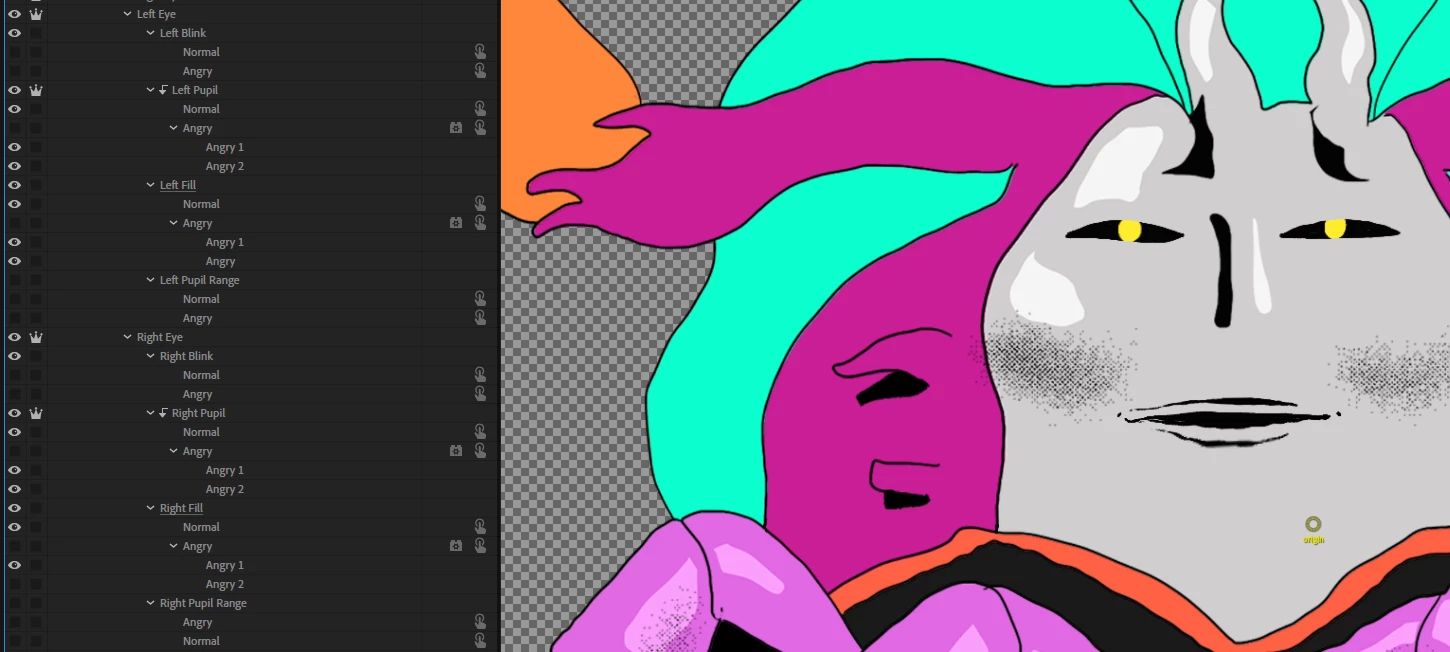
This puppet has a normal and angry expression. The eyes move great in Normal --- not so much in Angry! (See below)



I'd love the pupil range to work at an angle to follow the eye shape -- is that even possible? If not, I can always make the pupil range smaller for the angry eyes so they cover less distance. But I still have a main problem: My current set up doesn't allow the "Pupil Range" to change with the swap set.


Is there a better set up? Or different way to control how the pupils move about the pupil range? My eye gaze behavior is on the puppet rig by default. See set up below.


Any advice is appreciated! Thanks.
 

This topic has been closed for replies.
Correct answer DFries

You are correct -- swap sets don't seem to activate behaviors.


I don't think I would be able to duplicate the entire head because each expression artwork has cycle layers behavior to add hand drawn in-betweens. I have multiple angles of the head, and I feel like that would trip things up with the head turner?


My solution was similar to your last suggestion. I created a hold replay and trgiger for the Eye Gaze > "Mouse & Touch Strength". It's set to 30% for the Angry trigger, but 100% for the rest of the swap set expressions. This way it reduces the pupil range to 30% for the expression.

3 replies

alank99101739
Legend
July 14, 2020

Oh, another trick that might help is to try and do a Transform / rotate on the eye pupil layer. That might mean left/right start moving on the rotated angle, lining up with the angry eye slits better. Never tried it, but might work... Rotate a container the pupil is in (not just the pupil itself). Left and Right eye would rotate say +10 and -10 degrees.

DFriesAuthor
Participant
July 14, 2020

This was a cool suggestion! While it didn't work for the eye pupil layer, I could put a rotation on the entire eye group, and the range rotates with it.


SO --- What I could do is rotate the entire angry eye artwork 10 degrees in photoshop. Visually correct it in Ch by rotating -10 degrees. Create a trigger for that -10 deg rot and add it as part of my angry swap set.

alank99101739
Legend
July 14, 2020

I wonder if you will need need the pupil range per swap set *and* the eye gaze behavior per swap set. That is, put the swap set around all of Left Eye then repeat Left Angry Eye (rather than doing swapsets inside the different parts of the eye). I doubt the swapset changing the layers will cause the behaviors looking at the size to change what they look for. That is, triggers make things visible/not visible. But pupil ranges don't have to be visible to be in effect.


What concerns me however is I think you may have to have a Head tag in there as well. Looking at the Properties / Handles of the Eye Gaze behavior it first tries to find the Head tag, then look for Left Eye / Right Eye under the Head, then look for the other layers under that. So to do what I am suggesting you would have to duplicate the whole head, then you can put an Eye Gaze on it per head.


If it was my project and I was recording (not live streaming) I personally turn off the camera for eye gaze and use the mouse to control the eye positioning. If you do that (turn off snap), then you don't need to worry about it. You just drag the eye less far when angry. Much simpler, but only appropriate if you can use the mouse so you have good control over how far the pupils move.

DFriesAuthorCorrect answer
Participant
July 14, 2020

You are correct -- swap sets don't seem to activate behaviors.


I don't think I would be able to duplicate the entire head because each expression artwork has cycle layers behavior to add hand drawn in-betweens. I have multiple angles of the head, and I feel like that would trip things up with the head turner?


My solution was similar to your last suggestion. I created a hold replay and trgiger for the Eye Gaze > "Mouse & Touch Strength". It's set to 30% for the Angry trigger, but 100% for the rest of the swap set expressions. This way it reduces the pupil range to 30% for the expression.

Platty Puss
Inspiring
July 14, 2020

Hi Dennis. Hmmmm, that is some puppet you have. This is a WAG if you will have it. Could your make your "Eye Range" in a swap set just like your "Eyes" swap set. I have no clue if this will work since I have not encountered this problem in my puppets. You could even link the sets in the swap sets. Hmmmm.