


MartinDybdahl
Known Participant
Nov 23, 2016 3:55 PM UTC
Answered

"Camera busy".. Adobe Character Animation [Beta 5]

Hi everyone!

I've just purchased the Adobe Creative Cloud, and i really wanna try out the Character Animation software, but everytime i open up the software the "Camera & Microphone"-tab at the top right corner, tells me, that my camera is busy.... the microphone seems to work fine..

I am working on a windows computer, and i've tried to reinstall the program, and restarting my computer, but the same message appears; "Camera busy".. Does anyone know how to solve this problem?


Thank you in advance!
This topic is closed to new replies. Start a new post to keep the conversation going.
Fata MorganaCorrect answer
Inspiring
Oct 16, 2018 3:59 PM UTC

Hi

effectively the 2.0 is out and seems pretty amazing !

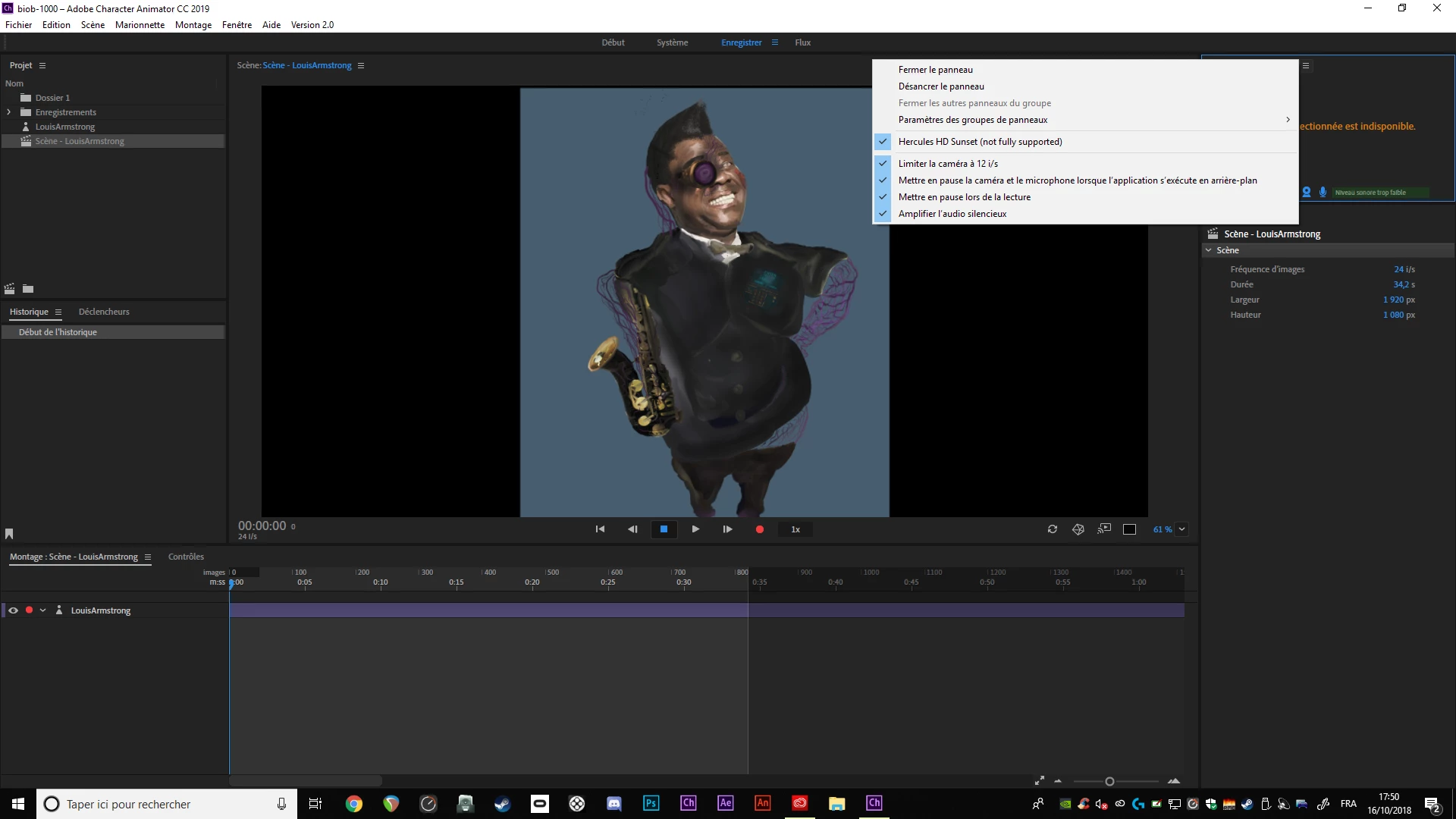
unfortunately still not working but I think my camera is too old (the soft say "not fully supported" )

Just a bit disapointed that it was working in the past. Anyway thank you for your anwsers !


Sorry !! it is working, i give a last change by change the usb port (wich i tried in the 1.5) but in the 2.0 it seems to work !

i'll finally can try the characterizer !

thank you all,

my bad for the disturbing

39 replies

motherpuppetz
Participating Frequently
Oct 19, 2018 6:02 PM UTC

I'm running MacOS Mojave on a '17 MacBook Pro.  The camera works fine across Apple apps.  But hasn't worked for Ch since I upgraded to 2019.  I have no other apps open when this happens and I've done all of the tips listed here and that I could find on Apple forums.  No other cameras, microphones or video capture cards.

Translate
Adobe Employee
Oct 20, 2018 5:32 PM UTC

Hello timo89121896.  I'm working on trying to reproduce the camera problem you are seeing. It could be that something changed with the release of Macos Mojave.  

I'll let you know what I find out.

Translate
Inspiring
Oct 15, 2018 10:37 AM UTC

oh yes thanks !

unfortunately I tried but the software say "only one camera is activate"

so my problem is not from here

I tried the solutions on the top of the discussion, if you have another ideas don't hesitate

Thank you for your time dave

Translate
CoSA_DaveS
Participating Frequently
Oct 15, 2018 3:16 PM UTC

Try 2.0 — it's now shipping!

The camera system was completely re-written and should work better.

Translate
alank99101739
Legend
Oct 15, 2018 4:09 PM UTC

I just stumbled across How to import a Video Feed to Adobe Character Animator tutorial - YouTube  which is v1.5, but might be useful.

(Waiting for v2 to appear as available for download - I assume its going through a staggered release to avoid overloading servers.)

Translate
thomásj41797896
Participant
Apr 17, 2018 4:37 AM UTC

If you use your smartphone (Android) as a webcam you are not going to have problems ! i had the same issue and i solved using my celphone ! 

Translate
MartinDybdahl
Known Participant
Sep 13, 2017 9:03 AM UTC

I can't figure out why, but when i press the "next camera"-button a random amount of times (about 4-5 times), it suddenly works! But thanks for all your help!

Translate
angie_taylor
Legend
Sep 13, 2017 9:22 AM UTC

That good old, turn it off and back on again solution! :-)

Translate
MartinDybdahl
Known Participant
Jan 10, 2017 9:54 AM UTC

I finally found the solution to my problem!.. Apparently I had to press "Switch to Next camera" about 5 times before it finds my camera, even though I only have one webcam in my PC

Translate
oksamurai
Legend
Jan 10, 2017 5:54 PM UTC

Oh so you don't remember installing 4 ghost cameras?

Weird. Well, glad it worked for you, and good to know that solution can potentially help others in the future. We'll take a look and see if there's anything we can do on our end to help with this issue for future releases.

Translate
MartinDybdahl
Known Participant
Jan 10, 2017 6:16 PM UTC

No i'm pretty sure i didn't install any ghost cameras. My webcam is the only camera, when i look in "device manager", so it doesn't look like any other camera is installed on my PC

Translate
Nov 28, 2016 12:11 PM UTC

Hi Martin,

A friend of mine... Windows User had a similar problem when using Skype...

She used an app called; Process Explorer.. a Microsoft program to locate what was using her camera...

Here is a link... might help!? How To Find What Program Is Using Your Webcam

Translate
MartinDybdahl
Known Participant
Dec 2, 2016 10:18 AM UTC

Hi Finnandme,

Thank you for the answer, but the Process Explorer says "0 matching items", when i search for processes using my camera..

Translate
Dec 2, 2016 2:44 PM UTC

Hi Martin!

I wished I could offer you a solution, but if nothing seems to be using the camera, how can it still be 'busy?'

Does your camera work in another program? If the camera works fine with other programs, then it would suggest some related issue with Character Animator!?

Translate
oksamurai
Legend
Nov 23, 2016 6:42 PM UTC

Try these tips: FAQ: Why does the Camera & Microphone panel not show my webcam's video?

I'd say 90% of the time this message is due to some other app taking control of the camera - screen capture software, video chat, whatever. Try closing everything else you have running and see if that helps.

Translate
MartinDybdahl
Known Participant
Nov 24, 2016 1:11 PM UTC

Thanks for the answer!

I've tried that, and unfortunately it doesn't seem to be the problem. It's a pretty new computer, so i have almost nothing but Office 365 and Adobe Creative Suite installed on it...

Translate
CoSA_DaveS
Participating Frequently
Nov 28, 2016 4:16 AM UTC

Can you describe your OS version, hardware type, and camera in detail?

Translate