Inspiring
January 27, 2012
Answered

accdb with CF9 under Win2008 R2 64bit

  • January 27, 2012
  • 7 replies
  • 32550 views

Hi there

I have a accdb designed with Access 2010 64bit.

I am running CF9 under Win2008 R2 64bit.

I have also installed http://www.microsoft.com/download/en/details.aspx?displaylang=en&id=13255

I have now googled and tried some dozen tricks to get this combination work:

until now - no way!

Does anybody succeed to to so and is there somewhere a description?

Thanx for help - Didi

This topic has been closed for replies.
Correct answer BKBK

Sorry I did not mention that:

of course I always do the 'practical' test as you proposed.

It gives me an error with a coherent comment:

java.sql.SQLException: [Macromedia][SequeLink JDBC Driver][ODBC Socket]internal error:  The specified DSN contains an architecture mismatch between the Driver and Application 


OK. That was that then. Let's move on.

I do believe our hopes now lie with JDBC. Since ColdFusion is a Java application, finding a 32-bit and 64-bit JDBC driver for MS Access will help many developers.

My search brought me to HXTT's JDBC driver for MS Access. The only problem is, I couldn't tell whether their driver is for 32-bit or 64-bit Access. Could it (hopefully) be universal, automatically detecting the system? 

(After the customary virus scan) I unpacked their access.zip file, copied the essential file Access_JDBC40.JAR from /access/lib/ to ColdFusion's lib directory. That's all there is to installing the driver. I then restarted ColdFusion.

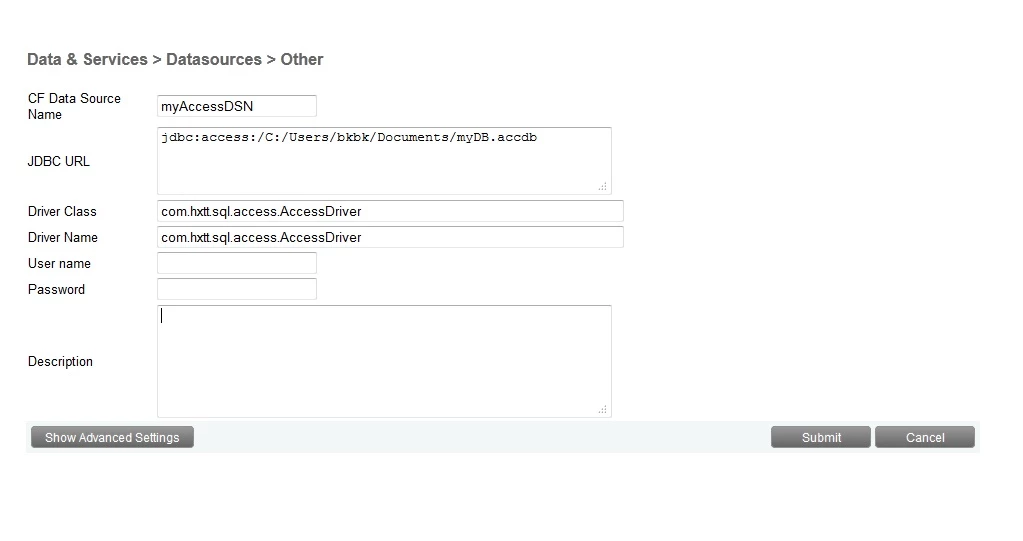
I went to the ColdFusion Administrator and configured a datasource as follows:

Data Source Name: myAccessDSN

Driver: Other

JDBC URL: jdbc:access:/C:/Users/BKBK/Documents/myDB.accdb

Driver Class: com.hxtt.sql.access.AccessDriver

Driver Name: com.hxtt.sql.access.AccessDriver

It worked flawlessly. But then again, though I installed everything you did, I am on 32-bit Access. 
7 replies

Participating Frequently
October 2, 2017

Didi is right on target.  I followed dozens of threads, this summer, to solve MS Access issues with ColdFusion and MS Server. Our old install of MX7 on Sever 2008 worked well with the SysWow64 workaround for ODBC drivers. But, our new 64bit versions of CF Server 2016 and MS Server 2016 would not cooperate.

I tried older JDBC suggestions and the Ucanaccess JDBC driver setup with failed results.  Using the HXTT suggestions by Didi and HTXX support, I have successfully gotten my MS Access data files to work.

Why bother with MS Access?  The multiple threads on just Adobe Forum show a significant number of us needing to use MS Access for a wide range of reasons.  My case,  old dude struggling with SQL conversion and need to get site updated with new software.


Note: this thread contains several HXTT Support suggestions for tweaking a setup. 

Known Participant
May 2, 2017

Sorry to bring up this very old thread, but I'm experiencing lots of issues with (I believe) Access Unicode driver.
I've a very old server (windows server 2003) I'm trying to migrate to a new machine (windows server 2012 + iis8.5)

but since some months, data source access works intermittently on the "old" server,

and -oddly enough-, now that I'm setting up the new server, the same issue shows there too!


*intermittently*  >> works "fine" for a few days, than hangs for a full day/ a day and a half

when it works, queries run very slow,

and when it does not work, loading pages hangs browser for ages remaining full blank, sometimes ignoring (?) timeout settings too.


Access data sources in coldfusion fail to update, and sometimes I have to restart the server to load the Data Sources page after "saving" (and modification was not saved).


After making all sort of experiments (...),

and I've come to strongly suspect the access driver is failing somewhat/somewhere,

So I've run into this thread, and tried BKBK suggestion above with the HXTT driver trial version.
It gives me errors - times out (instantly) on "linked" tables on another database,

Importing those tables, gives me odd errors with syntax (which had been working just fine so far with the unicode driver).

But the quickness of error responses is so encouraging I'm wishing to understand what might be wrong,
and if I could tweak something to use this driver with success.


I see this solution worked flawlessly here in at least two cases - but it was a different CF version,

so perhaps something, somewhere has changed?
Should I make some modification to make this work on my environment?

Thank you very much for any input you may give

(and yes, I'm already planning on switching to other databases,

but I now need a quick "patch" solution to have at least one working server

and give me time to perform this task with calm)

BKBK
Community Expert
October 2, 2017

fede_ctfd  wrote

Sorry to bring up this very old thread, ...

@fede_ctfd,

You should indeed start a new thread. Five years is a long time in software development. Some of the stuff in this thread may be outdated.

Known Participant
October 3, 2017

I agree, not sure about best practice in this community since I'm rarely active here, sorry

Just as a followup: thanks to HXTT fantastic support I was able to use their powerful driver, issues were mainly due to a particularly "sloppy" syntax used in database queries, the driver was a bit less forgiving, and due to a couple limitations in the "demo" version of the driver. I since purchased the driver and optimized the code, it was a beneficial job for the whole system, needless to say.


Anyway, for any other experiencing same issues with access drivers, like unexplicable connection loss and very very long response times, plus server slowdowns... doublecheck you are not under Dos/DDos attack

I'm happy having found this thread and purchasing the (very fast and solid) HXTT driver,

but in the end it turned out our issue was not with the old driver,

since our problem persisted even after the change, and we finally found out we were under attack...
banning those IPs completely revived our server performances.

(found this out by checking Coldfusion logs, and seeing frequent and continuative access by same IPs in unusual times of day, and doublechecking who those IPs belonged to through online services)

Hope it can help someone else out there struggling same way we did

itisdesign
Inspiring
July 19, 2012

Hi Didi,

For MSAccess in 64-bit CF, you need the 32-bit drivers.

Please follow these exact steps on the Win2008 R2 64bit CF9 machine:

1) Install the 32-bit AccessDatabaseEngine.exe.  Note: If 64-bit AccessDatabaseEngine_x64.exe or any 64-bit MS Office Apps are already installed, then AccessDatabaseEngine.exe must be installed via the command line with the "/passive" argument (ex: AccessDatabaseEngine.exe /passive).

2) Create DSN via CF Admin and ignore this error: "Unable to update the NT registry. Variable DRIVERPATH is undefined."

3) Register a "System DSN" using same name as in Step 2, via 32-bit C:\Windows\SysWOW64\odbcad32.exe, and choose this driver: "Microsoft Access Driver (*.mdb, *.accdb)"

Thanks,

-Aaron

Inspiring
July 22, 2012

Aaron,

    I followed your instructions above however I don't see the MDB db driver (at least that's what I named it when I created it in the SysWOW64)  so how do I make the "MDB" driver show in my CF Administrator DSN dropdown?

Connection verification failed for data source: MBD

java.sql.SQLException: [Macromedia][SequeLink JDBC Driver][ODBC Socket]internal error: Data source name not found and no default driver specified

The root cause was that: java.sql.SQLException: [Macromedia][SequeLink JDBC Driver][ODBC Socket]internal error: Data source name not found and no default driver specified

Thanks,

Daren

itisdesign
Inspiring
July 22, 2012

Hi Daren,

Step 2 was: 'Register a "System DSN"' (not "User DSN").  And that drop down on "CF Admin > Data sources" displays drivers, not data sources.  Here are the steps to correct the MSAccess/x64CF issue:

1) Open C:\Windows\SysWOW64\odbcad32.exe

2) Click the "User DSN" tab

3) Select your data source (which you've named "MDB") and click "Remove"

4) Click the "System DSN" tab

5) Important: If your "MDB" data source exists here as well, then select it and click "Remove"

6) While still on the "System DSN" tab, add the "MDB" data source

Basically, your data source must be deleted from SysWOW64's odbcad32.exe on both the User DSN tab and the System DSN tab.  THEN, once it doesn't exist on either tab, it can be added on the System DSN tab.

Thanks,

-Aaron

Didi3Author
Inspiring
March 24, 2012

@ HXTT Support: are you still with us?

As instructed by BKBK I installed the driver-library to

  "C:\ColdFusion\lib\Access_JDBC40.jar"

However, when I replace Access_JDBC40.jar with the newer version Access_JDBC41.jar that was included with the package I received from you, it does not work.

Do I need to configure a different Driver Class or JDBC URL ?

Well, Access_JDBC40.jar works fine for me, but I guess, 41 has some advantages?

-Didi

March 25, 2012

>Well, Access_JDBC40.jar works fine for me, but I guess, 41 has some advantages?

You cannot use Access_JDBC41.jar, since JDBC 41 API is for JDK1.7.X, and your ColdFusion is using JDK1.6.X. Both of Access_JDBC40.jar and Access_JDBC41.jar are released as v5.1 for different JDBC API standard.

Didi3Author
Inspiring
March 25, 2012

HXTT Support wrote:

You cannot use Access_JDBC41.jar, since JDBC 41 API is for JDK1.7.X, and your ColdFusion is using JDK1.6.X. Both of Access_JDBC40.jar and Access_JDBC41.jar are released as v5.1 for different JDBC API standard.

Thanx!!!

-Didi

Didi3Author
Inspiring
March 24, 2012

BKBK:

good idea to isolate the problem! -Thanx for the input!

HXTT Support:

Even better - now it works - triple Thanx for the solution!

For those who recommend to change the DB (Owain, are you still there?   ):

We made some performance tests and compared 'accdb plus HXTT' with SQL 2008 Express.

'accdb plus HXTT' is incredibly fast. Regarding our application you cannot measure a difference in response time ..

-Didi

Owainnorth
Inspiring
March 24, 2012

When you have one user and all the files are already cached, maybe

Wait for a second user to hit your site, it'll be like a DDOS.

Didi3Author
Inspiring
March 24, 2012

Owain North wrote:

When you have one user and all the files are already cached, maybe

Wait for a second user to hit your site, it'll be like a DDOS.

I absolutely agree, that accdb is not intended for a huge multiuser environment.

However, ColdFusion is the only user.

Since more than a decade I am told to trash MDBs since they will not perform.

On the other hand I have applications with half a million hits per day that do not even twinkle between two requests. Otherwise students learning for exam would rub through my doormat

As soon as performance drops, I definitely change ..

Besides some legacy stuff I can't get rid off on the fast lane (we have applications running from the 90s),  I somehow have started to regard this discussion about the lousy performing mdb as a kind of intellectual challenge

-Didi

Didi3Author
Inspiring
March 24, 2012

hi there

I would follow up on this thread since it perfectly documents the background.

Let's summarize: with http://www.hxtt.com/access.html and BKBK's support we now have a working environment.

One thing puzzles us:

The following steps work fine:

  1. SELECT qry from CF9 to the  DS
  2. UPDATE DS from CF9
  3. SELECT qry from CF9 to the DS (this reflects the change made in the step before)

But this procedure does not work

  1. SELECT qry from CF9 to the  DS
  2. UPDATE the underlying table from within MS Access
  3. SELECT qry from CF9 to the  DS (this does NOT reflect the change made in the step before)

What we already tried:

  • CFOBJECTCACHE does not help.
  • Setting "" in CFadmin does not help.
  • Disabling "Maintain Connections" in the Datasource does not help (see below).

Anybody a helpful idea?  (A recommendation to change the database is NOT regarded as helpful )

-Didi

Owainnorth
Inspiring
March 24, 2012

A recommendation to change the database is NOT regarded as helpful

Dammit, that's me out then.

BKBK
Community Expert
January 30, 2012

1) Did you in every case add the following line to the Connection String field in the ColdFusion Administrator?

Driver={Microsoft Access Driver (*.mdb, *.accdb)};DBQ=path_to_mdb/accdb_file

2) Do you have any 32Bit MS Office applications installed on the server?

Didi3Author
Inspiring
January 30, 2012

ad 1)  I try again

I guess it must be in the form c:\mypath\myDB.accdb

Backslashes, not forward slashes?

ad 2) nope

When I add a new Datasource in CFadmin, what Type of Driver do I select??

BKBK
Community Expert
January 30, 2012

Didi wrote:

ad 1)  I try again

I guess it must be in the form c:\mypath\myDB.accdb

Backslashes, not forward slashes?

Your path OK.

When I add a new Datasource in CFadmin, what Type of Driver do I select??

MS Access


