


Homestar9
Inspiring
January 17, 2025
Question

ACF 2021: Can't Check Maintain Connection to Mail Server

  • January 17, 2025
  • 3 replies
  • 740 views

I am running ACF 2021 (2021.0.18.330341) standard edition, and attempting to configure mail settings. I noticed something strange where, when I check the box "Maintain Connection to Mail Server" and then "Submit Changes", the box shows as unchecked, despite seeing the green "Server has been updated successfully" message:
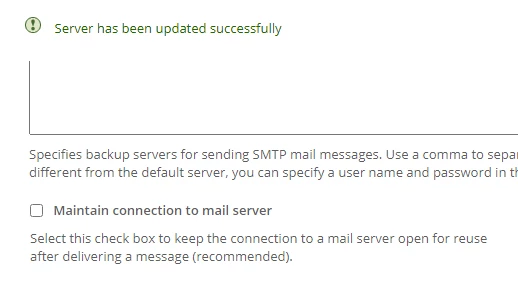
 

This feels like a bug to me. Can anyone else confirm if they have the same issue.

I tried enabling TLS connections on and off to see if it made a difference. It does not.  

Note: I have a successful connecction to the SMTP server and can send mail fine.  The reason why I want to enable this setting is because we frequently send out a "burst" of emails at once and read that enabling this feature is recommended.

3 replies

Charlie Arehart
Community Expert
Community Expert
January 20, 2025

Good discussion. I'd seen it over the weekend and had been meaning to check into and report here some things.  Hope it's helpful.


First, the bug is not so much that the Mail page's setting you're changing ("maintain connections to mail server". BTW, you should find that the same is true as well for the "Backup Mail Server" setting.)


Instead, the bug is that you shouldn't see those two settings appearing on the page, unless you're running CF Enterprise.  Those two (and a couple more) are among a few features on that Mail page which are ENTERPRISE-ONLY. You can see this clarified in the docs here.   BTW, it's not only on CF Standard that this problem you report happens also with the free Developer edition (so the settings should not be appearing there either.) 


As further clarification of "where the bug is",  I'll note that in a CF instance that IS using an Enterprise license key, that will not only let you save changes to these two settings, but more important it also shows two MORE settings on that page: "Mail Delivery Threads", "Maximum number of messages to spool to delivery", as well as the choice of "to Disk" or "to Memory" for the "Spool mail messages for delivery" option (that otherwise appears in all editions, only spooling to disk by default).


This last point clarifies that the "bug" is that Adobe didn't hide those first two settings ("maintain connections to mail server" and "backup mail server") from appearing in anything but an Enterprise-licensed instance, like they do for those other Mail settings I just named.


I'll add this comment to the bug report you created, in case people may not see this thread there (though I do see Dave L listed this thread among a couple others he shared as having long raised this issue in different ways).


If anyone learns something to the contrary, I welcome correction of course.

/Charlie (troubleshooter, carehart. org)
BKBK
Community Expert
Community Expert
January 21, 2025

Thanks, @Charlie Arehart , for the remark about the relevance of ColdFusion's Enterprise Edition to the setting "Maintain connection to mail server".

Homestar9
Homestar9Author
Inspiring
January 20, 2025

Thank you, @BKBK; I believe you are correct.  Someone submitted a bug a few years back but then mistakenly set the status to "withdrawn".  I have created the bug report here: https://tracker.adobe.com/#/view/CF-4225202

BKBK
Community Expert
Community Expert
January 21, 2025

Thanks, @Homestar9 , for the bug report and for sharing the link.

Voted for it.


I also added these comments to the bug report,

I wish to add the following note to "Actual Result":
The text "Server has been updated successfully" appears on the screen.
There are no related errors in the logs.

I wish to add the following note to "Expected Result":
If, for whatever reason, the setting "Maintain connection to mail server" does not apply, then ColdFusion should produce an appropriate warning or error message.


BKBK
Community Expert
Community Expert
January 18, 2025

I think you should report a bug. There has apparently been an issue with "

The issue also occurs on ColdFusion 2023.


BKBK
Community Expert
Community Expert
January 18, 2025