


Inspiring
April 21, 2025
Answered

BlueImp file upload not working after migration to host server

  • April 21, 2025
  • 3 replies
  • 3600 views

I am having trouble uploading files after migrating the site from local environment to the web. Following is the relevant section of code from a coldfusion function that uploads files using BlueImp:


<cffunction name="POST" access="private" returnformat="json">
        <cfargument name="options" type="struct" required="true">
        <cfargument name="listing_id" type="any" required="false" default="">
        <cfset var result = 0 >
        <cfset var vThumbnail = 0 >
        <cfset var fileInfo = "" >
        <cfset var fileName = "" >
        <cftry>
        <cfset fileInfo = GetFileInfo(form['files[]']) />
        <!---<cfdump var="#fileInfo#"><cfabort>--->
...

In my local environment, selecting a file produces the following, which is a dump of the form variables used by the function:


LOCAL DEV ENVIRONMENT
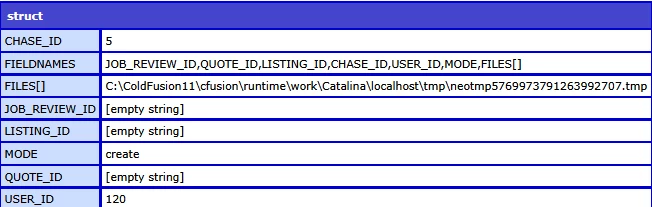
Then BlueImp does its thing via the POST function shown above and the <cfdump var="#fileInfo#"> in the above code returns something like the following:


LOCAL DEV ENVIRONMENT
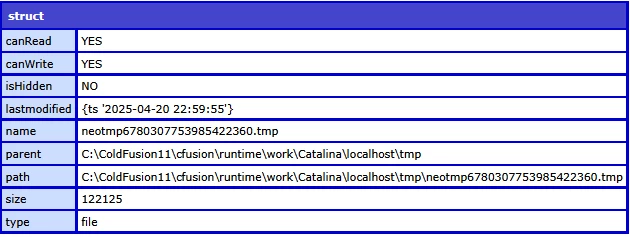
 

But, after uploading the site to Hostek, the initial file selection produces a similar form variables dump to the local environment, i.e.


REMOTE (LIVE) ENVIRONMENT:
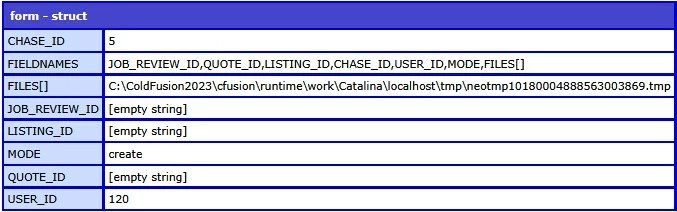
BUT, the <cfdump var="#fileInfo#"> just returns zero (0) in the network tab. There is no dump structure as with the local environment.

Any ideas what could be going on?
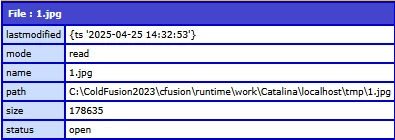
    Correct answer BKBK

    Aha, just found out I can use fileOpen() in a similar way. This seems to get me what I want:

    Gotcha!


    Thanks for the update. Very interesting test result indeed!


    It confirms my new hypothesis that ColdFusion, in general, and CFCs, in particular, are not necessarily denied access to Tomcat's tmp directory. Rather, it is the call getFileInfo() that is being denied permission.


    Has getFileInfo() been denied read/write permissions in the sandbox, perhaps? I think it's a good idea to ask the server administrator.


    Out of curiosity, did you, for the sake of rigour, use this code:

    fileopen(form['files[]'])


    quote
    Should the cflock encompass more of the code, like right from the <form>?

    By @paul_8809


    Good question. As answer, here is a suggestion:

    upload.cfm

    <cflock name = "uploadLock123" type = "exclusive" timeout = "60" throwOnTimeout = "yes">
    <form method="post" name="post-form" enctype="multipart/form-data" action="upload_action.cfm">
       <input type="File" name="test">
       <input type="Submit">
    </form>
    </cflock>


    upload_action.cfm

    <cflock name = "uploadLock123" type = "readonly" timeout = "60" throwOnTimeout = "yes">
        <cfset fileInfo = GetFileInfo(form.test) />
        <cfdump var="#fileInfo#">
    </cflock>


    3 replies

    BKBK
    Community Expert
    April 21, 2025
    quote

    BUT, the <cfdump var="#fileInfo#"> just returns zero (0).


    By @paul_8809


    Please attach a printscreen of the full dump (similar to the second printscreen above). 

    paul_8809Author
    Inspiring
    April 21, 2025

    There is no dump at all. Simply a zero (0) showing in the network tab.

    BKBK
    Community Expert
    April 21, 2025
    quote

    There is no dump at all. Simply a zero (0) showing in the network tab.


    By @paul_8809

    Understood.

    BKBK
    Community Expert
    April 21, 2025

    I think you should pay attention to Charlie's second suggestion. It is especially relevant to your question.


    Your printscreens show that you use ColdFusion 11 and ColdFusion 2023. Is the one, for example, a development environment and the other a production environment? What is the connection between BlueImp and the two ColdFusion servers? Please clarify.


    paul_8809Author
    Inspiring
    April 21, 2025

    Yes, 2011 is the development environment and 2023 the production.

    Sorry, what do you mean by "What is the connection between BlueImp and the two ColdFusion servers?" Do you mean the method by which they connect?

    BKBK
    Community Expert
    April 21, 2025

    Thanks for confirming the ColdFusion 11 / 2023 situation.  


    Sorry for the confusion about the word "connection". By that I meant something along the lines of "link", "relation" or "interaction". Especially between the form and the function.


    For example, we know a form is submitted. Which process submits the form? What / Where is the action page of the form.


    It is peculiar that the POST function, which is private, has knowledge of the form-variables. Yet these variables don't come in as an argument of the function. So how does the function know about them?   

    Charlie Arehart
    Community Expert
    April 21, 2025

    A few thoughts :


    1) In your first and third dumps, there are also differences in three of the form field values. You haven't acknowledged or explained those, so I think you may want to focus first on that, by viewing the underlying generated html for these in the form before submission. You may learn that something unexpected is happening there, which may be as important to understand.


    2) You haven't said what version of cf you're using.. More important, you've not said how your local and that hosted server may differ in regard to that. Most important, it would help to known if the hosted server is a more recent update of even the same version as your local. Do a:

    <cfdump var="#server.coldfusion#">

    and run that on each machine and let us know especially the ProductVersion value.


    (There may be a contributing factor if your local machine is before the cf updates in March 2024 but the server is after, for instance.)


    3) Finally, rather than manipulate that temp file, look into cffile action="upload", which is not about doing your later upload to blueimp but merely about more easily getting that file which was posted to cf. See the docs as well as a a 2006 blog post I'd done  that clarifies some common confusion with that tag.


    Let us know how things go, especially with 1 and 2. 

    /Charlie (troubleshooter, carehart. org)
    paul_8809Author
    Inspiring
    April 21, 2025

    HI Chariie,


    1) Yes, I should have explained that. The last dump was taken from a different part of the site where the same thing was happening. I've updated it to match the precise situation as that of the dev environment.


    2) The dev environment uses CF2011 and the production environment uses CF2023


    Local environment coldfusion server dump:


    Remote live coldfusion server dump


    I will work on your point 3 and get back


    Charlie Arehart
    Community Expert
    April 21, 2025

    Ok on all that. 


    1) While we await your exploration of cffile action="upload" (which may or may not change anything), now that we know your form was fine, let's focus on the result page where you're doing the dump. 


    You're issue is that it returns 0. That's the getfileinfo result--but your code fragment I'm the opening post shows that dump being commented out. Are you just removing that comment? Or does anything else differ about the getfileinfo call?


    (I'd also normally ask you to hard-code the filename passed in, as a sanity check, but in this case you can't, as that temp file--created by the post of a file from a browser to a cf page--lives only for the life of the request, as I discuss in my 2006 blog post. 


    1a) But here's one other sanity check you can do: do a cffile action="read" against the file (or "readbinary", if it's indeed a binary format file) that's being uploaded to cf (and then being somehow later uploaded by your code to blueimp, which doesn't matter for this problem). 


    2) Finally, FWIW, and since the "failing" one is on cf2023 (and its latest update 13) while the "working" one is cf11 (rather than "cf2011"--which never existed, but it's a common misnomer), I'll note that there could well be literally several dozen changes between those two versions (cf11 came out in 2014, so they're 9 years apart, and some changes for you came in cf2016, then cf2018, then cf2021, then finally cf2023).


    I'm not saying these relate to this problem, but for the sake of completeness I'll note that I have a talk I did where I reviewed all those potential compatibility issues in moving to cf2023 from any of those--all the way back to cf10, in fact. It's "Migrating apps to ColdFusion 2023 from earlier versions",and the pdf and YouTube recording are here on my presentations page. 


    2a) That said, beyond those VERSION differences, there are again the important cf updates to cf2023 (and cf2021) which came out in March and June 2024. It's possible that your issue could relate to them (though for now I think not). 


    I blogged on those then, but you may want to check my follow-up posts on them in July:

    Follow-up on March 2024 CF update: "patch" to log "implicit scope searches" that would fail


    And:

    Follow-up on June 2024 CF update: more on change of default algorithm from CFMX_COMPAT


    If anything I might suspect the first issue. See that post for more, but it's a lot to take in. FWIW, it points to my original post which (amid all its details) offers 3 ways to solve the problem, if it's even your issue. (And two of them are ones you can do even if you're on a hosted server.) 


    3) I realize all the above is a lot to take in. You surely just want a solution. 🙂 The problem is that we're looking at the RESULT while trying to sort out the CAUSE, which is always challenging. My first suggestions here are focused more on getting some additional diagnostics.


    Let's see what you find or anyone else might propose. 

    /Charlie (troubleshooter, carehart. org)