New Participant
July 29, 2022
Answered

Can CFadmin run over IIS instead of the internal web server?

  • July 29, 2022
  • 1 reply
  • 370 views

The latest DOD STIG for CF is for version 11, but I have to used even if its just in spirit.  It calls for the internal tomcat webserver to be disabled.


I could be wrong but it seems that even though I've configure all the IIS websites to run with CF, the admin pages are still being served by the internal webserver by default, yes? Is there a way to serve the admin pages over IIS so I can disable the internal web server?


Thanks.
    This topic has been closed for replies.
    Correct answer RaviShankar Chagnur

    Please follow below steps for accessing Coldfusion Admin page through IIS


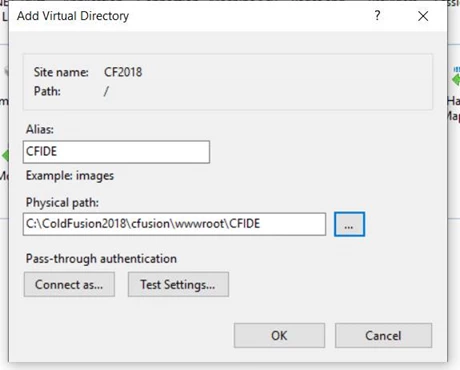
    1. Add a Virtual Directory CFIDE which will point to \ColdFusion2018\cfusion\wwwroot\CFIDE\

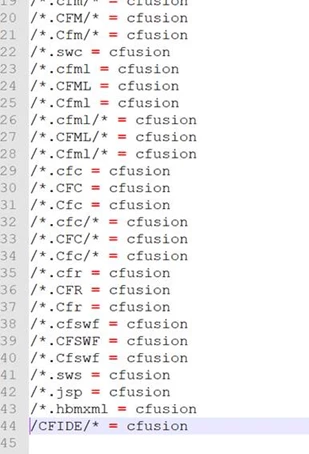
    2. Navigate  to connector folder \ColdFusion2018\config\wsconfig\magic folder. Take the backup of uriworkermap.properties file and then open it and uncomment the CFIDE. So the mapping looks something like this after uncommenting it.

    3 Restart IIS and you can access Admin through IIS

    1 reply

    RaviShankar Chagnur
    Adobe Employee
    RaviShankar ChagnurCorrect answer
    Adobe Employee
    July 29, 2022

    Please follow below steps for accessing Coldfusion Admin page through IIS


    1. Add a Virtual Directory CFIDE which will point to \ColdFusion2018\cfusion\wwwroot\CFIDE\

    2. Navigate  to connector folder \ColdFusion2018\config\wsconfig\magic folder. Take the backup of uriworkermap.properties file and then open it and uncomment the CFIDE. So the mapping looks something like this after uncommenting it.

    3 Restart IIS and you can access Admin through IIS

    New Participant
    July 29, 2022

    Thank you very much!!