


georget37352040
Inspiring
September 13, 2023
Answered

CF 2021 Update 10 failed to install

  • September 13, 2023
  • 3 replies
  • 2098 views

Hello,

I am having issues updating CF2021 Update 10. After running the install i recive this error at the end of the update wizzard
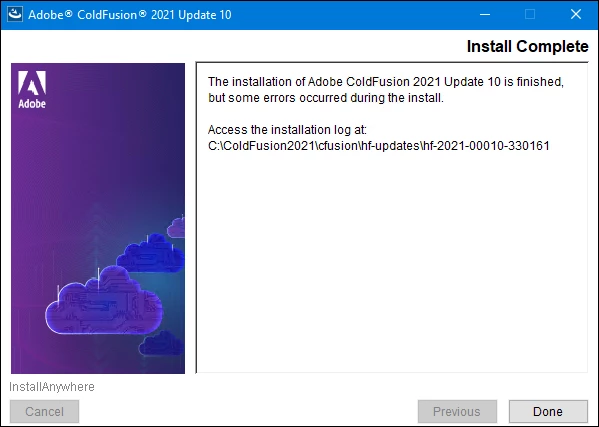
The log file show these errors:

Installation: Unsuccessful.

148 Successes
1 Warnings
2 NonFatalErrors
2 FatalErrors

Action Notes:

Failed to copy hotfix files:C:\Users\administrator.BAYNET\321779.tmp\dist\updates: Failed to copy the hotfix files to the target location. Retry installation after ensuring that the server is not running or files are not locked by the server.

Failed to copy hotfix files:C:\Users\administrator.BAYNET\321779.tmp\dist\wwwroot: Failed to copy the hotfix files to the target location. Retry installation after ensuring that the server is not running or files are not locked by the server.


Failed to copy hotfix files:C:\Users\administrator.BAYNET\321779.tmp\dist\updates
Additional Notes: 
FATAL ERROR - Failed to copy the hotfix files to the target location:C:\ColdFusion2021\cfusion\lib\updates
FATAL ERROR - C:\Users\administrator.BAYNET\321779.tmp\dist\updates (The system cannot find the file specified)

Failed to copy hotfix files:C:\Users\administrator.BAYNET\321779.tmp\dist\wwwroot
Additional Notes: 
FATAL ERROR - Failed to copy the hotfix files to the target location:C:\ColdFusion2021\cfusion\wwwroot
FATAL ERROR - C:\Users\administrator.BAYNET\321779.tmp\dist\wwwroot (The system cannot find the file specified)

CF starts and im able to browse it but certain pages do not work for example the Package Manager page is blank and this error is displayed
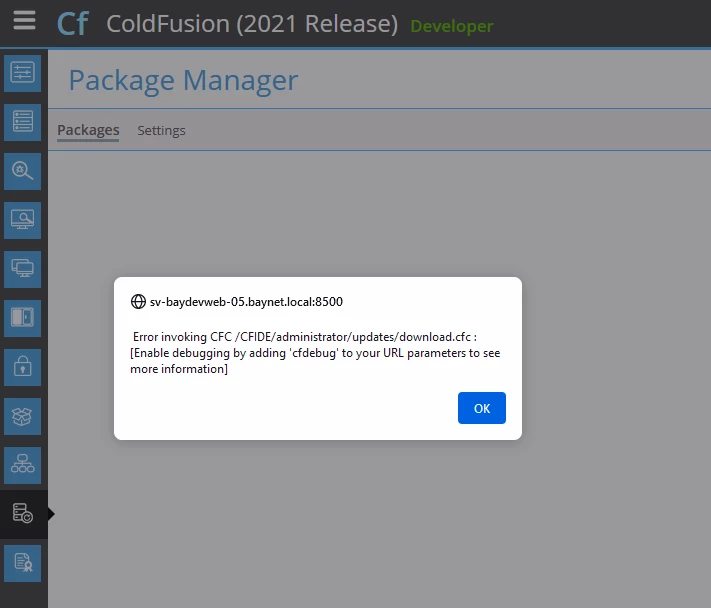
 

- We are running CF 2021 standalone server (Server Configuration) on Windows Server 2019.

- I ran Update 10 by first downloading the update from CF admin then using CMD to run the update (this is our normal procedure and have run all updates this way without any issues)

- I also manually stopped the CF service prior to running the update as we have in past seen issues with the install stopping the service.

- CF 2021 Update 10 release notes (https://helpx.adobe.com/coldfusion/kb/coldfusion-2021-update-10.html) has an Alert for note about The Oracle Java CPU update. However it notes that if using java bundled with CF there should be no issues with the update. We are using the CF bundled java so this should not be an issue.


I have tried the following:

1) Retired the update - failed with same error

2) Rolling back the update by restoring folders from the backup directory

3) I also had a manuall backup of the CFHOME folder prior to running update so tired restoring that but it throws a 500 page.

4) Reviewed installed packages by running cfpm.bat. I compared the list with another CF2021 (running update 9) instance on a different 2019 Windows Server. There is one missing plugin which is pmtagent. So i tried installing that using cmd install pmtagent in cfpm.bat. but its failing to install with following error: Sep 13, 2023 10:34:20 AM Error [Thread-20] - An error has occurred while installing the package pmtagent. Exception : Activator start error in bundle perfmon [266].

However Im not sure if it is required


Thanks,


This topic has been closed for replies.
Correct answer georget37352040

Hello Community,


Thanks for all the replies and ideas.

I ended up opening a case with CF Support and turns out the issue is related with Java. Specifically Java version 11.0.20.

I ran the upgrade successfully using this command

java -Djdk.util.zip.disableZip64ExtraFieldValidation=true -jar C:\ColdFusion2021\bundles\updateinstallers\hotfix-010-330161.jar

I will also try updating the java next time and run it without the extra flags in command that cf support suggested.

here is a link to the java version with issues

https://liferay.dev/blogs/-/blogs/important-jdk-11-0-20-notice


Thanks,

3 replies

georget37352040
georget37352040AuthorCorrect answer
Inspiring
October 6, 2023

Hello Community,


Thanks for all the replies and ideas.

I ended up opening a case with CF Support and turns out the issue is related with Java. Specifically Java version 11.0.20.

I ran the upgrade successfully using this command

java -Djdk.util.zip.disableZip64ExtraFieldValidation=true -jar C:\ColdFusion2021\bundles\updateinstallers\hotfix-010-330161.jar

I will also try updating the java next time and run it without the extra flags in command that cf support suggested.

here is a link to the java version with issues

https://liferay.dev/blogs/-/blogs/important-jdk-11-0-20-notice


Thanks,

Charlie Arehart
Adobe Expert
October 7, 2023

George, it's great your problem is resolved, and thanks for sharing the update. As for why that solution was not brought up before now, you had said originally that you'd seen the warning about this in the update 10 technote, but you said you did a manual update "using the CF bundled java so this should not be an issue.".


To be clear (for readers following along), this error (needing that new jvm arg in a manual install of the cf update) does indeed only happen if folks either a) change their cf to run on the jvm update released in July (11.0.20 for those on cf2021, 17.0.8 for those on cf2023) and use the cf admin to do the cf update, or b) they use that jvm to do a manual/command line (java -jar) update. 


I'd have suggested it as a solution to consider if you'd not said what I quote. Not complaining, just explaining the lack of perhaps a faster resolution for you.


Since you say you DID use the command line installer of the update (versus using the admin), it would seem you HAVE to have unexpectedly been running the updated Java for that command line install. That's the only way the problem could occur (when this is the solution). 


As for the resource you shared (from liferay), I'll note also that in the discussion of the matter at the top of the cf update technotes from August, Adobe does kindly point to my blog post on the matter, as I discovered the problem and the solution and documented it days after the new jvm update came out. I'm just noting that I discuss it from a cf perspective, regarding cf updates. (Liferay is indeed one of many other Java apps that suffered due to this Java change, as I point to at the bottom of my post.) 


Finally, for interested readers, the problem remains with the cf updates that came out today, Oct 6, as mentioned at the top of the technotes for them: update 5 of cf2023 and update 11 of cf2021. FWIW, those technotes also indicate that the NEXT cf update is planned to finally resolve this problem, so that updates in the cf admin or cmd line work as expected--even if the cf jvm is updated-- and without need of this special arg at the command line. 


As always, I'm just trying to help folks. There are indeed a lot of balls to juggle with all this stuff! 🙂 

/Charlie (troubleshooter, carehart. org)
Charlie Arehart
Adobe Expert
September 13, 2023

I had the same first suspicion as Jim. Since you say that's not the issue, and given all else you tried, I highly doubt you'll find resolution via back and forth here (though of course you may).


I'll say I'm especially concerned that your point 2 above. You should have used the updater's uninstall option instead, which can ALSO be run from the command line. But I realize you may not have done that before and were scrambling. You may have messed things up with that step. 


But it's NOT necessarily true that you "have no choice but to reinstall at this point", as many would might feel if in your situation. (And even then, that would not explain what happened in the first place, nor how to prevent it next time.) 


I'll say that if it's more important that the problem be solved (and soon) rather than be solved "for free" (over time) here, I'll propose that I'm VERY confident I could help you (via a remote desktop consulting session) to both a) get things running without error again, and then b) get that update implemented. I can't say how long it WOULD take, but it could easily be less than a half hour--though it could take longer if your step 2 can't be overcome easily.


Most important, if you don't find the time valuable you'd not pay for it. But I do help people solve such gnarly problems daily. You can find more on my rates, approach, satisfaction guarantee, and online calendar link at the consulting page of carehart.org. And while that calendar will only offer time tomorrow (not tonight), I can offer time tonight if this is urgent for you. In that case, email or call me at the number offered there.


Looking forward to your resolution, however you may get to it. 

/Charlie (troubleshooter, carehart. org)
georget37352040
Inspiring
September 19, 2023

Hello Charlie,


This is currently on a Development server and therefore i will continue to work away at it using the "free" community support.


Thanks for your offer

Charlie Arehart
Adobe Expert
September 19, 2023

The support here is indeed free (no need of scare quotes). And we nearly always can solve problems here (and in case you may or may not be aware, I offer hours of free support here per day, as do others). As for your new problem reported today, I'll offer your solution in reply to the other thread. You're almost home. 

/Charlie (troubleshooter, carehart. org)
Participating Frequently
September 13, 2023

This may be a silly question as it sounds like you're well practiced in the upgrade process, but when you ran the installer from the cmd line, were you in with administrator credentials? Just a hunch that this may be coming into play.

georget37352040
Inspiring
September 13, 2023

Yes i ran the cmd as administrator.

Ill also note that i am logged in as the domain admin. And the windows service uses a domain account as the Log On account and this account has full rights on CFHOME.

BKBK
Adobe Expert
September 16, 2023

Hi @georget37352040 ,

ColdFusion's error message is clear. Your installation includes the following unusual paths:


C:\Users\administrator.BAYNET\321779.tmp\dist\updates 
C:\Users\administrator.BAYNET\321779.tmp\dist\wwwroot


ColdFusion seems unable to find them.


A suggestion:

  1.  Open  the Command-Prompt as administrator. Use the Package Manager tool [ColdFusion2021\cfusion\bin\cfpm.bat] to run the command uninstall ALL 
  2. Restart ColdFusion 2021.
  3. Once again, open  the Command-Prompt as administrator. Use the Package Manager tool [ColdFusion2021\cfusion\bin\cfpm.bat] to run the command install ALL 

    Does that help?