Participant
December 21, 2022
Answered

CF 21 The Runtime service is not available error on macOS Monterey

  • December 21, 2022
  • 1 reply
  • 1434 views

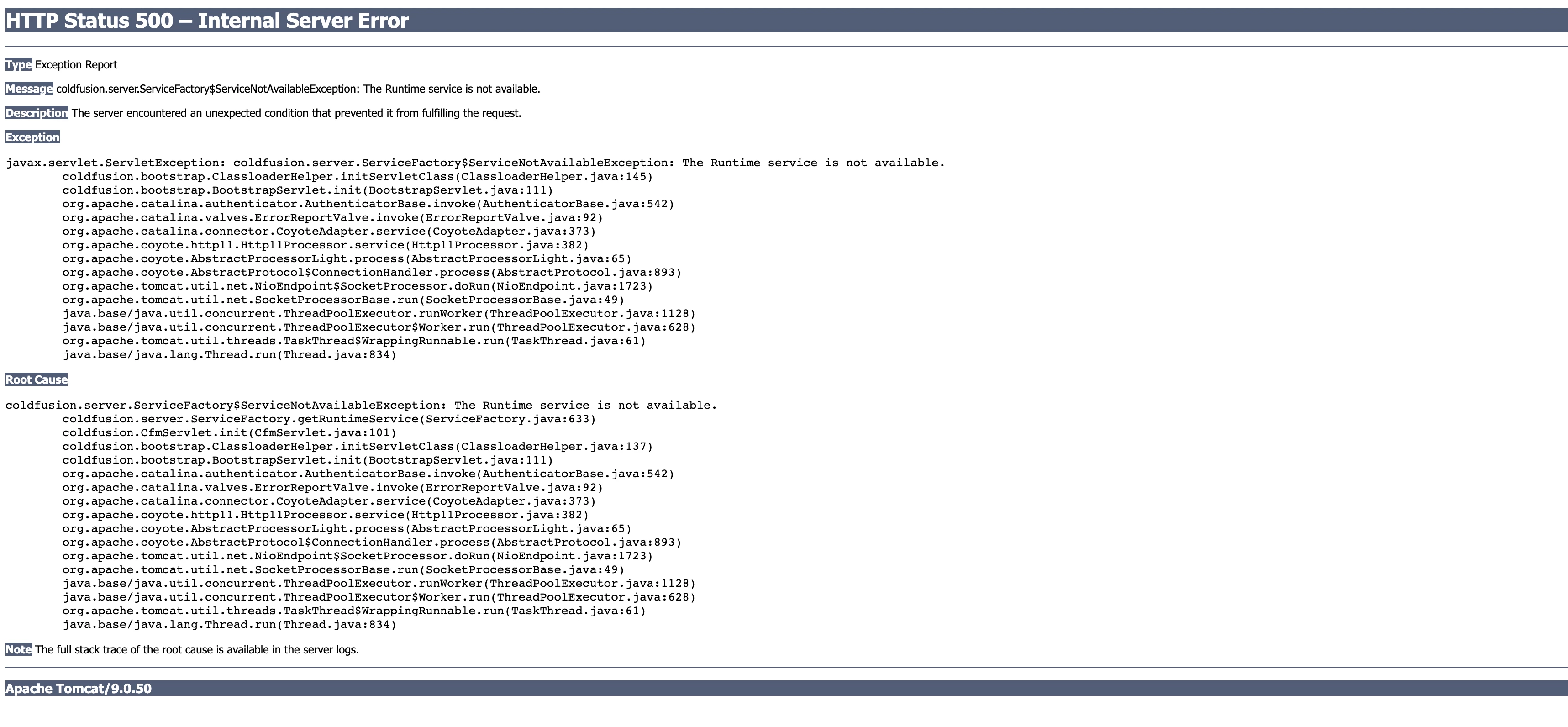
hello, on http://localhost:8500/CFIDE/administrator/ I am getting an error with the message "coldfusion.server.ServiceFactory$ServiceNotAvailableException: The Runtime service is not available."

I am running CF21 on macOS Monterey. The java version on my system is  "19.0.1". Please help with any ideas on how to overcome this. Thank you. 


    This topic has been closed for replies.
    Correct answer yazy27665374pke1

    Yazy, your screenshots of the startup log lines show clearly that CF is starting and then ending about 30 seconds later.  Are you saying that during that time, you visited the CF Admin and got the error you show?  I ask because I would have expected to see error lines in either of those, when you got the error you offered initially here.


    As for the startup lines, they show no problem at all. (They also show that you seem to have this instance of CF being monitored by the CF PMT monitor, but I don't see that being a cause of the error above.)


    Since the error is not about startup (it seems), we need to look elsewhere.


    First, help us out: was this CF instance working for some hours, days, weeks, or months, then suddenly not working? What changed? Did you apply CF updates, perhaps? Anything else you can think of? Did you or anyone tweak any underlying CF config files, perhaps trying to solve some other problem?


    If you had recently applied a CF update, look to the CF update installation log, which is NOT in the same cf logs folder, but in another location entirely. I have a blog post on where to find that, and how to quickly confirm if the update worked with 0 errors or not. 


    Finally, I hear you saying you are tempted to just reinstall CF. I understand how some folks get to that point of frustration or desparation (or simply lack of interest in finding a solution). I'll note that I have nearly always been able to help folks find and fix whatever was amiss. I do it with people daily. If you might be open to as little as 30 or even 15 minutes working together remotely, it may not take much longer for us to save you that effort of a reinstall.  You can learn more about my rates, approach, satisfaction guarantee, and more at carehart.org/consulting. I offer my online booking calendar there, and though it doesn't offer weekend hours, we can arrange that via email (address offered there also).


    That said, I'm happy to keep helping here only. It's just that I can't always respond readily, and with the holidays it may be even more challenging, but I'll try to watch out for your reply.


    I deleted Java 19 from my Mac. I reinstalled Coldfusion and it worked!

    Dave, Charlie, BKBK — thank you all very much for your inputs.

    1 reply

    Charlie Arehart
    Community Expert
    Community Expert
    December 21, 2022

    Some readers may want to assert that your problem is with that Java 19.0.1. Maybe, but maybe not.


    First, CF2021 does not in fact currently support anything but Java 11 (the latest being currently update 11.0.17). But unless you have specifically changed your cf to use that specific Java, it would instead use the one that CF is already configured to use. Open the cf jvm.config file, in the cfusion/bin folder, and see the first uncommented line with java.home. What is that set to? If it's the coldfusion/jre folder, then that WILL be a Java 11 version (unless someone copied a new jvm into that folder). 


    As for the error, it may have nothing at all to do with what java version cf is using. Look in the cf logs, especially the coldfusion-error.log and coldfusion-out.log. Look for errors during the startup of cf. See anything amiss?


    If not, and you need help, and you may want to show us the logs, please offer that as an attachment, not by pasting the text here. Or offer ONLY the lines since the last cf startup. 

    /Charlie (troubleshooter, carehart. org)
    Participant
    December 23, 2022

    Hello Charlie,

    Thank you for your assistance. In the cf jvm.config file, the value for java.home is set to "../../jre/Contents/Home". I have attached the error and out logs for your review.

    I have tried to go through them, but I am having difficulty understanding all the details. If I am unable to resolve the issue by reviewing the logs, I will consider reinstalling Coldfusion next week.

    Thank you for your help and have a happy holiday season.

    BKBK
    Community Expert
    Community Expert
    December 24, 2022

    The files coldfusion-error.log and coldfusion-out.log pertain to a ColdFusion installation that:

    1.  is installed with Java 11.0.11 (LTS), quite likely the Java that ships with ColdFusion. You can see that in coldfusion-error.log;
    2.  has stopped running.


    In other words, the path to Java 19.0.1 is probably not "../../jre/Contents/Home". If you want to use Java 19.0.1 with ColdFusion, I will suggest that you use the absolute path of the Java 19.0.1 installation directory.


    Use Google to find out how to obtain this path for MacOS Monterey. Then put it in jvm.config, and restart ColdFusion.