


Inspiring
June 4, 2014
Answered

CF11 is crashing ( application pool suffered a fatal communication error with the Windows Process Activation Service)

  • June 4, 2014
  • 2 replies
  • 7923 views

I have a cluster of 2 IIS web servers on Windows Server 2008 R2. They had been running on CF10 for over a year (if not two) with no problems. I upgraded one server to CF11 and now that server is crashing while the CF10 servers is still running fine.

In the Windows event log I'm seeing 4 instances of this error:

"A process serving application pool '******' suffered a fatal communication error with the Windows Process Activation Service. The process id was '4652'. The data field contains the error number."

Then finally:

"Application pool '******' is being automatically disabled due to a series of failures in the process(es) serving that application pool.".

Looking at the application pool in the IIS admin it is stopped. Restarting will resolve but it will eventually crash.

What could be the issue?

-Phil
    This topic has been closed for replies.
    Correct answer Phil_Cruz

    You need to disable the verbose. Change the log level to info from debug in isapi_redirect.properties (C:\ColdFusion11\config\wsconfig\1)

    Did you face the issue after enabling verbose?

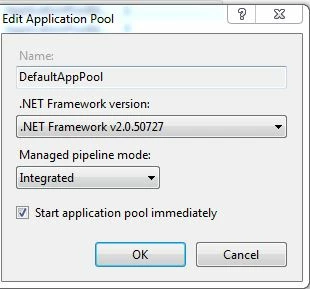
    Have you added Application under your website? If yes, is that Application running with it's own App pool or the websit's App pool?

    Also, share the Edit Application Pool settings screenshot


    I didn't disable logging but it has in fact stopped logging since around 8:30am PST, so that is strange.

    I didn't get the exact errors mentioned in the original post (yet) but I am facing the issue in that some requests are taking very long. I have Failed Request Tracing enabled and it showing requests for simple static files like .css files taking 10+ seconds.

    -Phil

    2 replies

    vishu_13
    Inspiring
    June 25, 2014

    give a try to test a new webiste. Create a new website in IIS, configure it with CF 11.This new website will have it's own application pool. Place all of the .cfm of your original website in this new website.

    Use Apache JMeter to use load/stress testing on this new website

    So, in this way you can test without the cluster setup. If everything works fine then test the behavior in a cluster environment.

    Apache JMeter steps

    Download jmeter from the link mentioned below

    https://jmeter.apache.org/download_jmeter.cgi

    NOTE : click on apache-jmeter-2.11.zip under binaries

    Test plan -> Right click --> Add - Thread group

    Right click on Thread group --> Add - Sampler- HTTP Request

    Right click HTTP Request --> Add- Listener - View Results in Table

    Click on HTTP Request  and enter the server name like localhost or ip address, then port number of your site like 80

    Enter the path as : http://localhost:81/hello.cfm

    Click on Thread Group in left panel. Increase the number of threads as 40 or something like that. Enter the loop count like 5000 or so

    Now click on the green start icon at top and click on view results in table

    If you are successful in finding the root cause, you will be able to fix it in a quick succession.

    HTH

    Thanks

    VJ

    Phil_CruzAuthor
    Inspiring
    June 25, 2014

    I have already tried creating a new website in IIS. I have taken the server out of the cluster so I can isolate it and test it alone. Out of the cluster, the only load the server sees is requests from our monitoring system. So like a couple of page requests a minute, very little. Under that "load" I'm seeing the error so there's no need to use JMeter.

    My guess, I think it's related to a bug in the connector

    Bug 54117 – access violation exception in isapi_redirect.dll

    This was adressed but I think CF11 ships with the old connector.

    Thanks,

    Phil

    vishu_13
    Inspiring
    June 25, 2014

    Recreate the connector for this new website and this time enable the verbose log

    Every request to the website will be monitored and the log will be inside isapi_redirect.log (C:\ColdFusion11\config\wsconfig\1)

    Share the logs

    Phil_CruzAuthor
    Inspiring
    June 4, 2014

    I'm seeing in the CF logs leading up to the crash:

    Jun 04, 2014 11:11:31 AM org.apache.coyote.ajp.AjpProcessor getRealPathFromServer

    SEVERE: Error in getRealPathFromConn

    java.net.SocketException: Connection reset by peer: socket write error

      at java.net.SocketOutputStream.socketWrite0(Native Method)

      at java.net.SocketOutputStream.socketWrite(Unknown Source)

      at java.net.SocketOutputStream.write(Unknown Source)

      at org.apache.coyote.ajp.AjpProcessor.getRealPathFromServer(AjpProcessor.java:402)

      at org.apache.coyote.ajp.AbstractAjpProcessor.getRealPath(AbstractAjpProcessor.java:1276)

      at org.apache.naming.resources.FileDirContext.doGetRealPath(FileDirContext.java:202)

      at org.apache.naming.resources.BaseDirContext.getRealPath(BaseDirContext.java:424)

      at org.apache.catalina.core.StandardContext.getRealPath(StandardContext.java:4660)

      at org.apache.catalina.core.ApplicationContext.getRealPath(ApplicationContext.java:432)

      at org.apache.catalina.core.ApplicationContextFacade.getRealPath(ApplicationContextFacade.java:333)

      at coldfusion.runtime.ServletContextWrapper.doGetRealPath(ServletContextWrapper.java:184)

      at coldfusion.runtime.ServletContextWrapper._doGetRealPath(ServletContextWrapper.java:116)

      at coldfusion.runtime.ServletContextWrapper.getRealPath(ServletContextWrapper.java:98)

      at coldfusion.filter.FusionContext.getRealPath(FusionContext.java:999)

      at coldfusion.filter.FusionContext.getRealPath(FusionContext.java:937)

      at coldfusion.runtime.RuntimeServiceImpl.resolveTemplatePath(RuntimeServiceImpl.java:866)

      at coldfusion.tagext.lang.IncludeTag.setTemplate(IncludeTag.java:420)

      at cfApplication2ecfc1835967654.runPage(C:\Data\http\domain\apps\Application.cfc:3)

      at coldfusion.runtime.CfJspPage.invoke(CfJspPage.java:246)

      at coldfusion.filter.SilentFilter.invoke(SilentFilter.java:47)

      at coldfusion.runtime.TemplateProxyFactory.resolveComponentHelper(TemplateProxyFactory.java:538)

      at coldfusion.runtime.TemplateProxyFactory.resolveName(TemplateProxyFactory.java:248)

      at coldfusion.runtime.TemplateProxyFactory.resolveName(TemplateProxyFactory.java:159)

      at coldfusion.runtime.TemplateProxyFactory.resolveFile(TemplateProxyFactory.java:120)

      at coldfusion.cfc.CFCProxy.<init>(CFCProxy.java:138)

      at coldfusion.cfc.CFCProxy.<init>(CFCProxy.java:84)

      at coldfusion.runtime.AppEventInvoker.<init>(AppEventInvoker.java:64)

      at coldfusion.filter.PathFilter.resolveApplicationScope(PathFilter.java:195)

      at coldfusion.filter.PathFilter.invoke(PathFilter.java:124)

      at coldfusion.filter.ExceptionFilter.invoke(ExceptionFilter.java:94)

      at coldfusion.filter.ClientScopePersistenceFilter.invoke(ClientScopePersistenceFilter.java:28)

      at coldfusion.filter.BrowserFilter.invoke(BrowserFilter.java:38)

      at coldfusion.filter.NoCacheFilter.invoke(NoCacheFilter.java:58)

      at coldfusion.filter.GlobalsFilter.invoke(GlobalsFilter.java:38)

      at coldfusion.filter.DatasourceFilter.invoke(DatasourceFilter.java:22)

      at coldfusion.filter.CachingFilter.invoke(CachingFilter.java:62)

      at coldfusion.CfmServlet.service(CfmServlet.java:219)

      at coldfusion.bootstrap.BootstrapServlet.service(BootstrapServlet.java:89)

      at org.apache.catalina.core.ApplicationFilterChain.internalDoFilter(ApplicationFilterChain.java:303)

      at org.apache.catalina.core.ApplicationFilterChain.doFilter(ApplicationFilterChain.java:208)

      at coldfusion.monitor.event.MonitoringServletFilter.doFilter(MonitoringServletFilter.java:42)

      at coldfusion.bootstrap.BootstrapFilter.doFilter(BootstrapFilter.java:46)

      at org.apache.catalina.core.ApplicationFilterChain.internalDoFilter(ApplicationFilterChain.java:241)

      at org.apache.catalina.core.ApplicationFilterChain.doFilter(ApplicationFilterChain.java:208)

      at sun.reflect.GeneratedMethodAccessor118.invoke(Unknown Source)

      at sun.reflect.DelegatingMethodAccessorImpl.invoke(Unknown Source)

      at java.lang.reflect.Method.invoke(Unknown Source)

      at com.intergral.fusionreactor.j2ee.filterchain.WrappedFilterChain.doFilter(WrappedFilterChain.java:97)

      at com.intergral.fusionreactor.j2ee.filter.FusionReactorRequestHandler.doNext(FusionReactorRequestHandler.java:472)

      at com.intergral.fusionreactor.j2ee.filter.FusionReactorRequestHandler.doHttpServletRequest(FusionReactorRequestHandler.java:312)

      at com.intergral.fusionreactor.j2ee.filter.FusionReactorRequestHandler.doFusionRequest(FusionReactorRequestHandler.java:192)

      at com.intergral.fusionreactor.j2ee.filter.FusionReactorRequestHandler.handle(FusionReactorRequestHandler.java:507)

      at com.intergral.fusionreactor.j2ee.filter.FusionReactorCoreFilter.doFilter(FusionReactorCoreFilter.java:36)

      at sun.reflect.GeneratedMethodAccessor117.invoke(Unknown Source)

      at sun.reflect.DelegatingMethodAccessorImpl.invoke(Unknown Source)

      at java.lang.reflect.Method.invoke(Unknown Source)

      at com.intergral.fusionreactor.j2ee.filterchain.WrappedFilterChain.doFilter(WrappedFilterChain.java:79)

      at sun.reflect.GeneratedMethodAccessor116.invoke(Unknown Source)

      at sun.reflect.DelegatingMethodAccessorImpl.invoke(Unknown Source)

      at java.lang.reflect.Method.invoke(Unknown Source)

      at com.intergral.fusionreactor.agent.filter.FusionReactorStaticFilter.doFilter(FusionReactorStaticFilter.java:53)

      at com.intergral.fusionreactor.agent.pointcuts.NewFilterChainPointCut$1.invoke(NewFilterChainPointCut.java:41)

      at org.apache.catalina.core.ApplicationFilterChain.doFilter(ApplicationFilterChain.java)

      at org.apache.catalina.core.StandardWrapperValve.invoke(StandardWrapperValve.java:220)

      at org.apache.catalina.core.StandardContextValve.invoke(StandardContextValve.java:122)

      at org.apache.catalina.authenticator.AuthenticatorBase.invoke(AuthenticatorBase.java:501)

      at org.apache.catalina.core.StandardHostValve.invoke(StandardHostValve.java:170)

      at org.apache.catalina.valves.ErrorReportValve.invoke(ErrorReportValve.java:98)

      at org.apache.catalina.core.StandardEngineValve.invoke(StandardEngineValve.java:116)

      at org.apache.catalina.connector.CoyoteAdapter.service(CoyoteAdapter.java:422)

      at org.apache.coyote.ajp.AjpProcessor.process(AjpProcessor.java:198)

      at org.apache.coyote.AbstractProtocol$AbstractConnectionHandler.process(AbstractProtocol.java:607)

      at org.apache.tomcat.util.net.JIoEndpoint$SocketProcessor.run(JIoEndpoint.java:313)

      at java.util.concurrent.ThreadPoolExecutor.runWorker(Unknown Source)

      at java.util.concurrent.ThreadPoolExecutor$Worker.run(Unknown Source)

      at java.lang.Thread.run(Unknown Source)

    Participant
    June 24, 2014

    I see the same entries in the Event log and the same end result. This is a single server. Win2008r2 with CF11.

    Phil_CruzAuthor
    Inspiring
    June 25, 2014

    I've engaged a consultant from http://www.cfconsultant.com/ to help me troubleshoot this. We've looked at everything haven't found any code or configuration that would seem to relate and have yet to find the root cause. This is happening with very little load on the server.


    My next step is to do a full uninstall-reinstall of IIS and CF11 and see if that resolves. If it doesn't, my next move is to bail on CF11 and go back to CF10. Unless someone from Adobe might have some suggestions as to how to resolve/troubleshoot.

    -Phil