Inspiring
July 21, 2021
Answered

CF2016 to connect to Azure SQL database

  • July 21, 2021
  • 1 reply
  • 1147 views

Hi,

Suddenly, the Data Source that was working quit working for me in CF2016.


The error is:

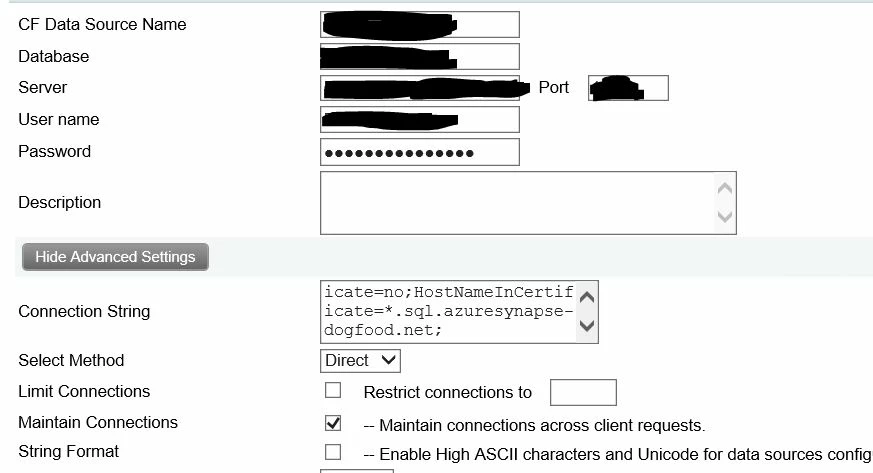
I was following this post to set up DataSource.  Below is my set up.  It worked since  Nov 2020.  But, today, it quits working! 


The connection string is 

EncryptionMethod=SSL;Encrypt=yes;TrustServerCertificate=no;HostNameInCertificate=*.sql.azuresynapse-dogfood.net;


I wonder if the "HostNameInCertificate" changed. 

I believed I got the HostNameInCertificate from an error message in CF2016 when I set it up back in Nov 2016.


Any idea on how to solve this?  


Thanks!  


DChan

This topic has been closed for replies.
Correct answer dchan@gfc.state.ga.us

Well, it's not necessary that simple.


1) First, let's please confirm what Java version is shown in the cf admin, on the "settings summary" (the page AFTER the "Java and jvm" page). What you shared above was a screenshot of the folders where you have different Java versions installed. That doesn't confirm that your cf instance is USING that Java you highlighted.


If you show you ARE using that latest Java, you might think that proves it's "not a Java problem". But actually that 1.8.0_301 is only the latest Java 8... 


2) Second, Cf2016 also supports Java 11, at least as long as you're past cf2016 update 8. It's possible that this is a problem of tls-related support that is fixed with Java 11 and not Java 8. And just as that 301 is the latest update to Java 8 (from this week, in fact), so it java 11. 0.12 now the latest Java 11.


That said, do beware that if you change major Java versions like that, you should also "clear the cfclasses" folder (if it has files in it), to force cf to recompile all your code using the new Java, or else you may start getting unexpected java errors, as some existing Java 8 code may now conflict with Java 11. (And there are a couple of related folders, cf-stubs and cfc-skeletons, that need to be cleared if they have files in them. And beware NOT to mistake classes for cfclasses above. ) I discuss clearing these things in point 12 of my post, https://www.carehart.org/blog/client/index.cfm/2014/12/11/help_I_updated_CFs_JVM_and_it_wont_start


3) Note also that by being on cf2016 still, you are running on borrowed time. Its support has ended earlier this year, with the March update, 17, being its last. Going forward, only cf2021 and 2018 will get updates, including security updates. 


4) Finally, I appreciate that all this can be a lot to take in. While I give all the info anyone should need in my various posts on the various topics (and related ones they link to), I appreciate that some don't want to read all that, or they find it overwhelming, or they may  trip over what they feel is a unique problem, or they, or they may just want someone to "handle it". For all those reasons, I can indeed help directly, remotely, quickly, and with satisfaction guaranteed or you won't pay for the time. More at carehart.org/consulting. 


Please do let us know how it goes, whether you resolve things or hit new challenges. 


Hi Charlie,


THANKS a lot for your input!!  


My problem is resolved for now by restoring the Java version to 8.0_111.  Or at least, the Data Source connection behavior is the same as before the problem occurred.  


Given what you said, I will pursue upgrade of CF2018 or CF20201 as soon as possible. 


As for the Java version, from the server, when I go to java.com to download, it showed me Version 8, update 301.  It seems that other version of Java are found under oracle.com/java (Java SE 11 for example).


Thanks!  


Dchan

1 reply

Charlie Arehart
Community Expert
July 21, 2021

My bet is that indeed nothing changed on your end, but that something changed on the SQL Server end. More specifically, I suspect that the server on which that DB is running has been changed to not allow a certain version of SSL or TLS and require some TLS version (or some encryption algorithm, etc.), whereas the Java version underlying CF does not support that TLS version (or encryption algo, etc.)


So am I saying that the solution may be as simple as updating your JVM that CF uses? Indeed, I am. For more on that (my reasoning, seeing what JVM you are running now, knowing what JVM you can change to for your given CF version, the process of changing JVMs, and more), see a post I did:

Solving problems calling out of CF via https, by updating JVM


Let us know if that helps. If not, we can consider any of many other possibilties (more obscure ones, from my experience).

/Charlie (troubleshooter, carehart. org)
Inspiring
July 22, 2021

Hi Charlie,


Actually, I updated java.com today and then the data source (say Data Source A)  (connection to Azure SQL Database) did not work. 


But a few days ago, I was trying to connect to another Azure SQL database with the same setting, but I ran into the same error. Yet, the Data Source A was working.  


After the java update, the java version may be 8.0_301.  This is a screen shot from the Cold Fusion server machine. 

I will look into your post soon. 


DChan

Charlie Arehart
Community Expert
July 22, 2021

Now, with Java 1.8.0.301 installed, restarted ColdFusion 2016.  The Data Connection to Azure SQL database becomes: 

The error message is not helpful at all....

Data Source setting is the same as the original post.  


Does it still look like a JVM issue?  


DChan. 


Well, it's not necessary that simple.


1) First, let's please confirm what Java version is shown in the cf admin, on the "settings summary" (the page AFTER the "Java and jvm" page). What you shared above was a screenshot of the folders where you have different Java versions installed. That doesn't confirm that your cf instance is USING that Java you highlighted.


If you show you ARE using that latest Java, you might think that proves it's "not a Java problem". But actually that 1.8.0_301 is only the latest Java 8... 


2) Second, Cf2016 also supports Java 11, at least as long as you're past cf2016 update 8. It's possible that this is a problem of tls-related support that is fixed with Java 11 and not Java 8. And just as that 301 is the latest update to Java 8 (from this week, in fact), so it java 11. 0.12 now the latest Java 11.


That said, do beware that if you change major Java versions like that, you should also "clear the cfclasses" folder (if it has files in it), to force cf to recompile all your code using the new Java, or else you may start getting unexpected java errors, as some existing Java 8 code may now conflict with Java 11. (And there are a couple of related folders, cf-stubs and cfc-skeletons, that need to be cleared if they have files in them. And beware NOT to mistake classes for cfclasses above. ) I discuss clearing these things in point 12 of my post, https://www.carehart.org/blog/client/index.cfm/2014/12/11/help_I_updated_CFs_JVM_and_it_wont_start


3) Note also that by being on cf2016 still, you are running on borrowed time. Its support has ended earlier this year, with the March update, 17, being its last. Going forward, only cf2021 and 2018 will get updates, including security updates. 


4) Finally, I appreciate that all this can be a lot to take in. While I give all the info anyone should need in my various posts on the various topics (and related ones they link to), I appreciate that some don't want to read all that, or they find it overwhelming, or they may  trip over what they feel is a unique problem, or they, or they may just want someone to "handle it". For all those reasons, I can indeed help directly, remotely, quickly, and with satisfaction guaranteed or you won't pay for the time. More at carehart.org/consulting. 


Please do let us know how it goes, whether you resolve things or hit new challenges. 

/Charlie (troubleshooter, carehart. org)