


CFCHART - Move labels or change color
(CF2016)
I am using CFCHART and have a problem with the labels, making it difficult to read the data
a) Text being in the same color as the bar
b) Sitting too close to the bars
Could anybody help me with either changing the colour (not sure that will help) and preferably moving the text further up so it sits on its own. Code and screenshot below.
On another note, the defaul is a very nice looking blue gradient, but text was also light on pie and bar and extremely difficult to read, can anybody help with making it a gradient of the colour I have?
Thanks
<cfchart
title="Revenue"
format="html"
show3d="yes"
showlegend="yes"
chartheight="400"
chartwidth="500"
labelFormat = "number"
showborder="true"
pieSliceStyle="sliced"
sortXAxis = "yes">
<cfchartseries type="bar" dataLabelStyle="pattern" seriescolor="4199d1" QUERY="GetRevenue" valuecolumn="totalrevenue" itemcolumn="revenue_country">
</cfchartseries>
</cfchart>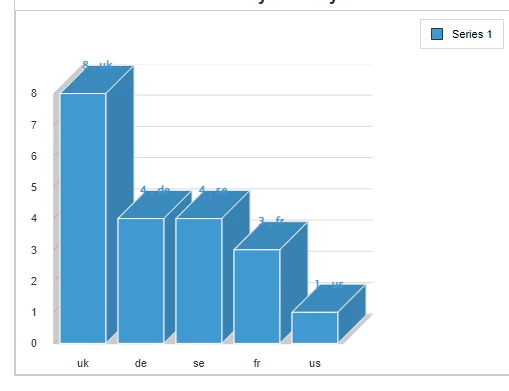
 AdChoices