


Inspiring
February 24, 2022
Answered

CFDocument Formatting not working on all ColdFusion instances

  • February 24, 2022
  • 2 replies
  • 821 views

We are using ColdFusion 2018, update 13. Our setup is that we are an internal shop with a production environment, test environment and the each developer has a local development environment on our PC's. 


We have a situation where a colleague is using a CFDocument tag which formats and generates the pdf great on a few of the development environments, but does not on all. The formatting is also not working on our test or production environment. 


Below is the cfdocument tag with 


<cfdocument format="pdf" pagetype="A4" orientation="portrait" fontEmbed="true" unit="cm" localUrl="true" filename="#somefilename#.pdf" overwrite="yes" marginLeft="0" margintop="0" marginright="0" marginbottom="0">
<div> some formatted html </div>
</cfdocument>


This is what it looks like when it works:
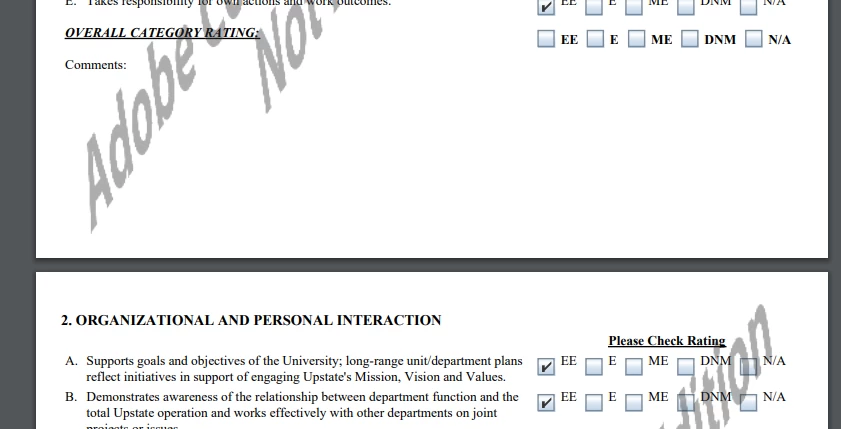
 
 
This is what it looks like when it does not work:
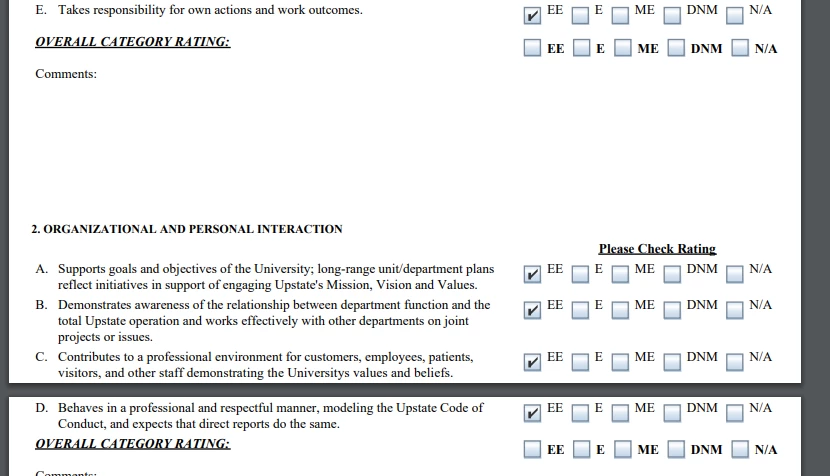


Any help is appreciated in what to look for.
Thanks.
    This topic has been closed for replies.
    Correct answer coldfusion_user_123456

    If you want more control of the PDF settings and consistency, use wkhtmltopdf instead. To see actual code examples, type wkhtmltopdf in the search bar at the top of this page.


    Thanks for the suggestion. I took some time yesterday to switch over to <cfhtmltopdf> and to rework the html that was being used to generate the pdf. It seems to work now on my development and our test environment. There is still the question as to why it worked on some environments, but not all, but for now I think we will move forward with this solution. If we run into similar issues in the future and find a solution to root cause, I will be sure to post it here. Thanks again for your suggestions and help.

    2 replies

    BKBK
    Community Expert
    February 26, 2022

    Hi @coldfusion_user_123456 ,

    I am unable to see the difference between the 2 documents you've shown. That is because I don't know what to look for.


    Could you please explain:

    1.  Which cfdocument setting you are talking about, the values you use and the effect you expect.
    2.  What is not working (as you would expect) .


    Inspiring
    February 28, 2022

    1. We don't know that is a specific cfdocument attribute. I would assume, since it formats fine in some environments and not others, it's not an attribute per say that is causing the issue. 

    2. If you look at the page breaks, you will notice that in screen shot 1 it is cleaner looking. In screen shot 2, the text runs into the subsequent page without any formatting with respect to page breaks and margins. 

    BKBK
    Community Expert
    March 5, 2022

    If you want more control of the PDF settings and consistency, use wkhtmltopdf instead. To see actual code examples, type wkhtmltopdf in the search bar at the top of this page.

    Charlie Arehart
    Community Expert
    February 24, 2022

    Are you implying that they are all at that same update 13? And what is the Java version that Cf reports using? Is THAT identical on each?


    Finally, within the html inside the cf document, see if there references to urls, such as in img src, script src, link rel, etc. Then take those urls and browse them in a browser on each machine. I suspect you will find one or more fails on different ones.


    More to the point, setup a cf page to do cfhttp calls to the urls, and check the result of those. Under the covers, the cfdocument does essentially this in trying to obtain the files. (It will not do it for files without full urls, since you are using the localurl attribute.) Again I suspect you'll find that one or more of these fail on the different machines.


    The question will then be why they fail, on some machines, whether from a browser on the machine or from within cf. There can be many explanations. It's possible that the error you get in requesting the files individually will tell you the problem. And if the failure is ONLY within cf (the cfhttp) and NOT in a browser on the machine, I'd again suspect a possible difference in the Java version used by cf, especially if the urls are https urls.


    Let us know what you find.

    /Charlie (troubleshooter, carehart. org)
    Inspiring
    February 28, 2022

    Thanks for the quick reply, Charlie. I have confirmed that we are using the same Java version (10.0.1) on all CF instances. I have also confirmed that we are not including any url references to external source code, images, etc. 


    Do you have any other suggestions for us to look at?

    Thank you.

    BKBK
    Community Expert
    February 28, 2022

    ColdFusion 2018 on Java 10.0.1?  Is that a typing error? CF2018 should currently be on Java 11, the latest version of which is JDK 11.0.14. Go to the ColdFusion Downloads page and scroll to the bottom.