


Known Participant
March 29, 2023
Answered

ColdFusion 11 code no longer works for ColdFusion 21

  • March 29, 2023
  • 2 replies
  • 2351 views

Hello,


I have migrated our Coldfusion apps from a server running ColdFusion 11 to 21, most have been successful but I am having difficulty resolving one error and would appreciate if anybody has any advice.


The block that errors is:


<CFLOOP INDEX="i" FROM="1" TO="#listlen(Form.Net)#">
<CFSET #Net# = #listgetat(Form.Net,i,",","true")#>
<CFSET #vat# = #listgetat(Form.vat,i,",","true")#>
<CFSET #Dep# = #listgetat(Form.dep,i,",","true")#>
<cfif #len(Dep)# eq "0">
<cfset #Dep# ="XX">
</cfif>
<CFSET #Act# = #listgetat(Form.act,i,",","true")#>
<cfif #len(Act)# eq "0">
<cfset #Act# ="Null">
</cfif>
<CFSET #Prj# = #listgetat(Form.prj,i,",","true")#>
<cfif #len(prj)# eq "0">
<cfset #prj# ="Null">
</cfif>
<CFSET #Loc# = #listgetat(Form.loc,i,",","true")#>
<cfif #len(loc)# eq "0">
<cfset #loc# ="">
</cfif>
<CFSET #PO# = #listgetat(Form.po,i,",","true")#>
<cfif #len(PO)# eq "0">
<cfset #PO# =#variables.MaxPO#>
</cfif>
<CFSET #LineDescr# = #listgetat(Form.LineDescr,i,",","true")#>
<cfif #len(LineDescr)# eq "0">
<cfset #LineDescr# ="XXXX">
</cfif>


I am new to ColdFusion and picking up somebody else's code so I am not 100% sure where the issue lies but the from research it may be the change in CFLOOP's behaviour in the 2016 release?


This is how the data is input-
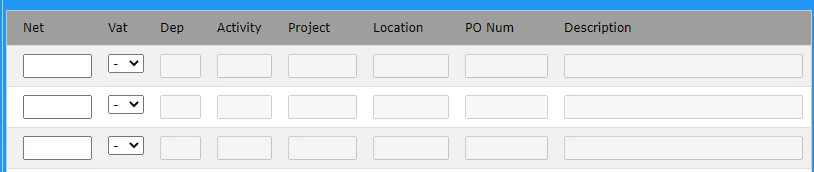
The user should be able to input as many lines as nessecary, but should only have to populate Dep, Project etc on the first line, and it should be copied for all subsequent lines, only Net and VAT should be required for every line. This works as expected on CF11.


The CF21 page works for single lines but errors when more than one line is entered. The error code is as follows:


Mar 28, 2023 15:33:55 PM Error [ajp-nio-127.0.0.1-8020-exec-15] - Invalid list index 2.In function ListGetAt(list, index [, delimiters]), the value of index, 2, is not a valid as the first argument (this list has 1 elements).&nbsp;Valid indexes are in the range 1 through the number of elements in the list. The specific sequence of files included or processed is: "path", line: 243


<CFSET #Dep# = #listgetat(Form.dep,i,",","true")#> is line 243.


The code works as expected on the old ColdFusion 11 server and only errors on the new server, has anybody had a similar issue before?


Any advice or guidance would be greatly appreciated.


This topic has been closed for replies.
Correct answer BKBK
quote

I have implemented the code above and get the error:


Start index 11 should be greater than zero AND less than or equal to end index 2.The range passed to ArraySet must begin with a number greater than zero and less than or equal to the second number.


This is at the first ArraySet

<cfset ArraySet(vatArray, vatlistLength+1, NetListLength, "")>


By @Reservoir2023


Ah, that means that the following code is probably wrong:


<CFLOOP INDEX="i" FROM="1" TO="#listlen(Form.Net, ',', true)#">


The error suggests that NetListLength is 2 and vatListLength is 10.


I had guessed as much. Which is why I included:


<!--- Assumption: It is required that each of the lists Net, vat, Dep, etc. shares this same length --->
<cfset NetListLength=listlen(Form.Net, ',', true)>


So it's back to the drawing-board.


I have refactored the above solution. Here's the result:


<!--- The idea is to list-append the empty string, where necessary, to make sure each list has the same length --->

<!--- Get the length of each list. The lists may not be of equal length. We will have to pad shorter lists up by appending empty string list elements. --->
<cfset NetListLength=listlen(Form.Net, ',', true)>
<cfset vatlistLength = listLen(Form.vat,",","true")>
<cfset DeplistLength = listLen(Form.dep,",","true")>
<cfset ActlistLength = listLen(Form.act,",","true")>
<cfset PrjlistLength = listLen(Form.prj,",","true")>
<cfset LoclistLength = listLen(Form.loc,",","true")>
<cfset POlistLength = listLen(Form.po,",","true")>
<cfset LineDescrlistLength = listLen(Form.LineDescr,",","true")>

<!--- Find which list-length is the maximum --->
<cfset maxListLength=arrayMax([NetListLength,vatlistLength,DeplistLength,ActlistLength,PrjlistLength,LoclistLength,POlistLength,LineDescrlistLength])>

<!--- Convert each list to an array. Each array may possibly have a different number of elements. --->
<cfset NetArray= listToArray(Form.Net)>
<cfset vatArray= listToArray(Form.vat)>
<cfset DepArray= listToArray(Form.dep)>
<cfset ActArray= listToArray(Form.act)>
<cfset PrjArray= listToArray(Form.prj)>
<cfset LocArray= listToArray(Form.loc)>
<cfset POArray= listToArray(Form.po)>	
<cfset LineDescrArray= listToArray(Form.LineDescr)>

<!--- Add the empty string "", where needed, to ensure that the arrays have exactly the same length  --->
<cfif NetlistLength lt maxListLength>
	<cfset ArraySet(NetArray, NetlistLength+1, maxListLength, "")>
</cfif>
<cfif vatlistLength lt maxListLength>
	<cfset ArraySet(vatArray, vatlistLength+1, maxListLength, "")>
</cfif>
<cfif DeplistLength lt maxListLength>
	<cfset ArraySet(DepArray, DeplistLength+1, maxListLength, "")>
</cfif>
<cfif ActlistLength lt maxListLength>
	<cfset ArraySet(ActArray, ActlistLength+1, maxListLength, "")>
</cfif>
<cfif PrjlistLength lt maxListLength>
	<cfset ArraySet(PrjArray, PrjlistLength+1, maxListLength, "")>
</cfif>
<cfif LoclistLength lt maxListLength>
	<cfset ArraySet(LocArray, LoclistLength+1, maxListLength, "")>
</cfif>
<cfif POlistLength lt maxListLength>
	<cfset ArraySet(POArray, POlistLength+1, maxListLength, "")>
</cfif>
<cfif LineDescrlistLength lt maxListLength>
	<cfset ArraySet(LineDescrArray, LineDescrlistLength+1, maxListLength, "")>
</cfif>

<!--- Convert each array back to list. Each list now has exacly the same number - namely, maxListLength - of elements. --->
<cfset form.vat=arrayToList(vatArray,',')>
<cfset form.Dep=arrayToList(DepArray,',')>
<cfset form.Act=arrayToList(ActArray,',')>
<cfset form.Prj=arrayToList(PrjArray,',')>
<cfset form.Loc=arrayToList(LocArray,',')>
<cfset form.PO=arrayToList(POArray,',')>
<cfset form.LineDescr=arrayToList(LineDescrArray,',')>


2 replies

Charlie Arehart
Community Expert
April 5, 2023

I'd like to offer a different take (and suggested solution), based on a change in behavior between 11 and 2021, especially given how your form has many "rows" of the same "field". If this is the problem, there's a simple fix: set sameformfieldsasarray="false" for this application. The default for this is what's changed (it was true in cf11...and 10 and 9. There was some http spec reason Adobe changed it).


[Update: in my original reply, I used formfieldsasarray rather than sameformfieldsasarray. Writing all this on my phone. I have corrected the references throughout my reply here.] 


I know you said you're new to cf.  You may know that before cf runs a requested template, it first runs any application.cfc or cfm it finds in the folder for that template, or it looks up to the next folder above it, and so on. Can you find that file?


If it's an application.cfc, set this (where you should see others like this.name), as this.sameformfieldsasarray="false".  If it's an application.cfm, add this to the cfapplication (which you should find there) as an attribute/value pair, sameformfieldsasarray="false".


Save the file, test your app, and let us know how it goes.


BTW, you mentioned changing the template and seeing no change. You mentioned the "path" shown in the error  in your opening message. Are you definitely change files in THAT path? 


As a sanity check, put a cfabort at the top of your application.cfm or cfc. That should make the request of ANY page in that app return blank. If it does not, as bkbk hinted your cf admin may be set to cache templates once they're running ("trusted cache", set on the "caching" page).


For now, remove that cfabort and let us know where things stand and we'll go from there, as this is already a long reply.


Hope we may be getting you to a solution. 

/Charlie (troubleshooter, carehart. org)
Known Participant
April 5, 2023

Hi Charlie,


Thank you for your comment - I have added the CFApplication tag to application.cfm and now loading most pages of the app result in an error with the following message:


Attribute validation error for tag CFAPPLICATION.It does not allow the attribute(s) FORMFIELDSASARRAY. The valid attribute(s) are APPLICATIONTIMEOUT,AUTHCOOKIE,CLIENTMANAGEMENT,CLIENTSTORAGE,COMPILEEXTFORINCLUDE,DATASOURCE,ENABLENULLSUPPORT,EXCHANGESERVERVERSION,LOGINSTORAGE,NAME,PASSARRAYBYREFERENCE,PRESERVECASEFORSTRUCTKEY,SAMEFORMFIELDSASARRAY,SAMLSETTINGS,SCRIPTPROTECT,SEARCHIMPLICITSCOPES,SECUREJSON,SECUREJSONPREFIX,SERVERSIDEFORMVALIDATION,SESSIONCOOKIE,SESSIONMANAGEMENT,SESSIONTIMEOUT,SETCLIENTCOOKIES,SETDOMAINCOOKIES,STRICTNUMBERVALIDATION,TIMEZONE,USEJAVAASREGEXENGINE,WSVERSION


The changes were definitely made to the correct files as running the test on the application causes the error to be logged with a different line number as I restructure the code. I have restarted the ColdFusion application server service as well in case of the cached page - I'll test the cfabort now.


Many thanks again,

BKBK
Community Expert
April 5, 2023

I was setting it to false - though I do get a different error with it set to true:


Complex object types cannot be converted to simple values.The expression has requested a variable or an intermediate expression result as a simple value. However, the result cannot be converted to a simple value. Simple values are strings, numbers, boolean values, and date/time values. Queries, arrays, and COM objects are examples of complex values. <p> The most likely cause of the error is that you tried to use a complex value as a simple one. For example, you tried to use a query variable in a cfif tag


it specifies the line <CFLOOP INDEX="i" FROM="1" TO="#listlen(Form.Net, ',', true)#">


The error is to be expected, of course. With


sameFormFieldsAsArray="true"


duplicate form-field-names will come in as arrays.


So when using that application attribute, place the following code before any code involving the form-field-values:


<!--- Convert any arrays back to list --->
<cfif isArray(form.Net)>
	<cfset form.Net=arrayToList(form.Net,',')>
</cfif>
<cfif isArray(form.Dep)>
	<cfset form.Dep=arrayToList( form.Dep,',')>
</cfif>
<cfif isArray(form.Act)>
	<cfset form.Act=arrayToList(form.Act,',')>
</cfif>
<cfif isArray(form.Prj)>
	<cfset form.Prj=arrayToList(form.Prj,',')>
</cfif>
<cfif isArray(form.Loc)>
	<cfset form.Loc=arrayToList(form.Loc,',')>
</cfif>
<cfif isArray(form.PO)>
	<cfset form.PO=arrayToList(form.PO,',')>
</cfif>
<cfif isArray(form.LineDescr)>
	<cfset form.LineDescr=arrayToList(form.LineDescr,',')>
</cfif>


BKBK
Community Expert
April 2, 2023

The cause of the error is unlikely to be related to the ColdFusion version. It is very likely related to the line

<CFLOOP INDEX="i" FROM="1" TO="#listlen(Form.Net)#">

The value of the loop's to-attribute, listlen(Form.Net), uses the default of includeEmptyFields, which is false. However, the code uses includeEmptyFields=true when getting each of the list elements Net, vat, Dep, Act, ...etc.  


Therefore the above line of code is incorrect. The correct code is

<CFLOOP INDEX="i" FROM="1" TO="#listlen(Form.Net, ',', true)#">


In addition, you could make your code easier to read, hence easier to debug, by refactoring it as follows:

<CFLOOP INDEX="i" FROM="1" TO="#listlen(Form.Net, ',', true)#">
	
	<CFSET Net = listgetat(Form.Net,i,",","true")>
	<CFSET vat = listgetat(Form.vat,i,",","true")>
	<CFSET Dep = listgetat(Form.dep,i,",","true")>
	<CFSET Act = listgetat(Form.act,i,",","true")>
	<CFSET Prj = listgetat(Form.prj,i,",","true")>
	<CFSET Loc = listgetat(Form.loc,i,",","true")>
	<CFSET PO = listgetat(Form.po,i,",","true")>
	<CFSET LineDescr = listgetat(Form.LineDescr,i,",","true")>
	
	<cfif len(Dep) eq "0">
		<cfset Dep ="XX">
	</cfif>	
	
	<cfif len(Act) eq "0">
		<cfset Act ="Null">
	</cfif>	
	
	<cfif len(prj) eq "0">
		<cfset prj ="Null">
	</cfif>
	
	<cfif len(loc) eq "0">
		<cfset loc ="">
	</cfif>	
	
	<cfif len(PO) eq "0">
		<cfset PO =variables.MaxPO>
	</cfif>
		
	<cfif len(LineDescr) eq "0">
		<cfset LineDescr ="XXXX">
	</cfif>
BKBK
Community Expert
April 5, 2023

@Reservoir2023 , did my suggestion help?

Known Participant
April 5, 2023

Hi @BKBK,


Thank you very much for looking at my issue and getting back to me - I have changed the code as you suggested but unfortunately I am still getting the same error.