Brainiac
July 30, 2014
Question

ColdFusion 11 Destroyed My Charts

  • July 30, 2014
  • 15 replies
  • 18670 views

Surely we can't be the only ones who are disappointed with the newest charting engine in CF11?  Yes, ZingCharts can be cool and the plethora of style options gives us total freedom to build the perfect chart.  However, that is also the root of the problem!  Since CF8, CFCHART has been adequate for our needs.  It produced good looking chart images and was just flexible enough for us to produce what we needed while staying simple enough for us to put together quickly and move on in development.  This has been true up through CF10....

We just installed CF11 on our test server and it has DESTROYED every chart we produce using the same code we've had in place for years.

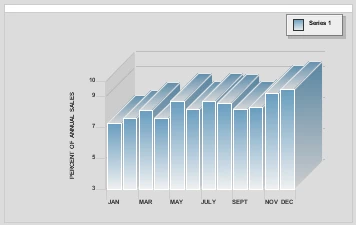
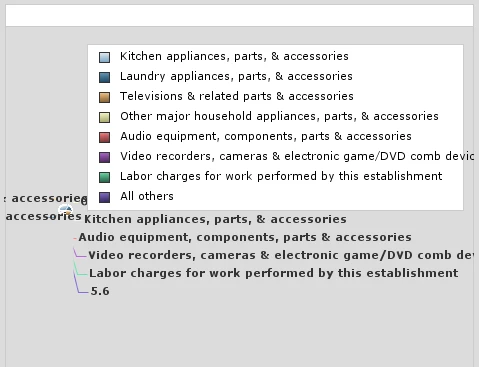
Custom chart colors: gone.  Readability: hit or miss.  3D angles and depths: changed.  Proper fitting of images in pages: gone.  Legends specifically told to hide: now showing, and showing incorrectly.  Labels: FUBAR.

What the hell?!  Who was in charge of the backward compatibility of this charting engine?  The least that should have been done was to give us a default style similar to the old one.

Again, we liked the simplicity the old engine gave us.  And, while it would be cool to spend some time with the ZingChart Editor creating super awesome charts, we don't have the time to mess with the minutiae of all the little details for these charts.  But it looks like I have no choice.  So, instead of proceeding with our upgrade to CF11 we have to stop and reconfigure hundreds of CFCHART tags!

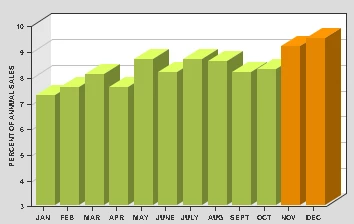
Here are some examples of our mangled charts that have had NO CODE CHANGES from CF10 to CF11:

CF10CF11

OK, rant over.  Have to waste time fixing this bullsh*t...

This topic has been closed for replies.

15 replies

New Participant
September 15, 2018

Same issue once upgraded to 2018. Is the issue not fixed yet?

Gary__F
Inspiring
April 17, 2017

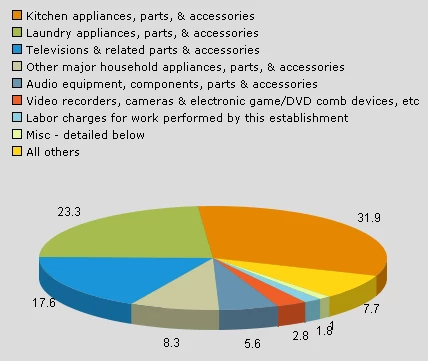
I'm trying to upgrade from CF8 to 2016. Every single chart in our application looks awful in 2016. It's taken a whole day just to make a few charts look decent but they're still not as nice as CF8 charts. One type that's proving tricky to fix are pie charts. Or pea charts as I call them now because they're so tiny!

I've attached an example. Notice it doesn't fill the plot area. I can't find a way to remove the labels or place them inside or over the slices to allow the pie to become bigger.

Brainiac
April 17, 2017

It's all trial and error using ZingCharts JSON styling.  Here's the link to their site:

JSON Attributes | ZingChart

To get you started here's one of the examples we put together to get some of our pie charts back to "normal".

<cfset plotarea ={

                    "adjustLayout"=true,

                    "alpha"=1,

                    "margin-top"=5,

                    "margin-right"=5,

                    "margin-left"=5,

                    "margin-bottom"=0

                }>

        <cfset title = {

                    "visible"=false,

                    "backgroundColor"="##dcdcdc"

                }>

        <cfset border = {

                    "borderColor"="none"

                }>

        <cfset legend = {

                    "visible"=false

                }>

        <cfset plot = {

                    "highlight"=false,

                    "value-box"={

                        "placement"="out",

                        "connected"=false,

                        "text"="%t",

                        "font-color"="##5A5A5A",

                        "type"="all"

                    }

                }>

        <cfchart

            databackgroundcolor="##dcdcdc"

            backgroundColor="##dcdcdc"

            plotarea="#plotarea#"

            title="#title#"

            border="#border#"

            legend="#legend#"

            plot="#plot#"

            chartwidth="460"

            chartheight="260"

            show3d="yes"

            name="pieChart">

Gary__F
Inspiring
April 17, 2017

Thanks, that's very useful. I will give those settings a try.

New Participant
November 9, 2015

Hi Every one I am having problem exporting graphs onto pdf. All graphs are missing when i click the pdf button.i checked my code everything is fine. What i did earlier was increased the time to live of each chart option in CF Admin it worked for almost all the clients but except for one. Are there any SSL Certificates or fire wall settings that is blocking the graphs?

Anit_Kumar
Community Manager
Community Manager
July 4, 2016

It could be a SSL problem. Can you try with non-ssl call?

Regards,

Anit Kumar

May 1, 2015

With Both Update 4 & 5, I have the issue with the line chart, as shown in the original post, where the legend is not put inside the plot area.  Instead the plot is squeezed down, with the legend sitting above it.   Is there any fix for this?  I use CFCHART because I generate PDFs, so the charts need to be generated server-side.

I *need* to have a fix.   I've tried all sorts of things in my JSON file, from not having the (pre-updates 4 & 5 ) default of  "legend":{"position":"100% 5%","layout":"x1","item":{"font-size":"13","font-family":"Arial Narrow"}},  to trying "legend":{} and even excluding "legend" completely.

ZingCharts website/documentation is no help, as the version they are at put the legend inside the plot area correctly.

Brainiac
May 1, 2015

Can you include a full code sample for us to check out?

May 1, 2015

chart/SC_PDF_lineChart_MX.js


{"graphset":[{"plot":{"marker":{"size":"0"},"value-box":{"text":"","font-size":"13","font-family":"Arial Narrow"}},"tooltip":{"font-size":"13","font-family":"Arial Narrow"},"plotarea":{"border-color":"#000000","border-width":"1"},"legend":{"position":"100% 5%","layout":"x1","item":{"font-size":"13","font-family":"Arial Narrow"}},"scale-y":{"tick":{"line-color":"#000000","line-width":"1"},"color":"black","line-color":"#000000","font-size":"13","item":{"color":"#000000","font-size":"13","font-family":"Arial Narrow"},"line-width":1,"font-family":"Arial Narrow","label":{"color":"black","font-size":"13","font-family":"Arial Narrow"}},"title":{"font-size":"13","font-family":"Arial Narrow"},"scale-x":{"tick":{"line-color":"#000000","line-width":"1"},"color":"black","line-color":"#000000","font-size":"13","item":{"font-angle":-90,"color":"#000000","font-size":"13","font-family":"Arial Narrow"},"line-width":1,"font-family":"Arial Narrow","label":{"color":"black","font-size":"13","font-family":"Arial Narrow"}}}]}

cfm file

<CFCHART

  style="chart/SC_PDF_lineChart_MX.js"

  name="myChart"

  chartWidth="800"

  chartHeight="#chartH#"

  format="png"

  tipStyle = "none"

  xAxisTitle="xxx"

  yAxisTitle="xxx"

  scaleFrom="0"

  fontBold="yes"

  fontSize="12"

  showXGridlines = "yes"

  showLegend="yes"

  backgroundColor="FFFFFF"

  xAxisType="category">

  <CFCHARTSERIES type="bar" item......

New Participant
December 21, 2014

Am I understanding that if we upgrade from CF9 to CF11 none of the cfgraph will work?

Is there an option to upgrade to CF11 but continue to use CF9 graphs?

Participating Frequently
January 5, 2015

No, they're not totally "broken" it is mainly formatting issues that I'm encountering.

New Participant
December 10, 2014

Is it just me, or do the bar graph labels on the x-axis still not work very well (Even after Update 3)?

New Participant
December 2, 2014

So are there any recent updates regarding these issues? We're having the same problem and would like to know the timetable for a resolution.

Anit_Kumar
Community Manager
Community Manager
December 3, 2014

Please apply the pre-release update 3 ColdFusion 11 Update 3 build has been updated — Adobe ColdFusion Blog

Regards,

Anit Kumar

New Participant
December 3, 2014

Thanks for your reply. This helps for testing & development, but I cannot put out a pre-release update to a production server. Any idea of when this will be officially released?

Participating Frequently
November 5, 2014

Any updates on this?  I just discovered that the upgrade to CF11 also destroyed my charts.  Sigh

Brainiac
November 5, 2014

I asked Adobe in an email and received this response:

"Cfchart is something we are working on and would update you after consulting with Engg.

[We have] sent a few test cases to Engg to get them fixed. "

I do not know who/what "Engg" is.

So, still waiting.  My opinion is that, the developers got the new CFChart "working" for CF11 but somehow thorough testing for functionality and backward compatibility were totally missed.  How it ever got through BETA testing is a mystery as well.  I think Adobe owes its community an explanation, apology, and some kind of compensation or offer of good faith.

At this point, I'm guessing a hot fix isn't going to be released.  We're probably looking at a major version update before relief.  CF11.1 maybe?


New Participant
October 22, 2014

I Feel your Pain.  Need a downgrade ...

Participating Frequently
October 13, 2014

I also have old code that I'm having to amend.

Specifically the empty title box with a border showing for non-titled charts and having to remove style="default" too.

I look forward to a hotfix for this.

Anit_Kumar
Community Manager
Community Manager
October 13, 2014

The "title" issue would be fixed soon and the others are being worked upon, as we discuss.

Regards,

Anit Kumar

New Participant
November 1, 2014

Hello Anit

When do you expect a fix for this issue?

No point for us upgrading to CF11 until there is a fix for CFcharts.

Mvh

Dag Pettersen