

ColdFusion 2021 Error while configuring connector on IIS. Ensure you have administrator privileges
Hello,
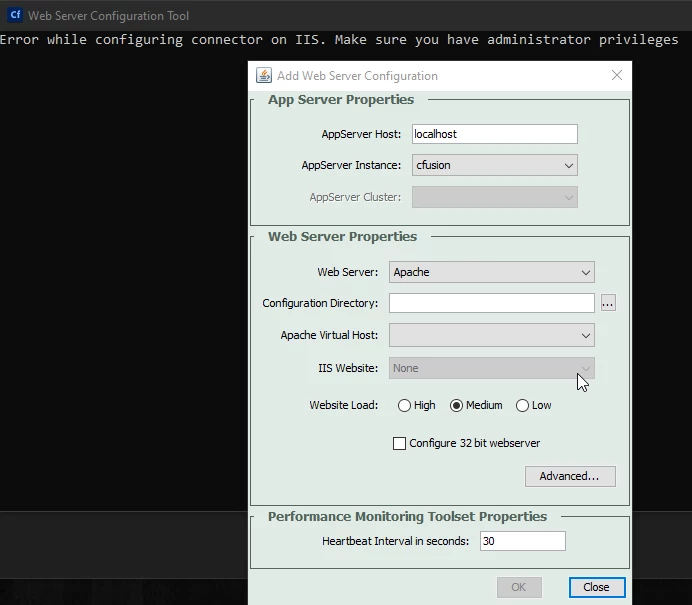
Long story short, my company recently performed an update on my local Windows 10 64 bit environment, which broke my local ColdFusion 2016 instance. (I believe they changed some permissions, CISCO umbrella etc.) I had an issue with starting the ColdFusion service, so I ended up reinstalling ColdFusion 2016 and got past the services issue but when I went to configure my existing IIS 10 sites again I received the following error through wsconfig ("as an administrator") "Error while configuring connector on IIS. Make sure you have administrator privileges"
Since I could not get past the wsconfig / IIS error, I completely uninstalled CF 2016 and installed ColdFusion 2021 (we have clients running 2016 and 2021). I also removed IIS 10 and reinstalled IIS 10 for a fresh start with IIS.
I have set up my initial local development site in IIS again. However, once again when I run CF wsconfig, I still get the "Error while configuring connector on IIS. Make sure you have administrator privileges".
I have tried everything I found in searches related to this, including the following:
--1. Applying various administrative (including IIS_IUSRS) permissions to ColdFusion2021/config directory, as well as the IIS sites.
--2. I also created the config files manually and at that point I was receiving a 500.0 error in the IIS sites (this was for the 2016 instance, before installing 2021)
--3. The application pools and CF are 64 bit, also tried with the 32 bit application pool.
--4. Executed C:\ColdFusion2021\cfusion\bin\connectors\Upgrade_all_connectors.bat
--5. I have check all logs including Event Viewer and the wsconfig log only logs "06/26 10:11:23 info Tomcat Connector"
I do believe this has something to do with permissions. The company was disallowing full admin on our local machines and we now have full admintrative permissions. That was part of the recent update.
Here's the current wsconfig dialog running as "Administrator". During installation of CF 2016 there was the option of choosing the web development type (IIS was an option), but I did not see the IIS options in the CF 2021 install.
I have been trying to resolve this for a couple days, so any other advice or suggestions would be greatly appreciated. Thank you in advance.
 AdChoices