


Inspiring
February 3, 2015
Answered

ColdFusion 9.0.2 with IIS 7.5, Windows 2008 R2 Failure

  • February 3, 2015
  • 2 replies
  • 2231 views

Hi,

I am trying to fresh install ColdFusion 9.0.2 on IIS7.5 ( Windows 2008 R2 ).

Options : Enterprise Multiserver configuration.

After install, when  I open CFIDE/administrator or any CF page its throwing error as below :

HTTP Error 404.3 - Not Found

The page you are requesting cannot be served because of the extension configuration. If the page is a script, add a handler. If the file should be downloaded, add a MIME map.

Thanks.
    This topic has been closed for replies.
    Correct answer sne_paul

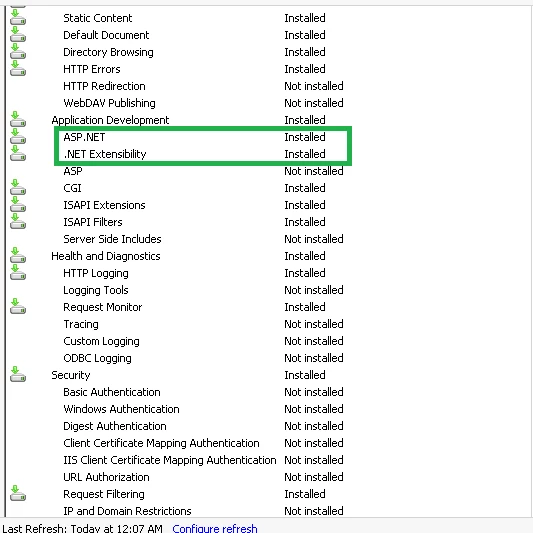
    Issue is Resolved just need to install ASP.NET module in IIS.

    2 replies

    sne_paulAuthorCorrect answer
    Inspiring
    February 10, 2015

    Issue is Resolved just need to install ASP.NET module in IIS.

    Legend
    February 3, 2015

    Hi Paul,

    When you run ColdFusion9\runtime\bin\wsconfig.exe does it show
    CF9 connected to IIS? Pictured.

    HTH, Carl.

    sne_paulAuthor
    Inspiring
    February 4, 2015

    Hi Carl,

    First Thank you very much for your prompt solution.

    It was empty. I have added the connection as required. And now its throwing 500.0 Error as below.

    Please help me.

    sne_paulAuthor
    Inspiring
    February 4, 2015

    I don't know.

    Did you mean CF9 is 32 bit and Windows 2008 r2 is 64 bit?

    Wonder if there is anything helpful in the CF9 IIS connector log? Here ColdFusion9\runtime\lib\wsconfig\1\LogFiles


    Hi Carl,

    No folder like that. As we installed as Multiserver, so its started like E:\Jrun4\

    And also no log file under : E:\JRun4\lib\wsconfig\1 \    location.