Inspiring
May 21, 2017
Answered

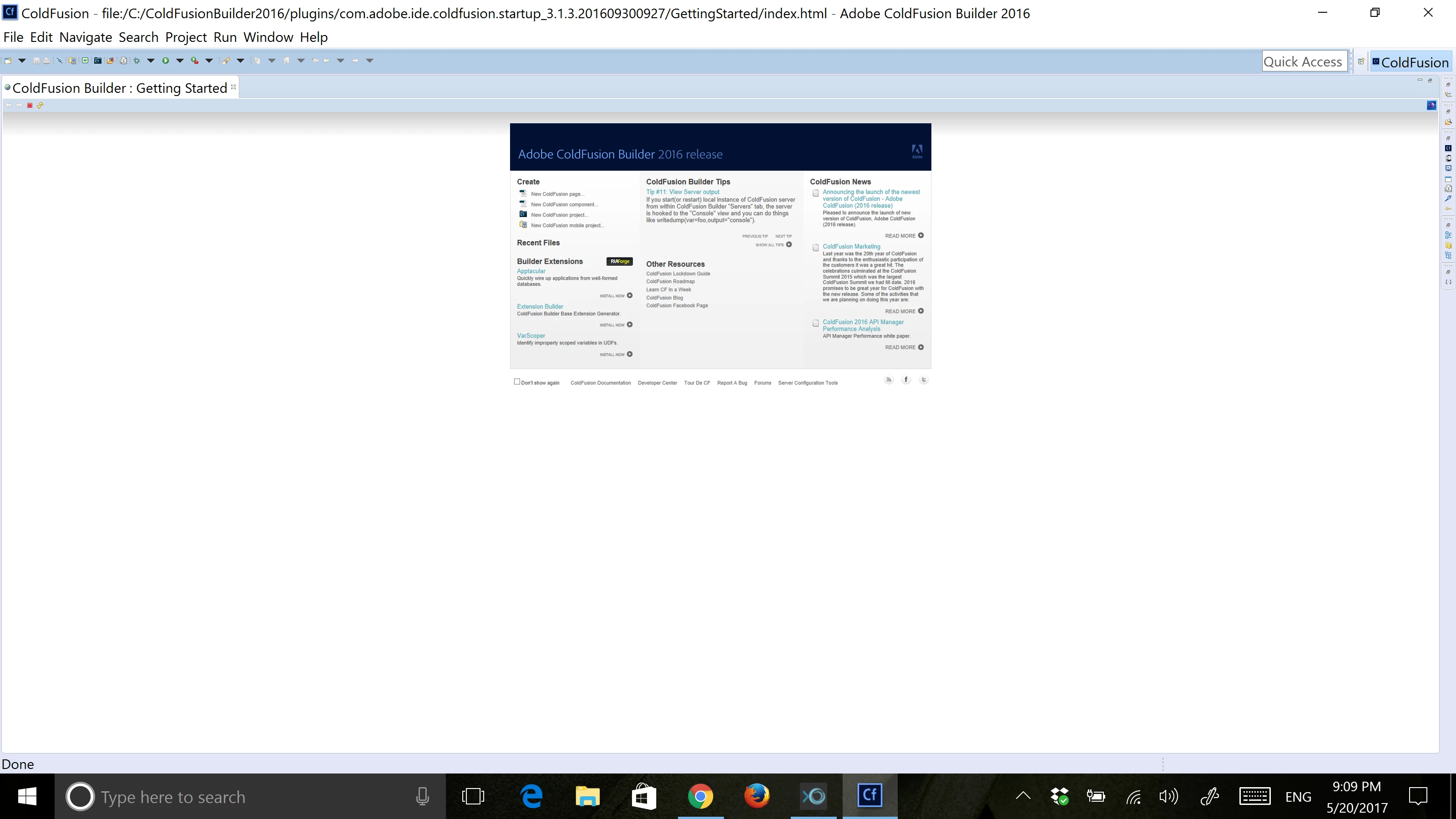
ColdFusion Builder 2016 small icons on high resolution.

  • May 21, 2017
  • 2 replies
  • 2701 views

I just change my laptop to a new one that has 3200 x 1800 resolution, but when opening CF Builder the tool bars and icons display very small, even the home screen shows very small.

I tried with a lower resolution but the IDE displays the same.

Is there any fix to this?

Thanks.

This topic has been closed for replies.
Correct answer angel-chrystian

The solution is:

  1. Open the Registry and navigate to this path Computer\HKEY_LOCAL_MACHINE\SOFTWARE\Microsoft\Windows\CurrentVersion\SideBySide, add a new DWORD record named "PreferExternalManifest" with value "1"
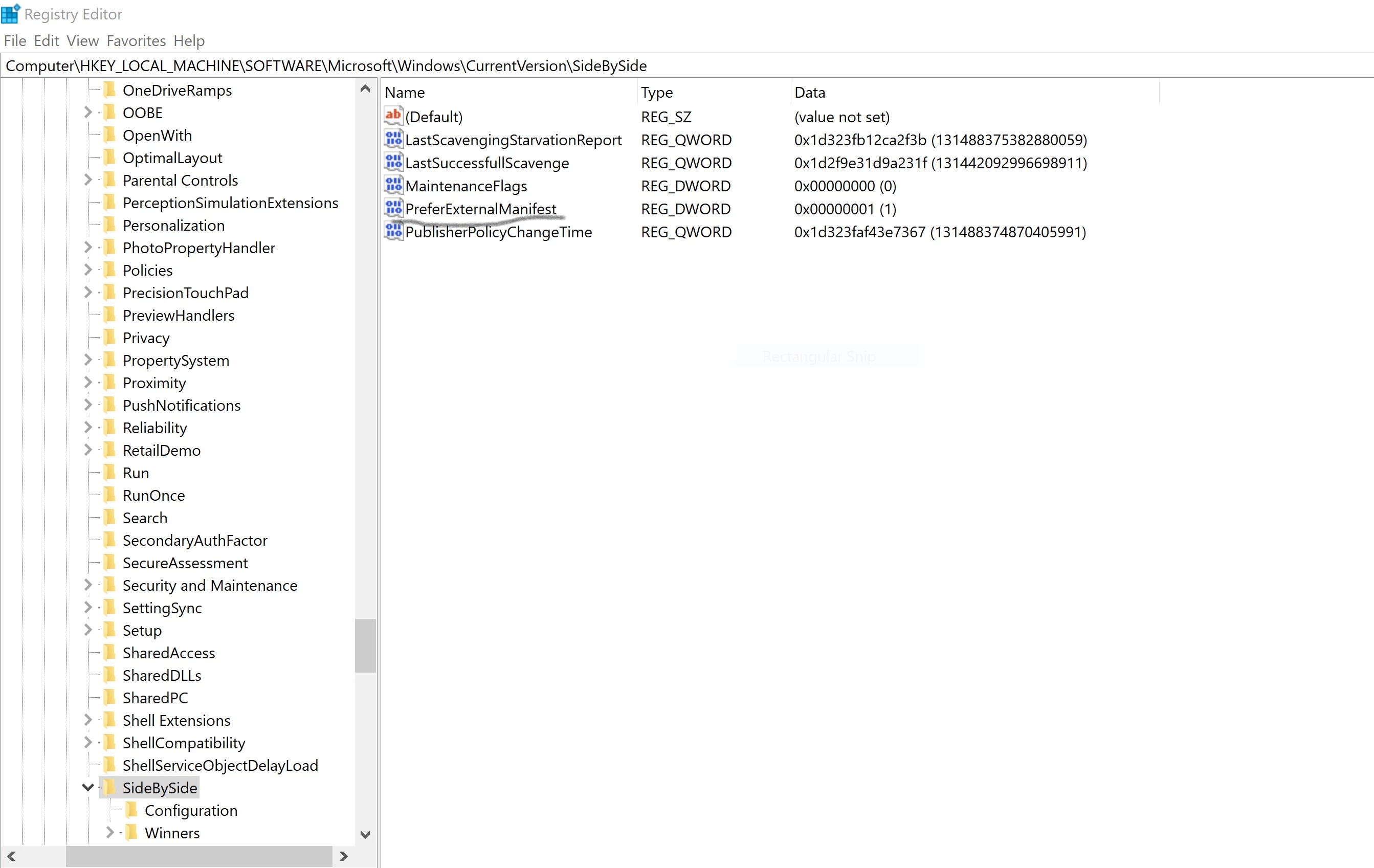
  2. In the CF builder installation directory (C:\ColdFusionBuilder2016) create a file named CFBuilder.exe.manifest with this content

<?xml version="1.0" encoding="UTF-8" standalone="yes"?>

<assembly xmlns="urn:schemas-microsoft-com:asm.v1" manifestVersion="1.0" xmlns:asmv3="urn:schemas-microsoft-com:asm.v3">

    <description>eclipse</description>

    <trustInfo xmlns="urn:schemas-microsoft-com:asm.v2">

        <security>

            <requestedPrivileges>

                <requestedExecutionLevel xmlns:ms_asmv3="urn:schemas-microsoft-com:asm.v3"

                               level="asInvoker"

                               ms_asmv3:uiAccess="false">

                </requestedExecutionLevel>

            </requestedPrivileges>

        </security>

    </trustInfo>

    <asmv3:application>

        <asmv3:windowsSettings xmlns="http://schemas.microsoft.com/SMI/2005/WindowsSettings">

            <ms_windowsSettings:dpiAware xmlns:ms_windowsSettings="http://schemas.microsoft.com/SMI/2005/WindowsSettings">false</ms_windowsSettings:dpiAware>

        </asmv3:windowsSettings>

    </asmv3:application>

</assembly>

3. Restart.

*Note: Some windows updates will remove the PreferExternalManifest record from the registry so you only need to add the record again.


2 replies

angel-chrystianAuthorCorrect answer
Inspiring
September 2, 2017

The solution is:

  1. Open the Registry and navigate to this path Computer\HKEY_LOCAL_MACHINE\SOFTWARE\Microsoft\Windows\CurrentVersion\SideBySide, add a new DWORD record named "PreferExternalManifest" with value "1"
  2. In the CF builder installation directory (C:\ColdFusionBuilder2016) create a file named CFBuilder.exe.manifest with this content

<?xml version="1.0" encoding="UTF-8" standalone="yes"?>

<assembly xmlns="urn:schemas-microsoft-com:asm.v1" manifestVersion="1.0" xmlns:asmv3="urn:schemas-microsoft-com:asm.v3">

    <description>eclipse</description>

    <trustInfo xmlns="urn:schemas-microsoft-com:asm.v2">

        <security>

            <requestedPrivileges>

                <requestedExecutionLevel xmlns:ms_asmv3="urn:schemas-microsoft-com:asm.v3"

                               level="asInvoker"

                               ms_asmv3:uiAccess="false">

                </requestedExecutionLevel>

            </requestedPrivileges>

        </security>

    </trustInfo>

    <asmv3:application>

        <asmv3:windowsSettings xmlns="http://schemas.microsoft.com/SMI/2005/WindowsSettings">

            <ms_windowsSettings:dpiAware xmlns:ms_windowsSettings="http://schemas.microsoft.com/SMI/2005/WindowsSettings">false</ms_windowsSettings:dpiAware>

        </asmv3:windowsSettings>

    </asmv3:application>

</assembly>

3. Restart.

*Note: Some windows updates will remove the PreferExternalManifest record from the registry so you only need to add the record again.

New Participant
January 24, 2018

So, they charge $200.00 for this program and we have to do Registry Edits to be able to use it.  LoL

I only have 1980x1020 res and I cannot see diddly in this program. 

Not only are the icons/buttons too tiny to have a clue what they are, the actual fonts in the pages I'd like to work on are unreadable.

In the case of the fonts, the size is ok, they're just stippled, faded and unreadable.  Like trying to read in an app from the 1990's.

Charlie Arehart
Community Expert
March 31, 2021

Windows 10, 64 bit, Education edition (same as Enterprise without the preinstalled games).


Thanks for the clarifications, Danny. So first, you say you are on Windows 10 but had run CFB in windows 8 compat mode. You've not clarified why. Is that related to an attempt to deal with the DPI issue, or for some other reason? And I assume that NOT running in Windows 8 compat mode did NOT help the DPI problem?


Second, I did confirm that the version of the Windows installer for CFB2018 if downloaded recently is indeed 3.2.1.0. And if installed, it reports in Help>About 3.2.1, and using Help>Check for Updates finds none, so that is indeed the latest CFB.


Finally, I'll note that I viewed it on two monitors, with 166 and 177 dpi respectively, which is on the high side as non-Macs go, and I don't see any problem at all. Since you are on Windows as well, I wonder what your DPI is. Do you know already? If not, here's a free online tool to easily report it: https://dpi.lv/ (and there are others). If it's perhaps 200 or more, are you saying it looked as bad as Angel reported in the first screenshot above in 2017?


Again, I realize you have implemented the workaround to resolve things, so if you don't want to undo that to confirm things, I understand. In that case, I leave this for others to consider who may come along in the future. But perhaps by then CFB2021 will come out and should surely have no DPI issues--until some future tech doubles or triples what's common. 🙂

/Charlie (troubleshooter, carehart. org)
EddieLotter
Inspiring
May 31, 2017

Press Ctl+0 (that's a zero) to reset the zoom, or hold down the Ctrl key and move the mouse wheel to change the amount of zoom.

I tested this in CFB3, but it should also work in CFB2016.

Cheers

Eddie

Inspiring
June 1, 2017

Thanks for your answer Eddie, but that only works for the working area, the zoom does not affect the size of the toolbar and/or the buttons in the right and top of the interface.

I read in another post that this issue comes from eclipse and there is a fix for Eclipse but I think adobe will still need to put hands on it also as I tried but it didn't work.

Solution for Eclipse with High Resolution laptops / Perfecto Mobile Community

EddieLotter
Inspiring
June 1, 2017

Sorry, I overlooked your mentioning the toolbar when I looked at your screenshot. Yes, this is a "High DPI awareness" issue that application developers have to explicitly take into account when developing applications for current environments. Unfortunately it looks like Eclipse isn't high DPI aware.

Cheers

Eddie