


Known Participant
April 22, 2014
Answered

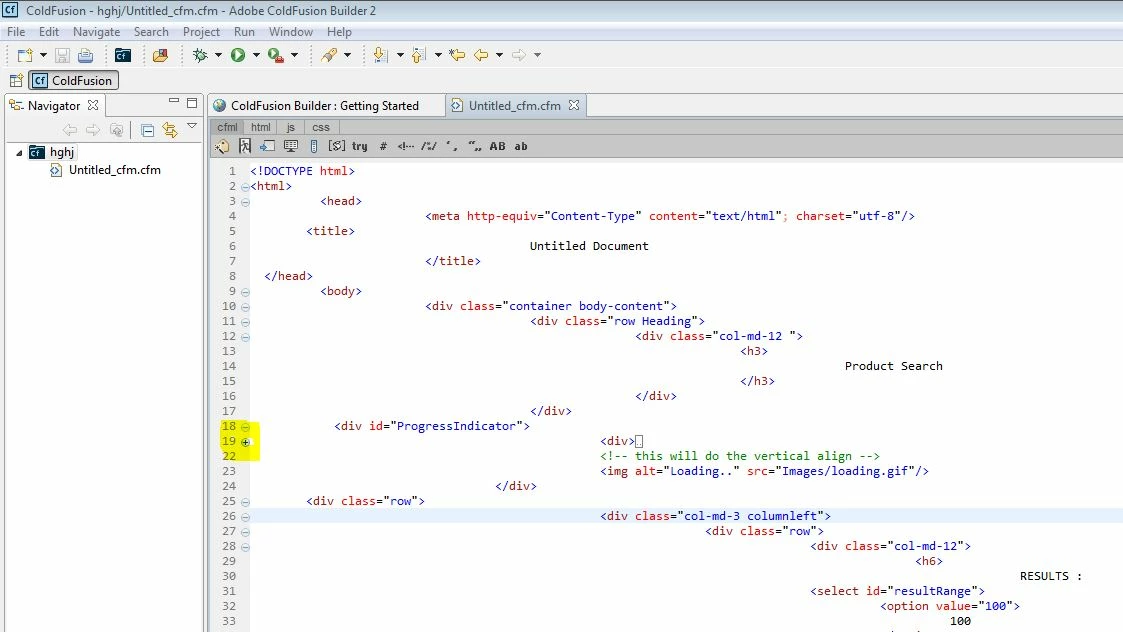
coldfusion builder2 not minimize(collapse) block of code proper way

  • April 22, 2014
  • 1 reply
  • 1066 views

Like for this code collapse not work properly:

<!DOCTYPE html>

<html>

          <head>

                         <meta http-equiv="Content-Type" content="text/html"; charset="utf-8"/>

        <title>

                                        Untitled Document

                         </title>

  </head>

          <body>

                         <div class="container body-content">

                                        <div class="row Heading">

                                                       <div class="col-md-12 ">

                                                                      <h3>

                                                                                     Product Search

                                                                      </h3>

                                                       </div>

                                        </div>

            <div id="ProgressIndicator">

                                                  <div>


                                                  </div>

                                                  <!-- this will do the vertical align -->

                                                  <img alt="Loading.." src="Images/loading.gif"/>

                                   </div>

        <div class="row">

                                                  <div class="col-md-3 columnleft">

                                                                 <div class="row">

                                                                                <div class="col-md-12">

                                                                                               <h6>

                                                                                                              RESULTS :

                                                                                <select id="resultRange">

                                                                                          <option value="100">

                                                                                                    100

                                                                                          </option>

                                                                                          <option value="200">

                                                                                                    200

                                                                                          </option>

                                                                                          <option value="500">

                                                                                                    500

                                                                                          </option>

                                                                                          <option value="1000">

                                                                                                    1000

                                                                                          </option>

                                                                                          <option value="2000">

                                                                                                    2000

                                                                                          </option>

                                                                                          <option value="3000">

                                                                                                    3000

                                                                                          </option>

                                                                                          <option value="4000">

                                                                                                    4000

                                                                                          </option>

                                                                                          <option value="5000">

                                                                                                    5000

                                                                                          </option>

                                                                                </select>

                                                                      </h6>

                                                            </div>

                                                  </div>

                                        </div>

                              </div>

                    </div>

          </body>

</html>
This topic has been closed for replies.
Correct answer Anit_Kumar

Shraddha,

Since my post on April 25th, Adobe has released the actual ColdFusion Builder version 3 (not beta).  Download the trial version and see if the problems are fixed.  If they are, then you can decide whether to buy the CFBuilder upgrade.

-Carl V.


Moreover, I tried your code snippet. If you look at the below screen shot, the code collapses properly.

And its not collapsing the code below that. If you close a parent tag, then the sub tags will also close.

Regards,

Anit Kumar

1 reply

Carl Von Stetten
Brainiac
April 22, 2014

Screenshot of the problem? Or are you talking about the indenting being off?

-Carl V.

Known Participant
April 23, 2014

In this screen shot you can see that blcok of div not collapse proper way...When i try to minimize div block then all the code after that div minimize.

Anit_Kumar
Community Manager
Community Manager
May 1, 2014

@Shraddha,

I only mentioned the code looking OK because I've had issues with code collapse when there were syntax issues with opening/closing tags.  So I was ruling that out as your issue.

Again, what you are seeing might just be a problem with the Aptana plugin that CFBuilder 2 uses.  Adobe bootstrapped HTML/JS/CSS/CFML code formatting and syntax highlighting support by leveraging Aptana in CFB1 & CFB2.  Adobe ditched Aptana and completely rewrote the HTML/JS/CSS/CFML stuff for CFB3, which is why I suggested downloading the beta and trying it out - that would confirm if you indeed are seeing a "bug" in CFBuilder that has been resolved in CFB3.

-Carl V.


@Shraddha,

Can you try CFB3 as suggested by Carl V and see, if you are still getting the code "collapse issue" or not?

Regards,

Anit Kumar