


Participant
September 6, 2016
Answered

Coldfusion Server Monitor Error

  • September 6, 2016
  • 1 reply
  • 875 views

Hi All,

OS / Redhat Linux 7

CF Version 11,0,07,296330

Tomcat version 7.0.64.0

Java version 1.8.0_25 

I have this strange issue that I am hoping is an easy fix.  Previously when I ran CF9 I was able to get into the Server Monitor without issue.  Back in June we deployed a new server and installed CF11.  Since then, I have not been able to get into the Server Monitor, so I am assuming the issue is related to the way I set up ColdFusion on this new server.

When I click on Launch Server Monitor in the CF Administrator, it launches a new window but displays the following error message:
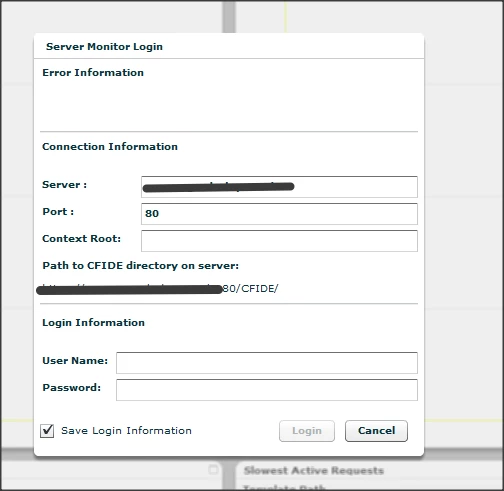
I am not sure if it just is looking in the wrong area for the server monitor, or the issue is due with the account used to set up CF.  ColdFusion is currently running as user "nobody"....which I am sure is not the right way to have this configured.  For login information, I have tried using the Administrator account that we log into the CF Admin page with, but have not had any luck.

Any help to get this resolved would be greatly appreciated

Thanks!

    This topic has been closed for replies.
    Correct answer brg3

    Hi Brian,

    Have you tried changing the Jetty configuration file as mentioned in the below article?

    Refer-"For connections using HTTPS protocol" section under Server monitoring:

    https://helpx.adobe.com/coldfusion/configuring-administering/using-the-coldfusion-server-monitor.html

    Thanks,

    Vikram


    We ended up getting this to work. Turns out port 5500 was blocked at the firewall...ugh.

    Thanks!

    1 reply

    Vikram Kumar M
    Community Manager
    Community Manager
    September 7, 2016

    Hi Brian,

    Are you using any SSL in your environment?

    Thanks,

    Vikram

    brg3Author
    Participant
    September 7, 2016

    Hi Vikram,

    Yes, the actual coldfusion administrator is behind SSL.  I can log into the coldfusion administrator without issue.

    Vikram Kumar M
    Community Manager
    Community Manager
    September 7, 2016

    Hi Brian,

    Have you tried changing the Jetty configuration file as mentioned in the below article?

    Refer-"For connections using HTTPS protocol" section under Server monitoring:

    https://helpx.adobe.com/coldfusion/configuring-administering/using-the-coldfusion-server-monitor.html

    Thanks,

    Vikram