


Known Participant
August 6, 2019
Answered

Edit content with images - save in database then render as a word doc

  • August 6, 2019
  • 1 reply
  • 1707 views

Hi all. I am looking for a solution that will allow me to edit content with images, save in database then render as a word doc. I hav tried serveral editors (tiny MCE, Summernote, etc.) and here is what happens.
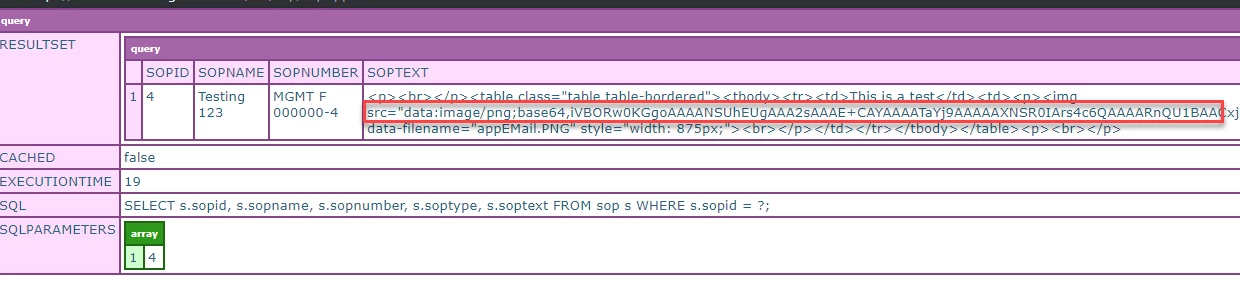
The image is saved along with the content as shown in the CFDUMP above.

When I output this content in a cfm doc, it renders on the page.

But when I save it as a word doc, I get a broken image:

Any ideas of why this is happening?

This topic has been closed for replies.
Correct answer paule12345

The image is part of the soptext value


Have a look at this Stackoverflow discussion:

https://stackoverflow.com/questions/2329897/how-to-display-images-in-word-generated-from-html

It appears that MS Word doesn't support importing inline base64 encoded images from an HTML document.   What you're creating is a block of HTML content, not a native Word doc, so you're relying on Word's HTML import functionality which is limited in what it can handle.

The last post in that discussion referencing the html-docx.js library may be of interest to you.

HTML-DOCX test

1 reply

Charlie Arehart
Community Expert
August 7, 2019

Show us both how you are rendering it on the page, and saving it to the word doc.

/Charlie (troubleshooter, carehart. org)
Known Participant
August 7, 2019

Here is my editor with the image:

Here is how it it saved in the database:

Here is how I am creating the word doc:

And here is the word doc with the broken image:

Community Expert
August 7, 2019

You're not showing the actual code that references the image, in your cfc.sop component.

Dave Watts, Eidolon LLC

Dave Watts, Eidolon LLC