


Known Participant
August 6, 2019
Answered

Edit content with images - save in database then render as a word doc

  • August 6, 2019
  • 1 reply
  • 1707 views

Hi all. I am looking for a solution that will allow me to edit content with images, save in database then render as a word doc. I hav tried serveral editors (tiny MCE, Summernote, etc.) and here is what happens.
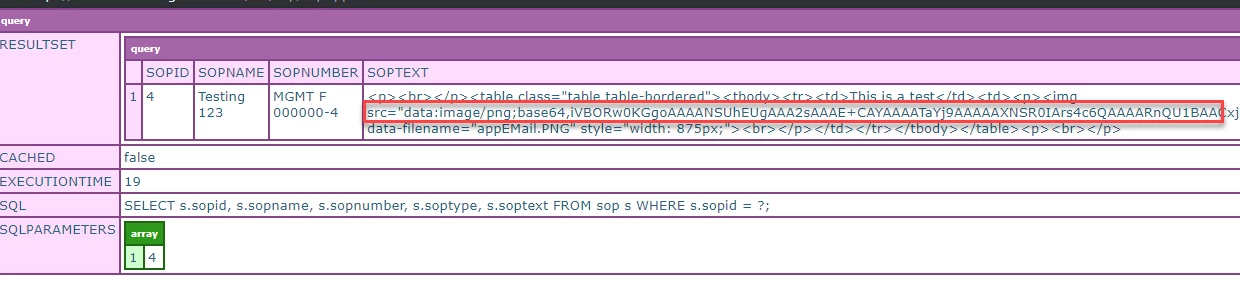
The image is saved along with the content as shown in the CFDUMP above.

When I output this content in a cfm doc, it renders on the page.

But when I save it as a word doc, I get a broken image:

Any ideas of why this is happening?

This topic has been closed for replies.
Correct answer paule12345

The image is part of the soptext value


Have a look at this Stackoverflow discussion:

https://stackoverflow.com/questions/2329897/how-to-display-images-in-word-generated-from-html

It appears that MS Word doesn't support importing inline base64 encoded images from an HTML document.   What you're creating is a block of HTML content, not a native Word doc, so you're relying on Word's HTML import functionality which is limited in what it can handle.

The last post in that discussion referencing the html-docx.js library may be of interest to you.

HTML-DOCX test

1 reply

Charlie Arehart
Community Expert
August 7, 2019

Show us both how you are rendering it on the page, and saving it to the word doc.

/Charlie (troubleshooter, carehart. org)
Known Participant
August 7, 2019

Here is my editor with the image:

Here is how it it saved in the database:

Here is how I am creating the word doc:

And here is the word doc with the broken image:

Inspiring
August 14, 2019

Thanks. That worked for saving the doc on the fly. Now I have to save the word doc and email it.

The image tag is part of my text that is saved in the database:

How can I convert and display the image using Coldfusion?


Check out the ImageReadBase64 tag.    The help doc example code shows how to read the base64 string and then use the cfimage tag to write that out to disk.

ColdFusion Help | ImageReadBase64

or you could use the cfimage action="writeToBrowser" to immediately display it in the browser.