


Inspiring
June 30, 2020
Answered

Getting Sporadic "I/O Exception: peer not authenticated" Error Using CFHTTP

  • June 30, 2020
  • 4 replies
  • 5023 views

Hi all -


I'm running the Developer Edition of CF 2018. I'm doing a POST call to an https URL using CFHTTP:


<cfhttp url="https://www.theremotesite.com" method="post" result="httpResp" timeout="60">
    <cfhttpparam type="header" name="Content-Type" value="application/json" />
    <cfhttpparam type="body" value="#myData#">
</cfhttp>


The call works fine about 75% of the time, but for the other 25%, this comes back:
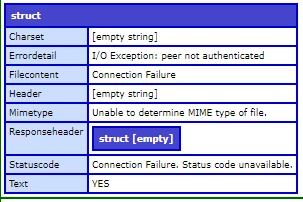
 

The same POST through the Postman app never results in this error.


I am seeing multiple posts on the Web about this problem, but the issues mentioned appear to be constant, not sporadic, and they seem to be related to CF9 and that era.


The solutions mentioned is some of those articles (updating the truststore, updating the JVM, swapping providers, etc) are not in my comfort zone, and I'm hesitant to make changes that will be problematic to back out. Some of thee articles are:


I need to get this issue fixed soon, so if anyone has a soution, I'm all ears, and would be very appreciative to hear it!

This topic has been closed for replies.
Correct answer Charlie Arehart

There are indeed explanations and solutions for that challenge, rimshot,

And easily reverted if needed.


First, about the sporadic nature, I suspect that is not about cf, but rather is likely caused by the fact that the remote site you're  calling has a load balancer, such that calls go to multiple web servers that are not identically configured, and something about one (or more) is configured such that the cfhttp call fails.
 
As for what you need to do, it MAY involve importing certificates, but instead it more likely is simply a need to update the jvm that cf uses.. I discuss that in a post:
 
https://coldfusion.adobe.com/2019/06/error-calling-cf-via-https-solved-updating-jvm/
 
You'll see I quote there the very error you indicate. And yes, I discuss how a jvm update is easily reverted if done correctly, with more detail in another post I point to there.
 
Finally, I want to plead to all reading this thread that if you ever DO decide to try to import certificates "into cf" (which means cf's jvm), it's CRITICAL to note first WHERE that jvm is as indicated in the cf admin. It may NOT be the jre folder in the coldfusion folder, and yet many blogs and technotes (and bkbk's comments here) suggest you import any certs into that. That location is indeed the DEFAULT (when cf is first installed), but if the jvm cf uses HAS been updated (as discussed above), then any cert you import needs to be imported into the lib/cacerts in THAT new jvm folder, or cf won't see it.


But again, the cert import may NOT be needed at all, only the jvm update. I see it in helping people with all this about weekly.


And while it all makes sense when one understands what I'm sharing, I realize that many won't want to have to take it all in. Or they may fear they still don't understand things well enough to do it on their own. For such folks, I'll note that I can do it with them in as little as 15 mins (remotely, via screenshare, on a consulting basis), showing also how easily it can be reverted (on you own, in seconds).


But hopefully you can do what's needed, and find understanding of what's going on, with just the info above. Let us know how it goes, rimshot.

4 replies

Charlie Arehart
Community Expert
July 9, 2020

Great to hear that you may have solved it, rimshot, with that JVM update. (Your reply confirming that is nested within a set of replies, so I thought I would draw the point out here, to make it easier for future readers to see that the problem was solved--or at least, you're waiting to confirm over time if it is so. And if it is, I hope you will mark as "the answer" the first comment where I indicated that.)


BTW, you mention you moved to Java 12. I would not recommend that. I explain why in another blog post (which I link to from the one I pointed to in my first reply). It would be in your interest to see if instead Java 11.0.7 (the latest current Java 11 update) would work. As I explain in the post, Oracle no longer supports Java 12 (or 13 or 14), but they do still support Java 11. See the post for more. The point is, you don't want to be running a Java version that Oracle no longer supports.


Anyway, glad you got the problem solved.

/Charlie (troubleshooter, carehart. org)
Brainiac
November 4, 2022

Just came across this posting.  We're experiencing this exact same sporadic "peer not authenticated" issue when working with PayPal REST services.  We are on CF2021.  We have an update scheduled for CF and the JVM for tonight.  Fingers crossed it solves the issue.

New Participant
December 13, 2022

Did the update fixed the issue?

Community Expert
July 6, 2020

I'd bet that @carehart is almost certainly right about there being a load balancer here, with at least two servers behind it with different configurations. Can you share the URL of the server?


Dave Watts, Eidolon LLC

Dave Watts, Eidolon LLC
Inspiring
July 8, 2020

Dave_Watts - Thanks for the response. Sorry, it's an internal URL, and is inaccessible from outside.

Charlie Arehart
Charlie ArehartCorrect answer
Community Expert
July 6, 2020

There are indeed explanations and solutions for that challenge, rimshot,

And easily reverted if needed.


First, about the sporadic nature, I suspect that is not about cf, but rather is likely caused by the fact that the remote site you're  calling has a load balancer, such that calls go to multiple web servers that are not identically configured, and something about one (or more) is configured such that the cfhttp call fails.
 
As for what you need to do, it MAY involve importing certificates, but instead it more likely is simply a need to update the jvm that cf uses.. I discuss that in a post:
 
https://coldfusion.adobe.com/2019/06/error-calling-cf-via-https-solved-updating-jvm/
 
You'll see I quote there the very error you indicate. And yes, I discuss how a jvm update is easily reverted if done correctly, with more detail in another post I point to there.
 
Finally, I want to plead to all reading this thread that if you ever DO decide to try to import certificates "into cf" (which means cf's jvm), it's CRITICAL to note first WHERE that jvm is as indicated in the cf admin. It may NOT be the jre folder in the coldfusion folder, and yet many blogs and technotes (and bkbk's comments here) suggest you import any certs into that. That location is indeed the DEFAULT (when cf is first installed), but if the jvm cf uses HAS been updated (as discussed above), then any cert you import needs to be imported into the lib/cacerts in THAT new jvm folder, or cf won't see it.


But again, the cert import may NOT be needed at all, only the jvm update. I see it in helping people with all this about weekly.


And while it all makes sense when one understands what I'm sharing, I realize that many won't want to have to take it all in. Or they may fear they still don't understand things well enough to do it on their own. For such folks, I'll note that I can do it with them in as little as 15 mins (remotely, via screenshare, on a consulting basis), showing also how easily it can be reverted (on you own, in seconds).


But hopefully you can do what's needed, and find understanding of what's going on, with just the info above. Let us know how it goes, rimshot.

/Charlie (troubleshooter, carehart. org)
Inspiring
July 9, 2020

Charlie_Arehart - I'm on CF2018 with the latest update (9) so I updated my JVM to 12.0.2 yesterday afternoon. Afterward, I experienced no more "peer not authenticated" connection failures over about 50 cfhttp calls. I did get back two "No such host is known" connection failures, but they may be related to a an issue I'm having with my wi-fi dropping out sporadically. So it seems the JVM update may have solved my issue! I'll keep an eye on it over the next few days and report back. Thanks!

Inspiring
July 28, 2020

Hi, rimshot. How have things turned out, since the jvm update? Did it keep the problems at bay?


Also, did you catch my later observation regarding the Java 12 you had gone to, and why 11 would be better? 


Hi Charlie_Arehart. Once I updated to version 12 there were no more errors over many submissions; however, I saw your note about version 12 early last week and changed it to 11.0.7, then we had issues with our firewall until a few minutes ago, so I haven't been able to test the connection much on 11.0.7. I'll keep an eye on it and report back after it's been through its paces. Thanks!

(P.S. In any case, I think the update of Java showed itself to be a good solution, so I'll mark it as the answer.)

BKBK
Community Expert
July 6, 2020

It indeed looks like a sporadic issue with certificates in ColdFusion's store. What's your operating system?


Just to clarify, by CF2009 you of course mean CF 9. 


Have you downloaded the certificate from the site. If so, then it is a painless exercise to import it into ColdFusion's key store. The following steps come from a recent thread on importing certificates


1) Copy your certificate file to the temp directory, so that its path is something like:
c:\temp\certificate_file.cer (assuming you're on Windows)

2) Open the DOS Command (CMD) Prompt as Administrator;
Use the CD command to navigate to C:/ColdFusion2018/jre/bin;

(I have assumed your ColdFusion installation directory is C:/ColdFusion2018)

Run the DOS command keytool /?

You will see that importcert is the flag for importing certificates.

3) Run the DOS command:

keytool -importcert -storepass changeit -noprompt -alias your_unique_chosen_name -keystore C:/ColdFusion2018/jre/lib/security/cacerts -trustcacerts -file C:/temp/certificate_file.cer

(I have assumed your ColdFusion installation directory is C:/ColdFusion2018 and that the file name is certificate_file.cer)

4) Restart ColdFusion.


Inspiring
July 8, 2020

BKBK - Yes, thanks. CF9 is what I meant. I've updated my original post.


Thanks. I will definitely try the certificate key store steps in whatever priority order the responses here indicate might be best. If a cert is missing in the store, though, I can't help but wonder why ity would work some of the time.

BKBK
Community Expert
July 8, 2020

Rimshot: "If a cert is missing in the store, though, I can't help but wonder why ity would work some of the time."

Then Charlie_Arehart's will be a more likely explanation. The Webmaster or Server Admin could provide you all the certificates you need.