


Inspiring
September 1, 2014
Answered

How to Set up HTTPOnly and SECURE FLAG for session cookies

  • September 1, 2014
  • 2 replies
  • 24650 views

Hi All,

To fix some vulnerability issues (found in the ethical hacking , penetration testing) I need to set up the session cookies (CFID , CFTOKEN , JSESSIONID) with "HTTPOnly" (so not to access by other non HTTP APIs like Javascript). Also I need to set up a "secure flag" for those session cookies.

I have found the below solutions.

For setting up the HTTPOnly for the session cookies.

1] In application.cfc we can do this by using the below code. Or we can do this in CF admin side under Server Settings » Memory Variables

     this.sessioncookie.httponly = true;

For setting up the secure flag for the session cookies.

2] In application.cfc we can do this by using the below code. Or we can do this in CF admin side under Server Settings » Memory Variables

     this.sessioncookie.secure = "true"

Here my question is how we can do the same thing in Application.cfm?. (I am using ColdFusion version 10). I know we can do this using the below code , incase of HTTPOnly (for example).

<cfapplication setclientcookies="false" sessionmanagement="true" name="test">

<cfif NOT IsDefined("cookie.cfid") OR NOT IsDefined("cookie.cftoken") OR cookie.cftoken IS NOT session.CFToken>

  <cfheader name="Set-Cookie" value="CFID=#session.CFID#;path=/;HTTPOnly">

  <cfheader name="Set-Cookie" value="CFTOKEN=#session.CFTOKEN#;path=/;HTTPOnly">

</cfif>

But in the above code "setclientcookies" has been set to "false". In my application (it is an existing application) this has already been set to "true". If I change this to "false" as mentioned in the above code then ColdFusion will not automatically send CFID and CFTOKEN cookies to client browser and we need to manually code CFID and CFTOKEN on the URL for every page that uses Session. Right???. And this will be headache.Right???. Or any other way to do this.

Your timely help is well appreciated.

Thanks in advance.
This topic has been closed for replies.
Correct answer BKBK

I tried the same thing. But still its not changing. I cleared all the browsing data and cookies and restarted the instance again.

The only difference between me and you is I am working on UNIX environment. So does this make any difference. I am not understanding.

Note :  I am modifying the file - /opt/coldfusion/cfusion/runtime/conf/web.xml. Can you just tell me the file (including path) you are modifying in windows , just to know.

As Steve Sommers posted - "Question for you: Are you doing this exercise as the result of a PCI vulnerability scan? If so, the scanner is going to complain about predictable CFIDs. This will be the case even if you configure CF to use UUIDs for session tokens (trust me, even though you can prove CFID and CFTOKEN work together, the scanners don't care and you have to appeal every quarter -- a pain). Instead, I recommend you use the "Use J2EE session variables" option. Making the JSession token secure and httponly requires two modifications -- one in the JVM config string in the CF Administrator, the other in an xml config file within the Java directory. Google "coldfusion jsession secure httponly" -- it's worth it."  Do I need to make any modifications in the JVM config string in the CF Administrator as well apart from what we did in web.xml??? .... I was just thinking .....


As I said earlier, the file I modified was {CF_INSTALLATION}\cfusion\runtime\conf\web.xml. That translates on Windows as C:\ColdFusion11\cfusion\runtime\conf\web.xml.

Apparently, there might be another difference between your system and mine. I have just one instance. If you have 2 or more instances, it might be that the file you have to modify is \WEB-INF\web.xml within the directory of the particular instance. These are servlet configuration settings which you can safely test (after backing up your files, of course).

2 replies

Brainiac
September 2, 2014

Question for you: Are you doing this exercise as the result of a PCI vulnerability scan? If so, the scanner is going to complain about predictable CFIDs. This will be the case even if you configure CF to use UUIDs for session tokens (trust me, even though you can prove CFID and CFTOKEN work together, the scanners don't care and you have to appeal every quarter -- a pain). Instead, I recommend you use the "Use J2EE session variables" option. Making the JSession token secure and httponly requires two modifications -- one in the JVM config string in the CF Administrator, the other in an xml config file within the Java directory. Google "coldfusion jsession secure httponly" -- it's worth it.

Inspiring
September 3, 2014

Yes steve I am doing this as a result of PCI vulnerability scan.

Steve Sommers wrote:

Question for you: Are you doing this exercise as the result of a PCI vulnerability scan? If so, the scanner is going to complain about predictable CFIDs. This will be the case even if you configure CF to use UUIDs for session tokens (trust me, even though you can prove CFID and CFTOKEN work together, the scanners don't care and you have to appeal every quarter -- a pain). Instead, I recommend you use the "Use J2EE session variables" option. Making the JSession token secure and httponly requires two modifications -- one in the JVM config string in the CF Administrator, the other in an xml config file within the Java directory. Google "coldfusion jsession secure httponly" -- it's worth it.

Sorry, I couldnt undestand the sentence that I have marked as bold and italic,above. Could you please elaborate it in simple words.

Also I would like to inform you that when I checked CF Admin->Server Settings->Memory Variables I found that J2EE SESSION has been set to YES. So does this mean that do we need to set HTTPOnly and SECURE flag for JSESSIONID only or for CF session cookies (CFID AND CFTOKEN ) as well . In the scanning report they have mentioned to set HTTPOnly and SECURE flag for SESSION COOKIES (I think this includes both CF SESSION COOKIES and JSESSIONID). But I think that I need to set those flags only for JSESSIONID (as J2EE SESSION is enabled in CF Admin) and not for CFID and CFTOKEN. Please have your inputs on this.


BKBK
BKBKCorrect answer
Community Expert
September 8, 2014

I tried the same thing. But still its not changing. I cleared all the browsing data and cookies and restarted the instance again.

The only difference between me and you is I am working on UNIX environment. So does this make any difference. I am not understanding.

Note :  I am modifying the file - /opt/coldfusion/cfusion/runtime/conf/web.xml. Can you just tell me the file (including path) you are modifying in windows , just to know.

As Steve Sommers posted - "Question for you: Are you doing this exercise as the result of a PCI vulnerability scan? If so, the scanner is going to complain about predictable CFIDs. This will be the case even if you configure CF to use UUIDs for session tokens (trust me, even though you can prove CFID and CFTOKEN work together, the scanners don't care and you have to appeal every quarter -- a pain). Instead, I recommend you use the "Use J2EE session variables" option. Making the JSession token secure and httponly requires two modifications -- one in the JVM config string in the CF Administrator, the other in an xml config file within the Java directory. Google "coldfusion jsession secure httponly" -- it's worth it."  Do I need to make any modifications in the JVM config string in the CF Administrator as well apart from what we did in web.xml??? .... I was just thinking .....


As I said earlier, the file I modified was {CF_INSTALLATION}\cfusion\runtime\conf\web.xml. That translates on Windows as C:\ColdFusion11\cfusion\runtime\conf\web.xml.

Apparently, there might be another difference between your system and mine. I have just one instance. If you have 2 or more instances, it might be that the file you have to modify is \WEB-INF\web.xml within the directory of the particular instance. These are servlet configuration settings which you can safely test (after backing up your files, of course).

BKBK
Community Expert
September 2, 2014

Abdul L Koyappayil wrote:

Here my question is how we can do the same thing in Application.cfm?. (I am using ColdFusion version 10).

You can do it in the Coldfusion Administrator. Navigate to the Memory Variables page. Tick the checkbox HTTPOnly. Click on the button to Submit Changes.

Inspiring
September 2, 2014

Hi BKBK,

Thanks for your comments.

I understood ,you answered to the question. But I have few questions here.

1]We dont have access to check this in CF Admin->Server Settings->Memory Variables. Any way This is a server level side solution and it may impact other applications in the same instance as well.Right?? But I think the impact is not a negative impact as we are just securing the session cookies.Right???

2]To do this via code , In Application.cfm (not using Application.cfc as our application is existing and old one) I created a structure with the required properties and passed this to the "sessioncookie" attribute in "cfapplication" tag as below.

  <cfset cf_ssn_cookies = {httponly='true', secure='true'}>

  <cfapplication name="mer_auth_lookup" sessionmanagement="yes" setclientcookies="yes" sessioncookie=#cf_ssn_cookies# >

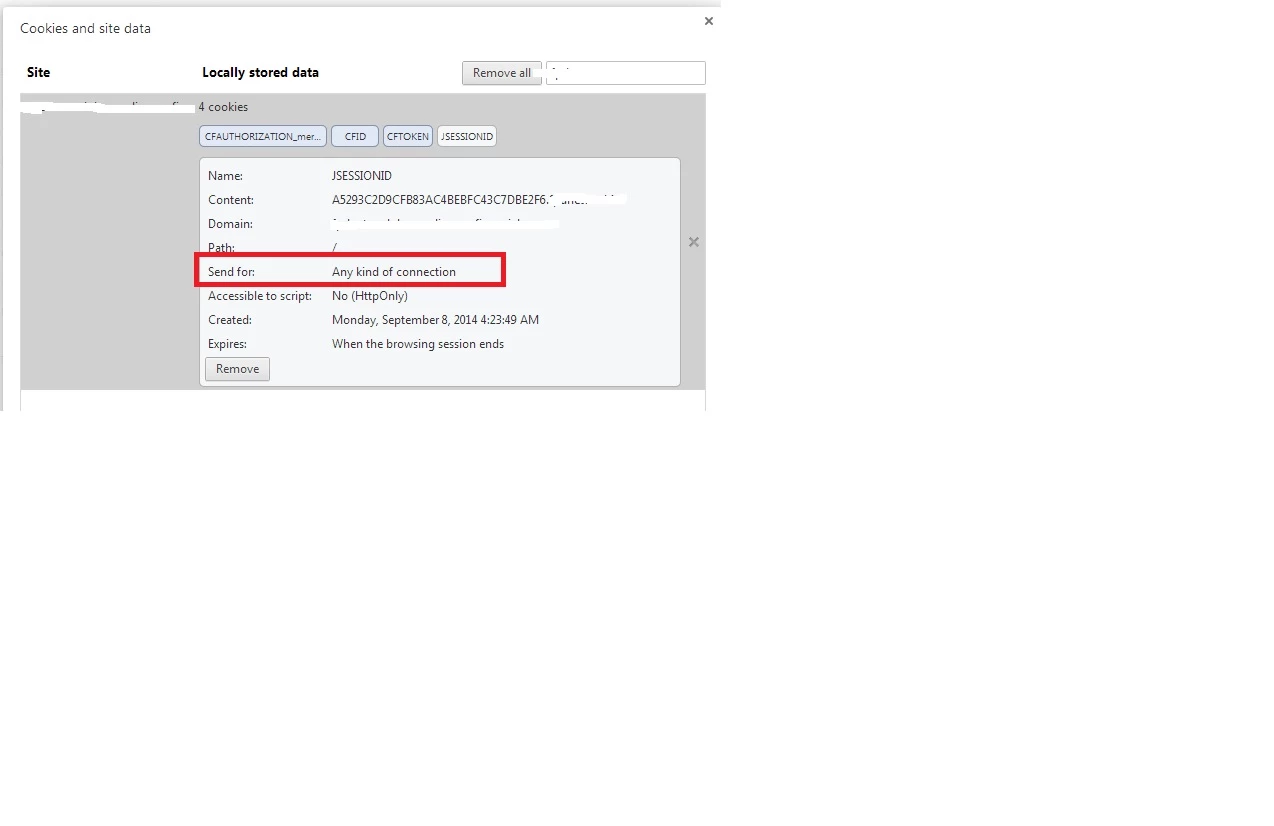
But it seems to be not working when I checked using chrome developer tools where I found empty values for the columns HTTP and SECURE as in the attached screen shot.

Here Could you pls tell me the method I followed to set HTTPOnly and Secure flag for the session cookies is correct or not. If it is correct plese let me know whether I am following correct steps using chrome web developer tool to check whether session cookies has been set with HTTPOnly and SECURE flag .

And If I am following correct steps to test why it is not working when checking in chrome developer tools.

BKBK
Community Expert
September 2, 2014

Using cfapplication's sessioncookie attribute is fine, too. For completeness, use something like

<cfset cf_ssn_cookies = {httponly='true', secure='true'}>

  <cfapplication name="mer_auth_lookup" sessionmanagement="yes" sessiontimeout="#createtimespan(0,0,30,0)#" setclientcookies="yes" sessioncookie="#cf_ssn_cookies#" >