


New Participant
February 26, 2010
Question

"This file does not have a program associated with it" (trouble installing)

  • February 26, 2010
  • 1 reply
  • 892 views

Hi. I need to install ColdFusion onto my computer, but once I get through the first step, I get this popup (note, I have uninstalled 8 and have installed the CF 9 Developer edition).

I take it that it doesn't recognize how to open ".cfm" files? I go into my Control Panel and try using different programs, such as IE or FireFox, but I still get this message whenever I go to CF in the Start menu and select "Getting started..." or "Administrator".
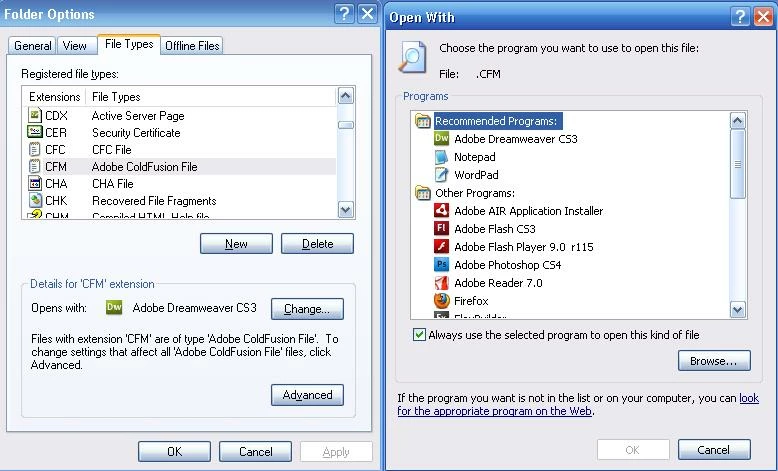
Any help would be appreciated, thanks!

-Reed

    This topic has been closed for replies.

    1 reply

    Inspiring
    February 26, 2010

    It looks to me like the web server connector failed (which it does, sometimes), so the web server doesn't know what to do with CFM requests (ie: pass them to CF for processing), so instead just returns the file to the browser.

    Run wsconfig, delete any connection it suggests it has, and add the connection back again.

    wsconfig should be in your [JRun]/bin dir, or... I think [ColdFusion]/runtime/bin dir, depending on whether you're running multi-server or stand-alone CF.

    --

    Adam

    New Participant
    February 26, 2010

    Hm, well I just pasted the "administrator.cfm" link into Firefox and this finally popped up. It's taking a bit to load, but I'm hoping this will work.

    Inspiring
    February 27, 2010

    Well that's what you want to see.  Looks like it's working OK.  I wouldn't worry too much about the links in your start menu.  Just bookmark the CFAdmin page in your browser.

    --

    Adam