


June 30, 2010
Answered

Scheduled tasks not running

  • June 30, 2010
  • 1 reply
  • 1502 views

I am running CF 9 on 2003 server.

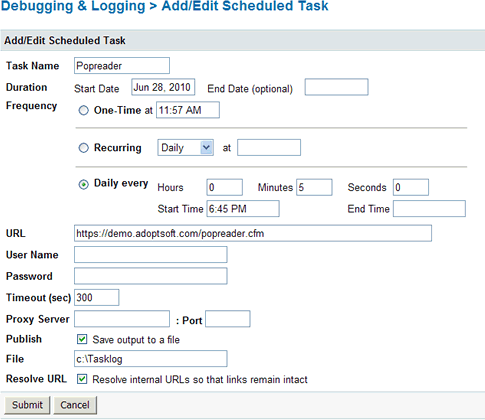
My scheduled tasks do not seem to run when scheduled. Sometimes they run a couple times, then they stop again. I only know they ran because of the entries in the log file. The task runs fine if i amually run it from the scheduled tasks page.

Is there any other way to know if a scheduled task is running except for the log file?

what could be causing this.
    This topic has been closed for replies.
    Correct answer

    In the administrator.


    This sounds like it could be a permissions issue. I have always had problems with scheduled tasks connecting to an HTTPS (SSL) url.  Have you tried running the scheduled task from an unsecured location?  You may also want to try creating a local service account that CF can use in order to log in over the SSL connection.

    1 reply

    ilssac
    Inspiring
    June 30, 2010

    At the bottom of the Schedule Task Form, check the "Save output to a file" box and fill in the "File" field with a file path and file name.

    The task will then save whatever output is generated by the task to a file.

    This can often give good hints when it is some network or web server issue causing the failures.

    HTH

    Ian

    June 30, 2010

    Thanks for the quick reply.

    I already did that. It doesn't produce anything because it doesn't run.

    tclaremont
    Inspiring
    June 30, 2010

    Did you create the task using CFSCHEDULE or in the administrator?