


Inspiring
March 27, 2016
Answered

SpreadsheetFormatColumns Not working What's going wrong?

  • March 27, 2016
  • 1 reply
  • 2085 views

Server: CF10

Platform: Windows and Linux (Win in DEV windows in PROD)

So I'm generating this awesome excel file for a client but having trouble getting date fields to behave properly. Everything else seems to work just fine but when I send the data to excel to be generated, excel treats it as just text and when this filed gets sorted it handles it as such.

More info: The column I'm trying to configure is called Arrival Date it is arriving formatted as mm/dd/yyyy (I have tried to format is as m/d/yy but when it arrives in the sheet that doesn't work as well)

I'm also including an image of the sorted row. It does think its a valid but just doesn't sort it in chronological order.
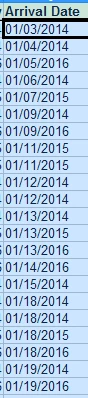
Code:

<cfset filename = expandPath("./TDYData_(#DateFormat(now(),'mmddyy')#).xls")>

<!--- Make a spreadsheet object --->

<cfset s = spreadsheetNew("TDYData")>

<!--- Add header row --->

<cfset spreadsheetAddRow(s, "TDY Phase,Full Name,Employment Category,Gender,Originating Agency,Agency Comments,Originating Office,Office Comments,Originating Country,TDY Request Received,Mission Office Supported,Type of TDY Support,eCC Submission,eCC Approval,eCC Point of Contact,Date of Departure from Originating Country,Arrival Date,Departure Date,Accomodation Type,Accomodation Comments,Assigned Desk,Local Mobile Number,TDY Comments")>

<!--- format header --->

<cfset spreadsheetFormatRow(s,

{

bold=true,

fgcolor="lemon_chiffon",

fontsize=10

},

1)>

<!--- Add query --->

<cfset spreadsheetAddRows(s, myExcel)>

<cfset SpreadSheetAddFreezePane(s,0,1)>

<cfset spreadsheetFormatColumn(s, {dataformat="m/d/yy"}, 17) />

<cfset spreadsheetFormatColumn(s, {alignment="right"}, 16) />

<cfheader name="content-disposition" value="attachment; filename=TDY_Data_(#DateFormat(now(),'mmddyy')#).xls">

<cfcontent type="application/msexcel" variable="#spreadsheetReadBinary(s)#" reset="true">

Any ideas?

Thanks

This topic has been closed for replies.
Correct answer WolfShade

I believe the issue is because you're not using SpreadsheetSetCellValue() to enter data.  It will respect your dataFormat.

It's kind of a pain to manually enter (via cfoutput or cfloop) data into the cells, but it does give you more granular control over things like formatting and such.

Also, if you're using integers (and only integers) in any cells, it will appear as though that gets inserted as text, too.  You have to set the dataformat, insert the data, then set the dataformat, again.  Weird, I know, but it works.

HTH,

^_^

1 reply

WolfShade
WolfShadeCorrect answer
Brainiac
March 28, 2016

I believe the issue is because you're not using SpreadsheetSetCellValue() to enter data.  It will respect your dataFormat.

It's kind of a pain to manually enter (via cfoutput or cfloop) data into the cells, but it does give you more granular control over things like formatting and such.

Also, if you're using integers (and only integers) in any cells, it will appear as though that gets inserted as text, too.  You have to set the dataformat, insert the data, then set the dataformat, again.  Weird, I know, but it works.

HTH,

^_^

Inspiring
March 28, 2016

WolfShade,

Thanks for answering. I would love to test this out but I guess I am confused at to where the dataformat will stick. There is no place in SpreadsheetSetCellValue to set dataformat. Or will it respect it in the spreadsheetFormatColumn that is being set?

Also, it does sound like a pain to do this but I could generate the whole spreadsheet then go back and reset the values for that one column through the entire spreadsheet before exporting it.

Do you have an quick example to show me what you mean? I just need to get started.

Thanks

Inspiring
March 28, 2016

Hi, mwoods1971‌,

As long as you use SpreadsheetAddRow() to insert column headers and data from a query, your date format will be essentially ignored and the dates will be entered as "General", which is what is throwing off your sorting.

I find that using CFSCRIPT and manually looping the query to insert the data is tedious and time-consuming, but worth the effort.  I had posted a URL in one of Raymond Camden's blog posts that linked to a code repo I created that outlined exactly what I did.  I'll see if I can find it.  Barring that, I can try to make another one.

BRB,

^_^

UPDATE:  Okay.. apparently when I deleted my Disqus account (because it's a STUPID service that really doesn't work), it deleted every comment I've ever made.  So.. that link to the code repo is lost.  I'll try to get another one set up and post the link, here.


Thanks I'll be sure to try it.

I have added this:

    <cfset spreadsheetFormatColumn(s, {dataformat="m/d/yy"}, 13) />
    <cfset spreadsheetFormatColumn(s, {dataformat="m/d/yy"}, 14) />
    <cfset spreadsheetFormatColumn(s, {dataformat="m/d/yy"}, 16) />
    <cfset spreadsheetFormatColumn(s, {dataformat="m/d/yy"}, 17) />
    <cfset spreadsheetFormatColumn(s, {dataformat="m/d/yy"}, 18) />   
    <cfset spreadsheetFormatColumn(s, {alignment="right"}, 16) />

<cfset therow = 0>

<cfoutput query="myExcel" startrow="1">

  <cfset therow = myExcel.currentrow + 1>

  <cfset SpreadsheetSetCellValue(s, DateArrive, therow, 17)>

</cfoutput>

So my idea was to loop back over the original query and rewrite using the date value and inserting it back into the cell.

I found something along the way that someone else had done that had a similar problem:

Forcing values to be inserted into spreadsheets as text | cfSimplicity

So, I'm guessing if we do it the manual way, I would have to do a SpreadsheetSetCellValue to enter in my column headers, then loop over the query to insert the data cell by cell.

But, if I do that will it automatically create a new row in the spreadsheet every time?