Participating Frequently
September 19, 2024
Answered

Strange problem with a included .cfc file

  • September 19, 2024
  • 2 replies
  • 1788 views

Recently I upgraded to CF2023 version. I observed a strange behaviour with a .cfc file that is included in one of the .cfml files using cfinclude tag. When I run that CFML file, it displays form as well as the contenet of the .cfc page on the top of the page. Please see the attached screenshot for the same. I dont see this issue in CF2016. Does the CF2023 not support .cfc files? Can some help me in this please?  

This topic has been closed for replies.
Correct answer BKBK

There is no need to use cfinclude. The function createobject has the path to the cfc, so ColdFusion can find it. Here zip.cfc is apparently in the same directory as the CFM file. So you can just use

<cfscript>
// creating an instance of the component with relative path zip.cfc
zipper = createObject("component", "zip");

//calling createZip function that is defined in zip.cfc
zipper.createZip(srcAttachmentToZip,destZippedAttachment); 
</cfscript>


 However, it is usually recommended in software development to put CFC files in a directory separate from CFM files. So, create a directory called, for example, appCfc, within the current directory. Then move the file zip.cfc into it. You should then replace the above code with:

<cfscript>
// creating instance of component with relative path appCFC/zip.cfc
zipper = createObject("component", "appCfc.zip");

//calling createZip function that is defined in appCFC/zip.cfc
zipper.createZip(srcAttachmentToZip,destZippedAttachment); 
</cfscript>

Hi @revatic4487012 ,

I have tested your code. I am glad to tell you that my test succeeded. 

The test files and directory-structure are as follows: zipApp (a directory) contains appCfc (a subdirectory) and the files  sample.txt and test.cfm. The subdirectory appCfc contains the file zip.cfc.
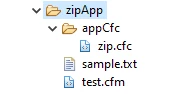
The file sample.txt is just a text file containing random text.

The file test.cfm contains the code:


 <cfset zipper=createobject("component","appCfc.zip")>
 <cfset zipper.createzip("#expandPath('sample.txt')#","#expandPath('packedFile.zip')#")> 
 Zip action succeeded


The file zip.cfc contains the code


<cfcomponent displayname="Zip" hint="Function for handling zip files">
	
	<cffunction name="createZip" access="public"  hint="Adds any number of files to a zip file">
		<cfargument name="srcFileNames" type="string" required="true" hint="Absolute Path to the file. May contain multiple files seperated by a comma">
		<cfargument name="destZipName" type="string" required="true" hint="The absolute path of the destination ZIP file">
		
		<cfscript>
		//make a fileOutputStream object to put the ZipOutputStream into
		var output = createObject("java","java.io.FileOutputStream").init(destZipName);
		
		//make a ZipOutputStream object to create the zip file
		var zipOutput = createObject("java","java.util.zip.ZipOutputStream").init(output);
		
		//make a byte array to use when creating the zip
		//yes, this is a bit of hack, but it works
		var byteArray = repeatString(" ",1024).getBytes();
		
		//we'll need to create an inputStream below for writing out to the zip file
		var input = "";
		
		//we'll be making zipEntries below, so make a variable to hold them
		var zipEntry = "";
		var zipEntryPath = "";
		
		//we'll use this while reading each file
		var len = 0;
		
		//a var for looping below
		var ii = 1;
		
		//a an array of the files we'll put into the zip
		var fileArray = arrayNew(1);
		
		//add files to file array object
		fileArray = listToArray(arguments.srcFileNames);
		
		//
		// And now, on to the zip file
		//
		//let's use the maximum compression
		zipOutput.setLevel(9);
		
		//loop over the array of files we are going to zip, adding each to the zipOutput
		for(ii = 1; ii LTE arrayLen(fileArray); ii = ii + 1){
			//make a fileInputStream object to read the file into
			input = createObject("java","java.io.FileInputStream").init(fileArray[ii]);
			
			//make an entry for this file
			zipEntryPath = listLast(fileArray[ii],"\");
			zipEntry = createObject("java","java.util.zip.ZipEntry").init(zipEntryPath);
			
			//put the entry into the zipOutput stream
			zipOutput.putNextEntry(zipEntry);
			
			// Transfer bytes from the file to the ZIP file
			len = input.read(byteArray);
			while (len GT 0) {
				zipOutput.write(byteArray, 0, len);
				len = input.read(byteArray);
			}
			
			//close out this entry
			zipOutput.closeEntry();
			input.close();
		}
		
		//close the zipOutput
		zipOutput.close();
		
		</cfscript>
		
	</cffunction>
	
	<cffunction name="unzip" access="public" hint="Unzips a file to a specfied location">
		<cfargument name="zipFilePath" type="string" required="Yes" hint="Path to zip file">
		<cfargument name="outputPath" type="string" required="Yes" hint="Ouput path">
		<cfscript>
		/**
		* Unzips a file to the specified directory.
		* 
		* @Param zipFilePath Path to the zip file (Required)
		* @Param outputPath Path where the unzipped file(s) should go (Required)
		* @Return void 
		* @author Samuel Neff (sam@serndesign.com) 
		* @version 1, September 1, 2003 
		*/
		 
		var zipFile = ""; // ZipFile
		var entries = ""; // Enumeration of ZipEntry
		var entry = ""; // ZipEntry
		var fil = ""; //File
		var inStream = "";
		var filOutStream = "";
		var bufOutStream = "";
		var nm = "";
		var pth = "";
		var lenPth = "";
		var buffer = "";
		var l = 0;
		     
		zipFile = createObject("java", "java.util.zip.ZipFile");
		zipFile.init(zipFilePath);
		entries = zipFile.entries();
		
		while(entries.hasMoreElements()) {
			entry = entries.nextElement();
			if(NOT entry.isDirectory()) {
				nm = entry.getName(); 
				lenPth = len(nm) - len(getFileFromPath(nm));
				if (lenPth) {
					pth = outputPath & left(nm, lenPth);
				} else {
					pth = outputPath;
				}
				if (NOT directoryExists(pth)) {
					fil = createObject("java", "java.io.File");
					fil.init(pth);
					fil.mkdirs();
				}
				filOutStream = createObject("java", "java.io.FileOutputStream");
				filOutStream.init(outputPath & nm);
				bufOutStream = createObject("java","java.io.BufferedOutputStream");
				bufOutStream.init(filOutStream);
				inStream = zipFile.getInputStream(entry);
				buffer = repeatString(" ",1024).getBytes(); 
				l = inStream.read(buffer);
				while(l GTE 0) {
					bufOutStream.write(buffer, 0, l);
					l = inStream.read(buffer);
				}
				inStream.close();
				bufOutStream.close();
			}
		}
		
		zipFile.close();
		
		</cfscript>
		
	</cffunction>
</cfcomponent>


When I run test.cfm, ColdFusion creates packedFile.zip within the same directory.

2 replies

BKBK
Community Expert
Community Expert
September 19, 2024

ColdFusion 2023 does support CFCs. In this case, ColdFusion is being lenient. I actually expected that you would get an error. That is because you may not include a CFC within a CFM page.


You are lucky that you get that problem now. Solving it will save you a lot of headache in future. 

In short, remove the statement <cfinclude template="zip.cfc" /> from the CFM file..


Tell us what you want to do with the CFC within the CFM, and you will receive suggestions. To start with, here are three ways to gain access to a CFC within a CFM page:


<cfset zipCFC = new path.to.CFC()>
<cfinvoke component="path.to.CFC" method="someMethod" returnvariable="result">
    <cfinvokeargument name="arg1" value="value1">
</cfinvoke>
<cfset zipCFC = createObject("component", "path.to.CFC")>


Participating Frequently
September 20, 2024

Thank you BKBK.


i woud like to call the createZip funtion in cfm file. createZip function defined in the zip.cfc

zip.cfc:

  1. <cfcomponent displayname="Zip">
  2. <cffunction name="createZip" access="public">
  3. .
  4. .
  5. </cffunction >
  6. <cffunction name="unzip" access="public">
  7. .
  8. .
  9. </cffunction>
  10. </cfcomponent>


I am calling the createZip function in my cfm as shown below. But the cfinclude statement dispalyning the content of the zip.cfc file. All the script content is getting displayed on the page. 

  1. <cfinclude template="zip.cfc" />
  2. <cfscript>
  3. zipper = createObject("component", "zip");
  4. zipper.createZip(srcAttachmentToZip,destZippedAttachment); //calling createZip function that is defined in zip.cfc
  5. </cfscript>


Please help here.

BKBK
Community Expert
Community Expert
September 20, 2024

There is no need to use cfinclude. The function createobject has the path to the cfc, so ColdFusion can find it. Here zip.cfc is apparently in the same directory as the CFM file. So you can just use

<cfscript>
// creating an instance of the component with relative path zip.cfc
zipper = createObject("component", "zip");

//calling createZip function that is defined in zip.cfc
zipper.createZip(srcAttachmentToZip,destZippedAttachment); 
</cfscript>


 However, it is usually recommended in software development to put CFC files in a directory separate from CFM files. So, create a directory called, for example, appCfc, within the current directory. Then move the file zip.cfc into it. You should then replace the above code with:

<cfscript>
// creating instance of component with relative path appCFC/zip.cfc
zipper = createObject("component", "appCfc.zip");

//calling createZip function that is defined in appCFC/zip.cfc
zipper.createZip(srcAttachmentToZip,destZippedAttachment); 
</cfscript>
Legend
September 19, 2024

Can you show us the code of the CFM and the CFC files?

Participating Frequently
September 19, 2024

The CFM file is a large file. I posted here the portion of it. hope that it is fine. this is the include statement <cfinclude template="zip.cfc" />. please see below.


The portion of the cfm code:
============================
<!--- First make sure that the user uploaded attachments   --->
<cfif #isDefined("form.vFilesCount")# AND #form.vFilesCount# neq "">
  <!--- Creating the directory if not existed:Check that the directory exists to avoid getting a Coldfusion error message. --->
  <cfset currentDirectory = "C:\Webs\MV\non_extended\buildteam\WorkItemAttachments\newDir">
  <!--- Check to see if the Directory exists --->
  <cfif DirectoryExists(#currentDirectory#)>
    <!---<cfoutput><p>The directory existed with the Name: #newDirectory#</p></cfoutput>--->
    <cfelse>
    <!--- If FALSE then create the directory --->
    <cfdirectory action = "create" directory = "#currentDirectory#" >
    <!---<cfoutput><p>Your directory has been created.</p></cfoutput>--->
  </cfif>
  <!---include the zip.cfc to convert files which are not suppoted by server to zip files--->
  <cfinclude template="zip.cfc" />
  <cfloop from="1" to="#form.vFilesCount#" step="1" index="i" >
    <!--- first actually upload the file --->
    <cfset FileExtPermited=0>
    <cfset vfileloaded=0>
    <cfif #isDefined("form.attachment#i#")# AND #form["attachment" & i]# neq "" >
      <cftry>
        <cffile action="upload" 
        filefield="attachment#i#"
             destination="#currentDirectory#\"
             nameconflict="Makeunique"  >
.
.
.
 
cfc file:
=========
<cfcomponent displayname="Zip" hint="Function for handling zip files">
<cffunction name="createZip" access="public"  hint="Adds any number of files to a zip file">
<cfargument name="srcFileNames" type="string" required="true" hint="Absolute Path to the file. May contain multiple files seperated by a comma">
<cfargument name="destZipName" type="string" required="true" hint="The absolute path of the destination ZIP file">
<cfscript>
//make a fileOutputStream object to put the ZipOutputStream into
var output = createObject("java","java.io.FileOutputStream").init(destZipName);
//make a ZipOutputStream object to create the zip file
var zipOutput = createObject("java","java.util.zip.ZipOutputStream").init(output);
//make a byte array to use when creating the zip
//yes, this is a bit of hack, but it works
var byteArray = repeatString(" ",1024).getBytes();
//we'll need to create an inputStream below for writing out to the zip file
var input = "";
//we'll be making zipEntries below, so make a variable to hold them
var zipEntry = "";
var zipEntryPath = "";
//we'll use this while reading each file
var len = 0;
//a var for looping below
var ii = 1;
//a an array of the files we'll put into the zip
var fileArray = arrayNew(1);
//add files to file array object
fileArray = listToArray(arguments.srcFileNames);
//
// And now, on to the zip file
//
//let's use the maximum compression
zipOutput.setLevel(9);
//loop over the array of files we are going to zip, adding each to the zipOutput
for(ii = 1; ii LTE arrayLen(fileArray); ii = ii + 1){
//make a fileInputStream object to read the file into
input = createObject("java","java.io.FileInputStream").init(fileArray[ii]);
//make an entry for this file
zipEntryPath = listLast(fileArray[ii],"\");
zipEntry = createObject("java","java.util.zip.ZipEntry").init(zipEntryPath);
//put the entry into the zipOutput stream
zipOutput.putNextEntry(zipEntry);
// Transfer bytes from the file to the ZIP file
len = input.read(byteArray);
while (len GT 0) {
zipOutput.write(byteArray, 0, len);
len = input.read(byteArray);
}
//close out this entry
zipOutput.closeEntry();
input.close();
}
//close the zipOutput
zipOutput.close();
</cfscript>
</cffunction>
<cffunction name="unzip" access="public" hint="Unzips a file to a specfied location">
<cfargument name="zipFilePath" type="string" required="Yes" hint="Path to zip file">
<cfargument name="outputPath" type="string" required="Yes" hint="Ouput path">
<cfscript>
/**
* Unzips a file to the specified directory.
* @9397041 zipFilePath Path to the zip file (Required)
* @9397041 outputPath Path where the unzipped file(s) should go (Required)
* @Return void 
* @7111211 Samuel Neff (sam@serndesign.com) 
* @version 1, September 1, 2003 
*/
 
var zipFile = ""; // ZipFile
var entries = ""; // Enumeration of ZipEntry
var entry = ""; // ZipEntry
var fil = ""; //File
var inStream = "";
var filOutStream = "";
var bufOutStream = "";
var nm = "";
var pth = "";
var lenPth = "";
var buffer = "";
var l = 0;
     
zipFile = createObject("java", "java.util.zip.ZipFile");
zipFile.init(zipFilePath);
entries = zipFile.entries();
while(entries.hasMoreElements()) {
entry = entries.nextElement();
if(NOT entry.isDirectory()) {
nm = entry.getName(); 
lenPth = len(nm) - len(getFileFromPath(nm));
if (lenPth) {
pth = outputPath & left(nm, lenPth);
} else {
pth = outputPath;
}
if (NOT directoryExists(pth)) {
fil = createObject("java", "java.io.File");
fil.init(pth);
fil.mkdirs();
}
filOutStream = createObject("java", "java.io.FileOutputStream");
filOutStream.init(outputPath & nm);
bufOutStream = createObject(
"java", 
"java.io.BufferedOutputStream");
bufOutStream.init(filOutStream);
inStream = zipFile.getInputStream(entry);
buffer = repeatString(" ",1024).getBytes(); 
l = inStream.read(buffer);
while(l GTE 0) {
bufOutStream.write(buffer, 0, l);
l = inStream.read(buffer);
}
inStream.close();
bufOutStream.close();
}
}
zipFile.close();
</cfscript>
</cffunction>
</cfcomponent>
Legend
September 19, 2024

Try adding output="false" to the function tags in the CFC.

