Participating Frequently
May 29, 2020
Answered

Convert RGB ->CMYK and CMYK->RGB

  • May 29, 2020
  • 7 replies
  • 5146 views

Hi!

I have some problem.

PS Color profile = Adobe RGB (1998). Color mode=RGB.

I set the black color R1 G1 B1 and in accordance with CMYK, so I get C91 M79 Y62 K97. But if I first enter the same code in CMYK I get R5 G5 B5. Now if I ask the RGB color R5 G5 B5 in Smuk I will be shown again another code C91 M78 Y62 K97 Why is this happening? How to understand which RGB code in CMYK best matches the code. Are there colors that translate back and forth and give the same code values?

Thank you.
This topic has been closed for replies.
Correct answer rob day

Most of what you are seeing is a rounding error when the Info panel is set to 8-bit. In 8-bit the CMYK readout is in 1 percent increments, but 8-bit obviously has 256 gray levels so the CMYK values are rounded. A highend press is certainly able to print more than 100 gray levels.


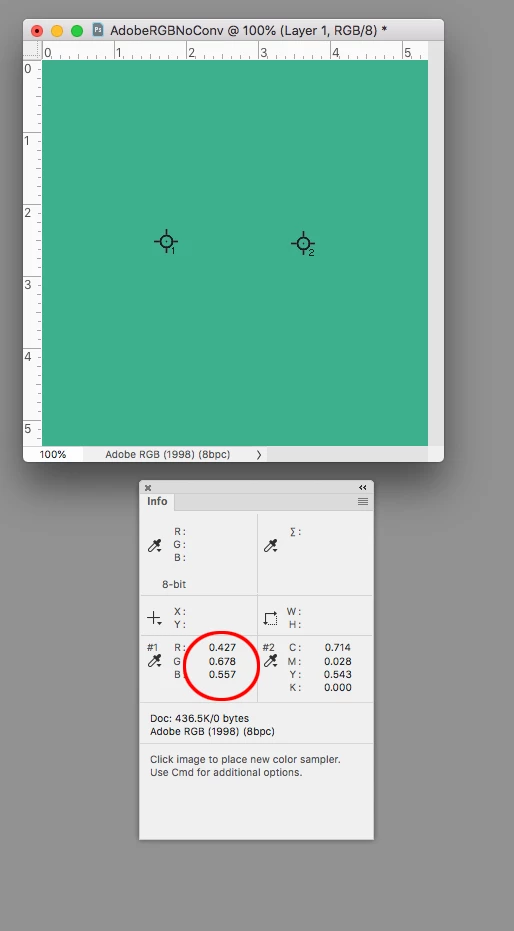
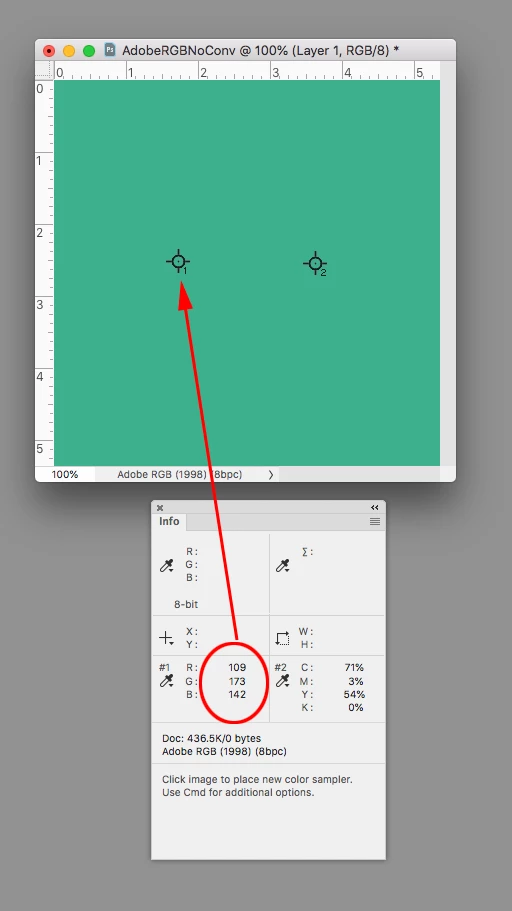
Here’s your starting AdobeRGB value with Info panel set to 8-bit. The sample on the left is the Actual color and on the right the expected CMYK conversion to FOGRA 39, using Relative Colorimetric as the Intent with BPC on.


If I set the Info panel samples to 32-bit I get .427|.678|.557


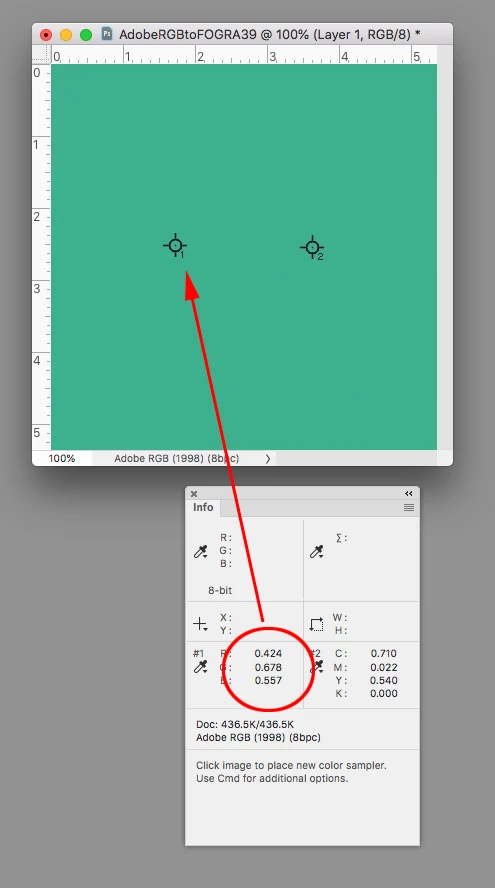
If I duplicate the file and do an AdobeRGB-to-FOGRA39-to-AdobeRGB conversion I get .424|.678|.557—an effective match:


7 replies

NB, colourmanagement
Community Expert
Community Expert
June 7, 2020

Hi

To get the right conversion from RGB to CMYK you use a CMYK profile. The CORRECT CMYK profile.

Properly crafted CMYK profiles are able to successfully convert RGB colour data to adapt it to the restricted colour and tonal range available from ink on paper. 

The nearest printed equivalents for the colours in your RGB document are calculated dusing the ICC  profile conversion. 

You MUST have the right CMYK profile for the actual printing process that will be used, it's like a tranaslation between 2 languages, guessing doesn’t cut it. You must know the actual destination language - that’s what's defined within the CMYK ICC profile.


I hope this helps

if so, please "like" my reply and if you're OK now, please mark it as "correct", so that others who have similar issues can see the solution

thanks

neil barstow, colourmanagement.net :: adobe forum volunteer

[please do not use the reply button on a message in the thread, only use the one at the top of the page, to maintain the thread title and the chronological order]

Participating Frequently
June 5, 2020

Thank you all again for your answers. But, advise please a way to correctly select CMYK colors for printing, so that they roughly correspond to what I see on the screen in RGB. Because it seems that just getting the values from the eyedropper is not enough.

rob day
Community Expert
Community Expert
June 5, 2020

If the mode of your Photoshop document is RGB, and the Info panel’s eydropper is set to CMYK, the CMYK numbers show the expected conversion from your RGB document’s assigned RGB profile to the current Color Settings’ Working CMYK space using the chosen Intent and Black Point Compensation.


The Intent is the preference for how colors outside of the CMYK gamut are brought into gamut. Generally using Relative Colorimetric with BPC turned on produces the least amount of appearance change in out-of-gamut colors.


If you turn on Proof Colors with the Proof Setup set to Working CMYK you will get a soft proof of how your RGB document is expected to print—the RGB preview will be brought into the Working CMYK gamut. With Proof Colors turned on you can check the output CMYK numbers, and get a CMYK preview for a specific press condition without actually making the conversion to CMYK.


The accuracy of the soft proof and output numbers depends on both your Monitor profile and the chosen CMYK profile. Is your monitor profile an accurate representation of your monitor’s properties, and have you chosen the correct CMYK profile for the destination printing press (will your printer really be printing to that profile)?

rob day
Community Expert
rob dayCommunity ExpertCorrect answer
Community Expert
June 2, 2020

Most of what you are seeing is a rounding error when the Info panel is set to 8-bit. In 8-bit the CMYK readout is in 1 percent increments, but 8-bit obviously has 256 gray levels so the CMYK values are rounded. A highend press is certainly able to print more than 100 gray levels.


Here’s your starting AdobeRGB value with Info panel set to 8-bit. The sample on the left is the Actual color and on the right the expected CMYK conversion to FOGRA 39, using Relative Colorimetric as the Intent with BPC on.


If I set the Info panel samples to 32-bit I get .427|.678|.557


If I duplicate the file and do an AdobeRGB-to-FOGRA39-to-AdobeRGB conversion I get .424|.678|.557—an effective match:


Participating Frequently
May 30, 2020

Thank you all for your answers, I can understand why the values change when the conversion is reversed. But I can't understand whether in the future, when selecting colors, you need to select them so that they give the same code when forming back and forth, so that they are commutative?

Legend
May 30, 2020

" whether in the future, when selecting colors, you need to select them so that they give the same code when forming back and forth, so that they are commutative?" No, because you never go back and forth.


I think I may know where this is coming from. Some people find themselves stuck between a colour managed workflow and one where someone has given a list of CMYK or RGB colours to match. The problem is, you cannot mix these two workflows. The list of colours to match generally means the person choosing them doesn't know colour management.

NB, colourmanagement
Community Expert
Community Expert
May 30, 2020

Hi,

You've been asked "Why?" but have not replied?

Does this help your understanding?: https://www.colourmanagement.net/advice/about-icc-colour-profiles/#what_profiles_do


In a conversion from RGB to CMYK the colour values are being remapped from a 3 channel colour space to a 4 channel colour space (because we now have black ink involved throughout most of the colour space [not just in neutrals, normally]- this decided by the "black generation" settings chosen when creating the CMYK profile). 

Unravelling this conversion is not 100% predictable. 

Whilst you may find that some colours, when converted between some RGB and some CMYK colour spaces, make the round trip 100% unaltered, in many cases this will just not be the case.

This also applies to RGB > RGB > RGB conversions, gamut mapping (and the resulting concatenation [crushing] of some high gamut colour values, irrespective of rendering intent) as well as mathematical rounding errors and choices made in the mapping by the designer of the software that created the ICC profiles create this situation - which you seem to think of as an anomaly.


I hope this helps

if so, please "like" my reply and if you're OK now, please mark it as "correct", so that others who have similar issues can see the solution

thanks

neil barstow, colourmanagement.net :: adobe forum volunteer

[please do not use the reply button on a message in the thread, only use the one at the top of the page, to maintain the thread title and the chronological order]

c.pfaffenbichler
Community Expert
Community Expert
May 30, 2020

I also like the analogy of language – if a text (that is not extremely simple) is translated from one language to another and then that is being translated to the original language again there is a high probability that the result will not match the original text word-for-word.  

Legend
May 30, 2020

I agree. There is no reason, none, never to convert colours and later convert them back, except broken workflows. I like the translation analogy too. Imagine writing a book, having it translated to Chinese, then deleting the original book because it could always be translated back if needed. It is clear that it would not be the same book. A workflow which designs in one colour space and converts WITHOUT ARCHIVING FIRST is a broken workflow.

c.pfaffenbichler
Community Expert
Community Expert
May 29, 2020

You omitted to mention which CMYK. 

D Fosse
Community Expert
Community Expert
May 29, 2020

It's because CMYK profiles compensate for ink density. You can never print a pure 0-0-0 black.


All CMYK profiles have a total ink limit. If you go over that, you get ink smearing and refusal to dry properly. The numbers you get when converting is the deepest black possible. They will vary with different CMYK profiles, because each profile represents a certain press/paper/ink process.


Actually the compensation isn't even a full compensation, it doesn't take into account the reflectance and properties of the paper. To get a match from screen to print you also need to set your monitor black point accordingly.

Participating Frequently
May 29, 2020

Ок. But it happend with other colors too, not only with black. For Example R192 G173 B142 converts into C71 M3 Y54 K0. And C71 M3 Y54 K0 converts into R110 G174 B143, and  R110 G174 B143 converts into C71 M2 Y54 K0. All this happens in a one color profile.The shades of the resulting colors are almost identical. But I do not understand what color correspondences are more correct to specify to the customer in the logbook.


PS CMYK COATED FROGRA39(ISO12647-2:2004)

Participating Frequently
May 29, 2020

Color Conversions have consequences … 


What is the issue really? What are you trying to achieve and why would it involve multiple Color Conversions? 


I want to find out if there are any colors that when converting from RGB to CMYK and then back from CMYK to RGB give the same code.