
Link in Zwischenablage kopieren
Kopiert
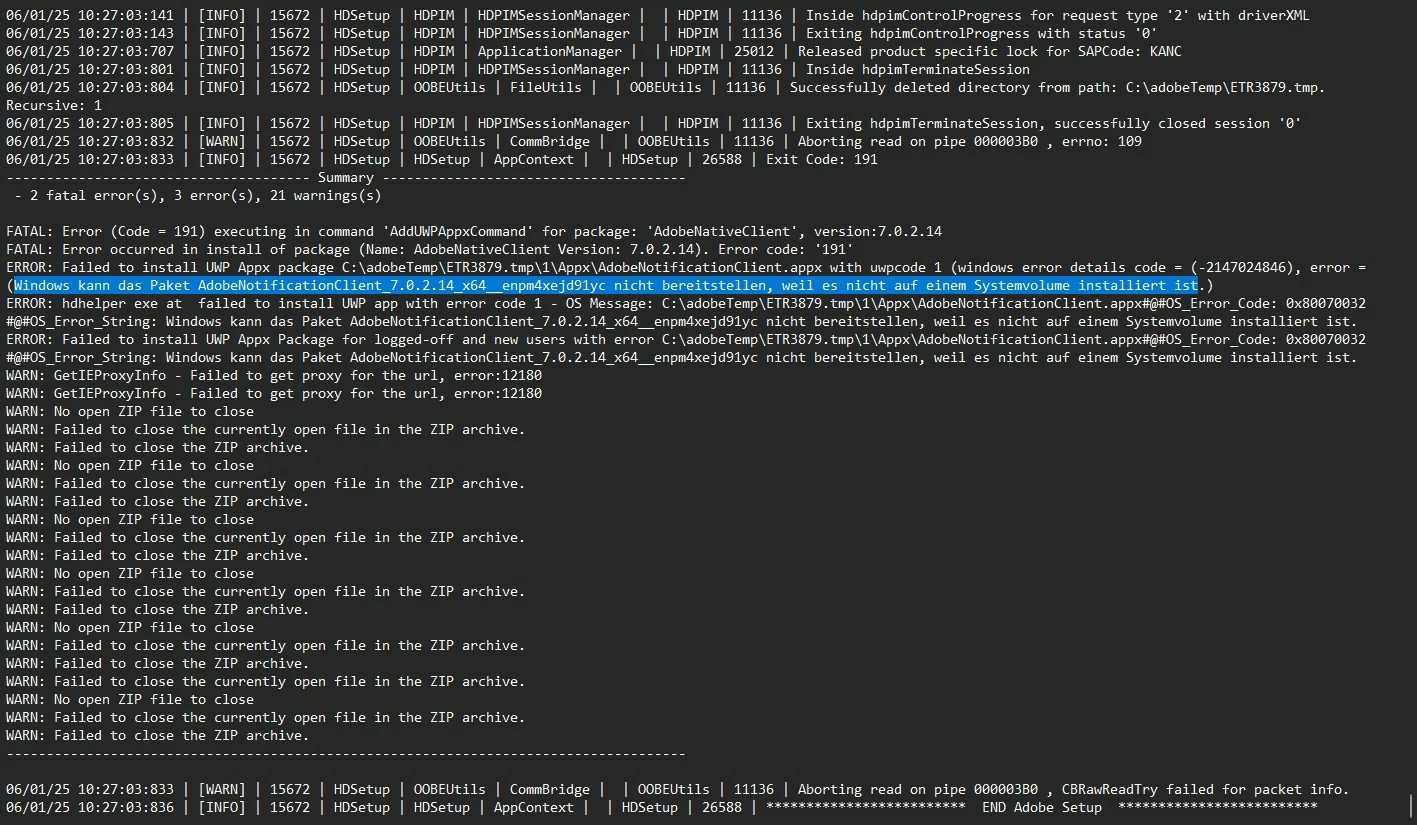
Hallo, seit Tagen versuche ich, das Update der CC zu installieren. Es endet stets mit Fehler 191. Alle Empfehlungen zur Fehlerbehebung habe ich durch, ohne Erfolg. Ein Blick in die Install-Dateien lässt mich vermuten, dass in dem Update-Paket etwas fehlt.
Gibt es denn eine Lösung für dieses Problem (ohne, dass ich Informatik studieren oder 28 ITler engagieren muss)?
solution:
In my case I found out that the error was caused by a changed storage location for new MS store apps.
After I changed the storage location for new Apps (in windows settings - system - storage) back to the system volume, the update of Creative Cloud worked flawlessly.
I found it at
Yes, but the solution is:
In my case I found out that the error was caused by a changed storage location for new MS store apps.
After I changed the storage location for new Apps (in windows settings - system - st
Link in Zwischenablage kopieren
Kopiert
click file > quite creative cloud
then run the creative cloud as administrator
retry the update.
Link in Zwischenablage kopieren
Kopiert
I have tried this repeatedly – just now again. The result is the same.
Link in Zwischenablage kopieren
Kopiert
Link in Zwischenablage kopieren
Kopiert
As I already wrote: I've tried all the tips on this page without success. Interestingly, I clicked "Repair" in the Control Panel, uninstalled CC, and installed the latest version. And the error message is still there, saying a file is still missing. Where can I get it? It's neither on the PC nor does it come with the reinstallation.
"Failed to install UWP Appx package C:\adobeTemp\ETR8244.tmp\1\Appx\AdobeNotificationClient.appx with uwpcode 1 (windows error details code = (-2147024846), error = (Windows kann das Paket AdobeNotificationClient_7.0.2.14_x64__enpm4xejd91yc nicht bereitstellen, weil es nicht auf einem Systemvolume installiert ist.)"
Link in Zwischenablage kopieren
Kopiert
Hi @Beauteous_happiness0D4C
Sorry to hear about your frustration getting this sorted. In addition to the suggestions from kglad have you already tried using the uninstaller from here https://adobe.ly/3FqZeKm rebooting and then installing from the direct link here? https://adobe.ly/3ZOH4ZL
Best,
Dave
Link in Zwischenablage kopieren
Kopiert
Thanks, but that also only resulted in the error message we're familiar with. If even a complete reinstallation fails, I think there must be a programming error.
Link in Zwischenablage kopieren
Kopiert
I have the same problem. Run as administrator, reinstall. nothing help.
Link in Zwischenablage kopieren
Kopiert
Link in Zwischenablage kopieren
Kopiert
Yes, but the solution is:
In my case I found out that the error was caused by a changed storage location for new MS store apps.
After I changed the storage location for new Apps (in windows settings - system - storage) back to the system volume, the update of Creative Cloud worked flawlessly.
I found it here: https://community.adobe.com/t5/enterprise-teams-discussions/no-fix-for-persistent-191-error/td-p/136...
Link in Zwischenablage kopieren
Kopiert
did you repair ms store?
Link in Zwischenablage kopieren
Kopiert
Yes, I've tried all the suggested solutions. Without success.
Link in Zwischenablage kopieren
Kopiert
do you have an education, teams or enterprise subscription?
Link in Zwischenablage kopieren
Kopiert
solution:
In my case I found out that the error was caused by a changed storage location for new MS store apps.
After I changed the storage location for new Apps (in windows settings - system - storage) back to the system volume, the update of Creative Cloud worked flawlessly.
I found it at
Yes, but the solution is:
In my case I found out that the error was caused by a changed storage location for new MS store apps.
After I changed the storage location for new Apps (in windows settings - system - storage) back to the system volume, the update of Creative Cloud worked flawlessly.
Link in Zwischenablage kopieren
Kopiert
thanks for the update.
Link in Zwischenablage kopieren
Kopiert
Thanks a lot for that information. By changing back to the "default" storage, the update works again...
Link in Zwischenablage kopieren
Kopiert
glad that worked for you, too.
Link in Zwischenablage kopieren
Kopiert
Danke Dir, das war auch bei mir die Lösung, großartig, auf das Zurücksetzen des Speicherortes von D: zurück auf C: wäre ich niemals gekommen!
Link in Zwischenablage kopieren
Kopiert
I don't know why this setting was changed to a different drive in the first place. But thank you. That did the trick.
Link in Zwischenablage kopieren
Kopiert
Hey, danke dass du das geschildert hast und das es stand Juli noch nicht so lang her ist. Hat es bei dir mittlerweile funktioniert? Diese Lösungsansätze hab ich auch alle schon durch. Neuinstallation, vorherige Deinstallation mit dem Adobe Tool... Einfach ALLES. Sogar die tolle KI ist mit ihrem Latein am Ende... Wie ist bei dir der Stand bzw. Wenns wieder läuft, wie hast du das geschafft? Danke vorab und LG
Link in Zwischenablage kopieren
Kopiert
Link in Zwischenablage kopieren
Kopiert
Nein, ich hab es noch nicht gelöst. Ich versuche es jetzt mal mit dem Weg von pavels57117862
Machen Sie sich bereit! Im Januar erwartet Sie ein verbessertes Adobe Community-Erlebnis.
Mehr erfahren