
Participant
April 7, 2015
Answered

Adobe CC storage space alerts

  • April 7, 2015
  • 3 replies
  • 3521 views

Hi,  I am confused about my storage space on my Adobe CC account as I am frequently getting alerts that I am running out of storage. I currently have a student version (20 GB limit.) When I click on the Creative Cloud info on my desktop, the dialogue box indicates that I am only using 3.22 GB (see this link for screenshot: http://prntscr.com/6qu59h). When I click on the Adobe Cloud icon and search settings, I see this (http://prntscr.com/6qu7w9) 94.75% of 20 MB.   Can you help me to better understand the difference in numbers?   Thank you.
This topic has been closed for replies.
Correct answer Ken G. Rice

When you delete files (and folders) from the Creative Cloud Files folder on your desktop the items are not immediately deleted but moved into the Archive (think Trash on Mac OS X or Recycle Bin on Windows). The Archive is not on your computer but in the Creative Cloud file storage.

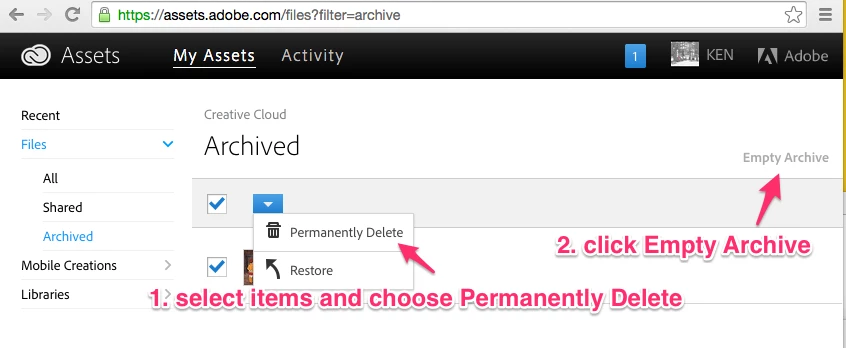
Open a browser and visit Adobe Creative Cloud. You can then Permanently Delete items from the Archive by [1] selecting those you want to delete and choosing Permanently Delete, or [2] if you want to remove everything just choose Empty Archive.

3 replies

Inspiring
September 30, 2017

I have just started getting the Creative Cloud Out of Space message.

When I go to Archives....and most other folders, I'm told that nothing is there.

I do not see how much storage I am using under Settings.

I can only see three files.  I have no shared libraries... I archived one picture and it isn't showing up in archives.  Trying to navigate out there is very confusing. I'd like to just be able to see a list of exactly what I have and how big each of the files or folders is, and be able to delete items, but I am not finding that information.  Is there a tutorial somewhere?

David__B
Adobe Employee
Adobe Employee
October 2, 2017

Hi Susan,

Does it show how much space is used here if you log in with your Adobe ID?

Adobe Creative Cloud

Best,

- Dave

frederiqueg62889199
Participant
June 29, 2017

Same problem here, my storage was full, i deleted files, but it keep saying me it's full... and Archive files are empty

Ken G. Rice
Community Manager
Ken G. RiceCommunity ManagerCorrect answer
Community Manager
April 7, 2015

When you delete files (and folders) from the Creative Cloud Files folder on your desktop the items are not immediately deleted but moved into the Archive (think Trash on Mac OS X or Recycle Bin on Windows). The Archive is not on your computer but in the Creative Cloud file storage.

Open a browser and visit Adobe Creative Cloud. You can then Permanently Delete items from the Archive by [1] selecting those you want to delete and choosing Permanently Delete, or [2] if you want to remove everything just choose Empty Archive.

Participant
April 8, 2015

Your reply was helpful.

Further questions:

If I understand correctly, when I want to "trash" a file, I will have to delete it from two places: Desktop trash AND the Adobe archived files as well?

I have a number of files that were not properly named and I don't know what is in the file or folder without restoring the file. Is there a way to open the file in the archived files list without restoring it completely and then having to go through the two-step process of deleting it from my desktop trash as well as the Adobe archives?

Hope my question makes sense.

Ken G. Rice
Community Manager
Community Manager
April 8, 2015

The Archive is flattened so you cannot see the contents of a folder without restoring it. I have emailed you a list of the contents of your Archive.