


- Home
- Creative Cloud Services
- Discussions
- Re: Any way to transfer cc libraries to a differen...
- Re: Any way to transfer cc libraries to a differen...

Copy link to clipboard
Copied
Any way to transfer cc libraries to a different owner?


 1 Correct answer



 34
Replies
34
34
Replies
34


Copy link to clipboard
Copied
these are user forums. for applicable apps, use https://helpx.adobe.com/ie/x-productkb/global/how-to-user-voice.html
for others, use https://www.adobe.com/products/wishform.html

Copy link to clipboard
Copied
To Everyone,
The real issue here is what happens to the many many links that exists in many documents when you share and copy a CCLibrary owned by USER1 to USER2's account in order to transfer ownership. Even if USER2 copies over the latest and greatest version of USER1's CCLibrary, all of the links in the documents will go missing and have to be relinked if USER1's account is terminated.
In my case, this would be at least 2000 links that will go missing in this transfer of ownership because the assets in my files link to USER1's CCLibrary not USER2's.

Copy link to clipboard
Copied
Hi All,
We have released a new update of Adobe Bridge (CC 2018) on 16 July 2018. The new version build number is 8.1.0.383. This version is available to install via Adobe Creative Cloud application.
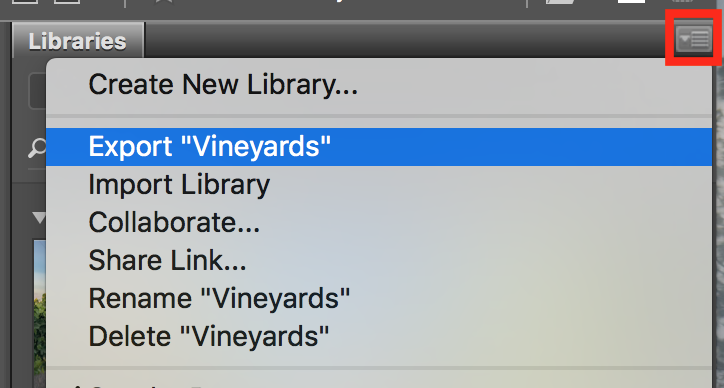
This Bridge update contains support for CC Libraries. Please check the "Libraries" workspace after installing new version of Bridge CC.
You may need to update the Creative Cloud application and restart your computer to see the updated installer.
Thanks,
Deepak Gupta

Copy link to clipboard
Copied
This seems to have the same functions, I cannot see anything to transfer ownership, only collaborate?

Copy link to clipboard
Copied
FILE OWNERSHIP CHANGE FEATURE SHOULD HAVE BEEN IN PLACE YEARS AGO-- are you guys kidding us? When has an employee with a company ever stayed more than 3-5 years in this day and age?

Copy link to clipboard
Copied
Updated bridge to the latest version 8.1.0.383, as well as all other adobe apps.
Can't find anything in the libraries panel which looks like a way to change owner of a existing library.
Can you provide more information about this?
Copy link to clipboard
Copied

Copy link to clipboard
Copied
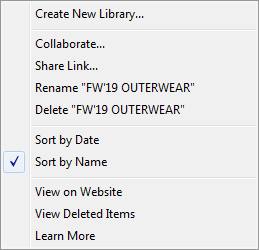
Hi, was this in Illustrator? What version? I don't see that option on mine.
Copy link to clipboard
Copied
Hi jaimes60390070
The option should show in the flyout menu of the libraries panel over the 'Collaborate...' option. If you don't see it, please verify that you are using an updated version of the software. This feature in the latest 2018 versions of illustrator, let us know if you are using a recent version and you still don't see that as an option.
Best,

Copy link to clipboard
Copied
Any similar solution for LR mobile library ?

-
- 1
- 2

Get ready! An upgraded Adobe Community experience is coming in January.
Learn more
 AdChoices