New Participant
March 11, 2015
Answered

Any way to transfer cc libraries to a different owner?

  • March 11, 2015
  • 5 replies
  • 28014 views

Any way to transfer cc libraries to a different owner?

Correct answer fernandocenturion

Hi Zjoerdje​,

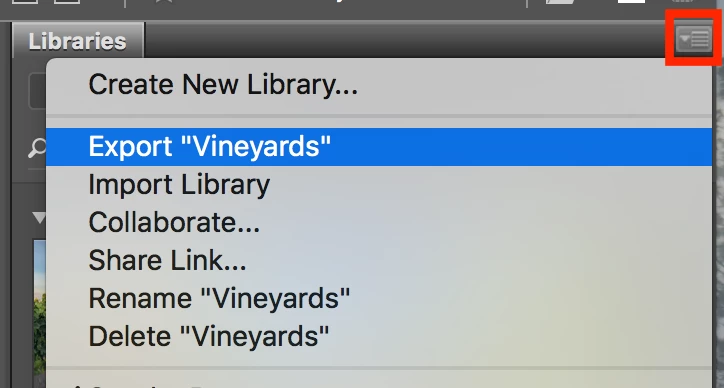
You can find the import/export from the context menu of CC Libraries.

Best,

5 replies

New Participant
November 8, 2018

Any similar solution for LR mobile library ?

Deepak_Gupta1
Community Manager
Community Manager
July 17, 2018

Hi All,

We have released a new update of Adobe Bridge (CC 2018) on 16 July 2018. The new version build number is 8.1.0.383. This version is available to install via Adobe Creative Cloud application.

This Bridge update contains support for CC Libraries. Please check the "Libraries" workspace after installing new version of Bridge CC.

You may need to update the Creative Cloud application and restart your computer to see the updated installer.

Thanks,

Deepak Gupta

New Participant
August 3, 2018

Updated bridge to the latest version 8.1.0.383, as well as all other adobe apps.
Can't find anything in the libraries panel which looks like a way to change owner of a existing library.
Can you provide more information about this?

New Participant
May 21, 2019

Hi Zjoerdje​,

You can find the import/export from the context menu of CC Libraries.

Best,


Hi, was this in Illustrator?  What version?  I don't see that option on mine.

New Participant
March 28, 2018

To Everyone,

The real issue here is what happens to the many many links that exists in many documents when you share and copy a CCLibrary owned by USER1 to USER2's account in order to transfer ownership. Even if USER2 copies over the latest and greatest version of USER1's CCLibrary, all of the links in the documents will go missing and have to be relinked if USER1's account is terminated.

In my case, this would be at least 2000 links that will go missing in this transfer of ownership because the assets in my files link to USER1's CCLibrary not USER2's.

New Participant
July 10, 2015

I have the same question. Can ownership of a library be transfer to another users? We're moving our current CC account to a different one. This will probably delete the library on the old account unless we can find a way to move it over.

Thanks

Ken G. Rice
Community Manager
Community Manager
July 10, 2015

From the Assets site at https://assets.adobe.com you can use Send Link and Save To Creative Cloud to copy an entire Library over to a different account.

New Participant
July 10, 2015

Hi Ken,

Thank you for the message. I know you can share and collaborate library but what would happen if the account was deleted where the library was create?

Thanks

deto_ws
Inspiring
March 12, 2015

hi shumway,

you can use share option : https://helpx.adobe.com/creative-cloud/help/collaboration.html#collaborate_libraries

i hope can help

regards