Exit
  • Global community
    • Language:
      • Deutsch
      • English
      • Español
      • Français
      • Português
  • 日本語コミュニティ
  • 한국 커뮤니티
1

Bug: Issues with Adobe Spark web Interface when creating multiple branded templates

Community Beginner ,
Mar 29, 2020 Mar 29, 2020

When you create a brand in Adobe Spark and create multiple branded templates under 'Brand Templates', the web interface doesn't support scroll and the templates become unaccessible beyond the x-axis of the browser.


We need the web development team to enable scrolling on the <div> or have the <div> contents wrap in the browser.

Please have the development team recreate this bug my creating multiple templates under the following page: https://spark.adobe.com/sp/branding/

Then add the following code "overflow-x: auto;" to enable scrolling.

<div role="rowgroup" style="position: absolute; transform: translate3d(0px, 0px, 0px); width: 1424px; height: 250px; pointer-events: auto; overflow-x: auto;" class="">

We also need to be able to access these branded templates in the iOS app. This feature is currently unavailable and I'm not sure why.
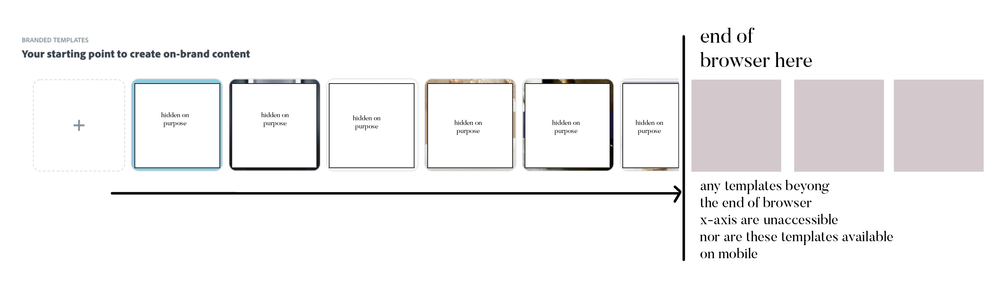



Screen Shot 2020-03-29 at 11.02.40 AM.png

TOPICS
Collaboration
974
Translate
Report
Community guidelines
Be kind and respectful, give credit to the original source of content, and search for duplicates before posting. Learn more
community guidelines
Community Expert ,
Mar 29, 2020 Mar 29, 2020

Spark support is at https://adobespark.zendesk.com/hc/en-us/categories/202688167-Adobe-Spark
-the above link has a full page of over 90 links for help articles

Translate
Report
Community guidelines
Be kind and respectful, give credit to the original source of content, and search for duplicates before posting. Learn more
community guidelines
Community Beginner ,
Mar 29, 2020 Mar 29, 2020

Hi John,


Thanks for your comment. The support required is the the web interface. I don't need help using the Adobe Spark application. It needs Adobe developers to fix the UI.

Translate
Report
Community guidelines
Be kind and respectful, give credit to the original source of content, and search for duplicates before posting. Learn more
community guidelines
Community Expert ,
Mar 29, 2020 Mar 29, 2020

>needs Adobe developers to fix the UI


use the links below to make a report or request
-for Video & Audio & Animator programs https://adobe-video.uservoice.com/
-https://www.adobe.com/cfusion/mmform/index.cfm?name=wishform

Translate
Report
Community guidelines
Be kind and respectful, give credit to the original source of content, and search for duplicates before posting. Learn more
community guidelines
Community Beginner ,
Mar 29, 2020 Mar 29, 2020
LATEST

Thanks for the recommendation John! Best.

Translate
Report
Community guidelines
Be kind and respectful, give credit to the original source of content, and search for duplicates before posting. Learn more
community guidelines

