Participant
May 13, 2015
Answered

Can the Creative Cloud Files folder be moved?

  • May 13, 2015
  • 2 replies
  • 10931 views

I just installed CC.  The default location for the Creative Cloud Files folder is C:\users\name\Creative Cloud Files.  Can I move it to another location and still retain sync capabilities?

Correct answer Ken G. Rice

Yes.

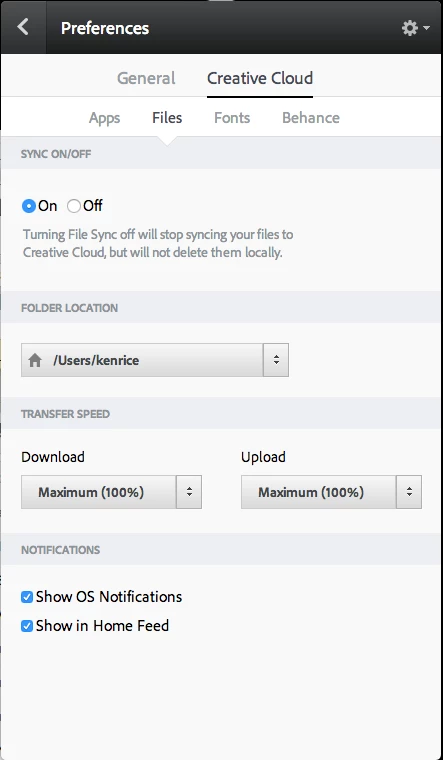
From the Creative Cloud desktop application open the Preferences and switch from the General tab to Creative Cloud tab. Then switch from Apps to Files below that. Under Folder Location you can change it.
2 replies

Participant
August 31, 2025

sorry to revive again,

but since 2022 it appears the syncing tab has been removed, is this function still available? I have found myself in the same situation.

kglad
Community Expert
Community Expert
August 31, 2025
Ken G. Rice
Community Manager
Ken G. RiceCommunity ManagerCorrect answer
Community Manager
May 13, 2015

Yes.

From the Creative Cloud desktop application open the Preferences and switch from the General tab to Creative Cloud tab. Then switch from Apps to Files below that. Under Folder Location you can change it.

Participant
June 13, 2022

Hello, I have the same problem but in 2022 these windows have already changed, where can I move everything? I would like all the creative cloud to an external disk since the internal one is very small.

ProDesignTools
Community Expert
Community Expert
September 19, 2022

Following on to what @DR_Bacon said, here's a screenshot of the current setting for changing the sync folder location for Creative Cloud:


More info on this Adobe help page, if you need it:


https://helpx.adobe.com/creative-cloud/help/set-sync-options.html