


- Home
- Creative Cloud Services
- Discussions
- Re: Can you selectively sync files for Creative Cl...
- Re: Can you selectively sync files for Creative Cl...

Copy link to clipboard
Copied
On my laptop I only want to sync specific folders or files with Creative Cloud. On my Desktop I want to sync all the files between both devices. Dropbox has a feature that allows you to select which cloud files to sync per device, can I accomplish this with CC?


 1 Correct answer


Unfortunately, no. The file syncing is currently an all or nothing option. But it sounds like a great feature request to have that added. Could you post some documentation from Dropbox on how this is controlled by the user?

 46
Replies
46
46
Replies
46

Copy link to clipboard
Copied
Unfortunately, no. The file syncing is currently an all or nothing option. But it sounds like a great feature request to have that added. Could you post some documentation from Dropbox on how this is controlled by the user?

Copy link to clipboard
Copied
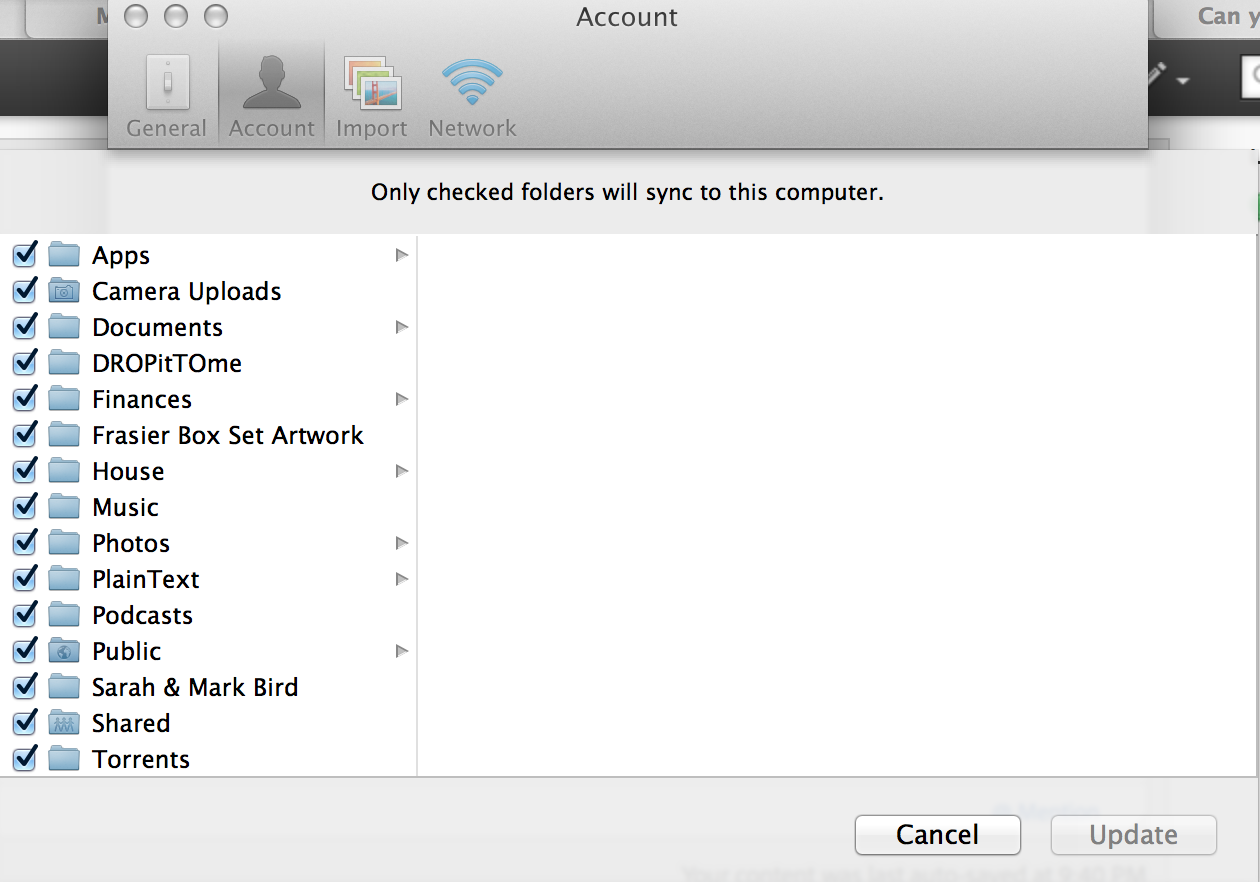
I second this request as I only have a 250gb SSD on my laptop so syncing all my creative cloud files (70gb+) just takes up too much space although on my iMac (1TB) it's no problem. Here is how it's handled in Dropbox:

Copy link to clipboard
Copied
I also need this functionality. To be honest I was just about to buy in to the Creative Cloud as I thought this would be a basic feature, v surprised that it isn't. This is a deal-breaker for me. I too have a PC with lots of space but my SSD ultrabook does not. I need to be able to work on the ultrabook but only in selected folders. This surely must affect lots of others too.
I will have to pass on CC until this is added.

Copy link to clipboard
Copied
Greetings, I'm not sure so better safe than sorry. Sometimes I Download Credit Card Statements (and the like) on my Windows Laptop, other times when using my Android Phone. Do they both ways automatically upload to the same exact Cloud or after uploading to Adobe's Cloud do I have to somehow Sync the two (PC & Phone)? Thanks, Barry

Copy link to clipboard
Copied
Hi Brett, below you find Ramesh's, an Adobe Empoyee, answer on a similar request in 2016.
Quite embarrassing for Adobe to ask her community to put in a feature request in 2022 when in 2016 it was already long overdue. So please do not ask us to put in feature request for a no-brainer and "every other cloud service" feature. Get your bosses embarrassed. 😉 Hi Everyone,
I am so sorry for all the frustration this has caused to all of you. Due to changing priorities, this feature request got overlooked for quite some time now. This feature now has found it's way in ToDo list. The engineering team will start looking into it very soon.
Thank you all so much for your patience. And I am again so sorry for the inconvenience.
Regards,
Ramesh.
Also, please share your interest in having this feature by voting/commenting here: Selective Sync – Welcome to CC Assets Website & Libraries Feature and Bug Reporting Page

Copy link to clipboard
Copied
This link is broken - we're still awaiting the HUGE need for this feature to be met. What is the point of having cloud storage if you cannot choose to keep things on the cloud. OneDrive, Dropbox and many others allow selective file synchronisation - because you don't need to sync all files all the time and we need to keep harddrives light and save the planet.
Furthermore, your CC software often bugs out (quite often after an update) and then wants to re-synchronise the entire freaking load of files! This has happened to me probably 10 times now - sometimes I've ended up with two Creative Cloud folders alongside each other - what a bloody waste of time, energy, blah blah blah. You'd think Adobe would have more noggin.
Come on Adobe, this one is a no-brainer. Or is that a question?


Copy link to clipboard
Copied

Copy link to clipboard
Copied
This is insane. I was thinking about getting the 2 TB plan, but my SSD is 256 GB. I wouldn't be able to use even 10% of the cloud storage. It kinda defeats the whole purpose of having stuff in the cloud.
With Google Drive and OneDrive, I can right-click on files and folders and select whether I want to keep them locally or only in the cloud, and the icon changes accordingly. That doesn't seem like it would take years of development, but this thread is almost a decade old!
Copy link to clipboard
Copied
adobe's cloud storage has a different purpose from those others. adobe's is used for file sharing, not to save local storage space.

Copy link to clipboard
Copied
LOL, as if the two are mutually exclusive.
Creative Cloud is missing a core, essential feature every other cloud service has had for years at this point. The only reason they're able to get away with it is because users are locked in to paying for it as part of the bundle that lets them access the actual Creative Cloud apps. So, Adobe has little incentive to ship a fully functional, up-to-date file sync system.
@kglad, I get that you're a "community expert" (whatever that means), but chiming in to tell people they're using the software wrong is just unhelpful. Creative Cloud file sync service is crap and that's that.
Copy link to clipboard
Copied
Copy link to clipboard
Copied
I said we are locked into PAYING FOR IT. Which we are, if we need to use Creative Cloud apps. And your answer is "pay for another service that works"? Again, just recuse yourself here, mate. You're contributing nothing.

Copy link to clipboard
Copied
but chiming in to tell people they're using the software wrong is just unhelpful.
By @default21883955a44ijf

kglad was not telling you that you were using it wrong, he was explaining the intention of Adobe with regard to the use of sync.
Copy link to clipboard
Copied
Incorrectly, though. This purports to be a service you can use to keep your projects synchronized between computers, but it lacks a core feature that all comparable cloud syncing services offer. It's not about "saving space," it's about providing a way for users to sync a subset of the folders they own/share in Creative Cloud. My team finally just stopped using Creative Cloud folder sync because it is unusable for anyone without a 1TB drive in their computer. Looking at the decade-old requests here for selective sync, it's very clear Adobe has no interest in developing this tool.
I don't know what you have to do to become a "community expert" but the first requirement seems to be arguing with customers. Great job, guys! No notes. You're doing great.
Copy link to clipboard
Copied
Copy link to clipboard
Copied
Everything. Good day!
Copy link to clipboard
Copied
locked.

Copy link to clipboard
Copied
Would it not be possible to move the files not wanted on the computer to “Archived” in the cloud? Clicking “Restore” should download them back to the computer. Or does creative cloud have a time limit on how long files can be “Archived”?
Thanks
Copy link to clipboard
Copied
There is no time limit to keeping files in Archived. But remember, while they are in archived, they are still taking up cloud storage space. The same way the files in the Recycle Bin/Trash still take up hard drive space.
Copy link to clipboard
Copied
Thanks for the reply brett, and for pointing out that the files still take up cloud space. For Me the whole point is being able to keep my files safe and accessible in the cloud while freeing up space on my device.

Copy link to clipboard
Copied
This is apparently another feature which is available for Apple users but not for PC.

Copy link to clipboard
Copied
Our studio team would definitely like to be able to selectively synchronize subfolder and individual files, since our organization is attempting to move everyone off traditional servers and over to cloud based sharing (which means horrid Sharepoint for MSOffice users, but hopeless for the creative teams).

Copy link to clipboard
Copied
I don't know how I could exist without Dropbox.
Copy link to clipboard
Copied
If it helps anyone I use CC file storage for "Live" jobs and then once they're completed I move them to an archive using a different cloud storage that can selectively sync (copy.com). That way all the live jobs benefit from Creative Cloud features but I don't need to sync all of the archived jobs to my laptop that doesn't have the hard drive capacity to store them. However, if I need to access an archived job I can simply download it from the copy.com web interface.

-
- 1
- 2

 AdChoices