
Inspiring
April 11, 2017
Answered

CEPHtmlEngine.exe process causing Illustrator performance issues

  • April 11, 2017
  • 4 replies
  • 12338 views

Hi David,

I am happy to report that with the latest update to the Creative Cloud App my problem of perpetual cloud syncs has been fixed. Everything is now working normally. I am truly happy that the engineers addressed the problem and where able to fix it.

As to your question, my problem with Illustrator is that certain background processes (it seems it is CEPHtmlEngine.exe) is loading multiple times in the background causing a CPU overload (loading 20 times or more). The issue has been around now for over a year. It is known to Adobe and a fix has been promised, but I am still having the issue. The issue is so bad, I can only use Illustrator for a short time until it becomes unusable and needs to be terminated. Again, it’s all that cloud stuff which I really don’t need. I need to be able to work locally on my machine and reliably so.

The thread dealing with the issue is here: What is the "Adobe CEP HTML Engine"? It`s using too much from my processor. There are many threads pertaining to just that issue, and obviously it still has not be adressed proberly in any of the many updates. At least any fixes dont work for me...

Should I post the issue in the Illustrator forum?

Thanks to the team for getting my syncing issue fixed!!

Cheers, Walter
This topic has been closed for replies.
Correct answer Red Point

https://forums.adobe.com/message/8908608#access_token=eyJ4NXUiOiJpbXNfbmExLWtleS0xLmNlciIsImFsZyI6IlJTMjU2In0.eyJmZyI6Il…

Another forum thread, with the same issue. I have tried all the fixes but to no avail. I will now attempt to delete the CEPHTML Engine Exe file in Illustrator.

4 replies

ChristianEngemand
Participant
August 9, 2019

This is still a big issue...

Indesign.. Illustrator.. Photoshop... these are programs i use that all does this.. could someone from the adobe team please adress this..

obedo83002110
Participant
September 17, 2019
Same here. Huge problem. Multiple Adobe CEP HTML Engine processes in multiple Adobe software. Indiesign Illustrator PhotoShop.
Participant
December 13, 2019

Same issue here. 

Red PointAuthor
Inspiring
March 3, 2019

The initial procedure to fix this issue does not work, because ALL the links referred to in the support document do not apply to Illustrator 2019.

See: High CPU usage due to CEPHtmlEngine

Please send us an updated procedure which will work in Illustrator 2019.

Thanks, Walter

Participating Frequently
July 21, 2019

J'ai le même problème. Incroyable il n'y a pas fixe sur 2019 ... ce qu'ils font?

Red PointAuthor
Inspiring
March 3, 2019

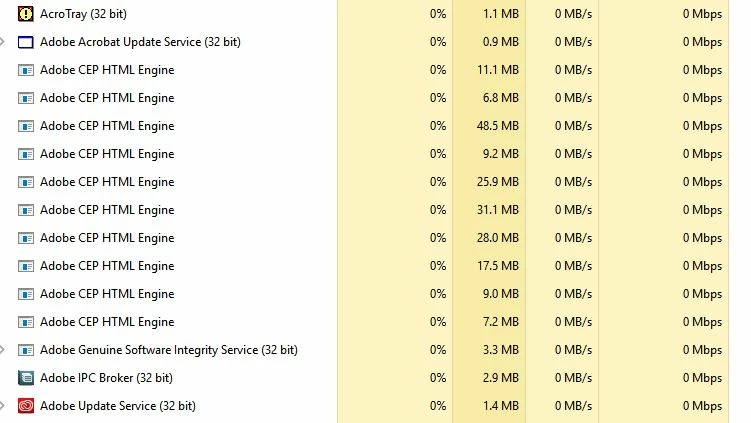
Here is a screenshot:

Red PointAuthorCorrect answer
Inspiring
April 11, 2017

https://forums.adobe.com/message/8908608#access_token=eyJ4NXUiOiJpbXNfbmExLWtleS0xLmNlciIsImFsZyI6IlJTMjU2In0.eyJmZyI6Il…

Another forum thread, with the same issue. I have tried all the fixes but to no avail. I will now attempt to delete the CEPHTML Engine Exe file in Illustrator.

Red PointAuthor
Inspiring
April 11, 2017

Preran (Adobe Staff) said Feb 25 2016 that the issue would be fixed (solutions he mentioned did not work for me). :

Cheers,

Walter

Red PointAuthor
Inspiring
April 11, 2017

Hi Walter,

Glad to hear that the syncing issue was fixed. I'm wondering if the high CPU use issue related to CEPHtmlEngine.exe process is something different or new from the thread you referenced. I think in that case there were particular libraries files which were causing the issue. Please see this support article for reference - High CPU usage due to CEPHtmlEngine. I think in that case the issue was affecting several products and was subsequently resolved by an update to the Creative Cloud app.

A few questions for you:

  • What version of Illustrator was this happening with CC2015 or CC2017?
  • Was it affecting other products or just Illustrator?
  • Do you have the latest version of the Creative Cloud app installed (you can check from the preferences)?
  • Did the issue seem to start right after the latest update?
  • What anti-virus software do you use?

I'm not sure if this is an Illustrator specific issue, I suspect not, so am happy to try to work with you on it here in this forum.

Cheers,

- Dave


Hi David,

I followed the Support Article that you are refering too and followed it step by step. I deleted the folder library, downloaded the ZIP File, recreated the folder aso. but the issue did not go away. That's why I decided to delete the CEPHtmlEngine.exe file and it solved the problem. With the only setback, that I am now receiving two error messages at the beginning and one error message at the end of my Illustrator sessions.

But I am glad to take that into account, because I can now work without the CPU issues, which was affecting my whole system and made it impossible to work on anything. It took me almost a year to realize that the CPU issue was Illustrator related. I just realised that at times my system was so slow, my keyboard input would lag behind and show considerable latency. It was only much later I realised that it was Illustrator relateed after spending long hours researching the issues. I usually have more than one programm opened, so I did not connect the strings right away..

To answer your questions:

  • The CPU overload issue was there in CC2015 and stayed with the CC2017 update. I always update.
  • No other products seem to be affected, although I am having issues with After Effects that I need to look into (but havent had the time yet).
  • I have Creative Cloud build 4.0.1.188 installed
  • The Illustrator issue was there since I can remember. But a year for sure!
  • I use virus protection that came with Windows 10 (no other virus software).

If you can broker a solution to this problem, I am sure many users will be happy to hear of it. I suspect that many users are working with Illustrator with the CEPHtmlEngine.exe file deleted, as this was posted as a workaround by one user and it does work. Although not optimal in the long run....

Cheers,

Walter