Exit
  • Global community
    • Language:
      • Deutsch
      • English
      • Español
      • Français
      • Português
  • 日本語コミュニティ
  • 한국 커뮤니티
1

Core Sync (32 bit) won't stop syncing.

Community Beginner ,
Apr 12, 2016 Apr 12, 2016

Since the update yesterday my system runs the processor constantly - Core Sync (32 bit).

I never experienced this before with the desktop installed Creative Cloud component.

Any help will be much appreciated.

TOPICS
File sync
3.4K
Translate
Report
Community guidelines
Be kind and respectful, give credit to the original source of content, and search for duplicates before posting. Learn more
community guidelines

correct answers 1 Correct answer

Adobe Employee , Apr 14, 2016 Apr 14, 2016

Hi Dave:

Sorry for your inconvenience. Could you please provide the information about your operating system, and please use the log collector tool https://helpx.adobe.com/creative-cloud/kb/cc-log-collector.html and send the zip file on your desktop to me at SyncForum-Communication@adobe.com.? Please attach the forum post link with email as well.


Best Regards

Lin


Translate
Adobe Employee ,
Apr 12, 2016 Apr 12, 2016

Hi there,

Sorry for your troubles. I know our engineering team is aware of an issue related to this. Please see this thread: Mac File Sync issue when using extended characters in folder names

Could you try turning off file sync and see if that helps?

Use the Adobe Creative Cloud desktop app to manage your apps and services, download apps, share file...

Thanks,

- Dave.

Translate
Report
Community guidelines
Be kind and respectful, give credit to the original source of content, and search for duplicates before posting. Learn more
community guidelines
Community Beginner ,
Apr 13, 2016 Apr 13, 2016

Hi Dave,

Thank you for the feed back.

Just to mention that I did not have this issue before the auto-upgrade happened two days ago.

I don't believe I have any file name /directory name issues, all being pretty simplistic.

I have switched the Sync off but would obviously like to have it work as before.

Thanks again!

Translate
Report
Community guidelines
Be kind and respectful, give credit to the original source of content, and search for duplicates before posting. Learn more
community guidelines
Adobe Employee ,
Apr 14, 2016 Apr 14, 2016

Hi Dave:

Sorry for your inconvenience. Could you please provide the information about your operating system, and please use the log collector tool https://helpx.adobe.com/creative-cloud/kb/cc-log-collector.html and send the zip file on your desktop to me at SyncForum-Communication@adobe.com.? Please attach the forum post link with email as well.


Best Regards

Lin


Translate
Report
Community guidelines
Be kind and respectful, give credit to the original source of content, and search for duplicates before posting. Learn more
community guidelines
Explorer ,
Feb 01, 2024 Feb 01, 2024

Same issue here, so, following. 


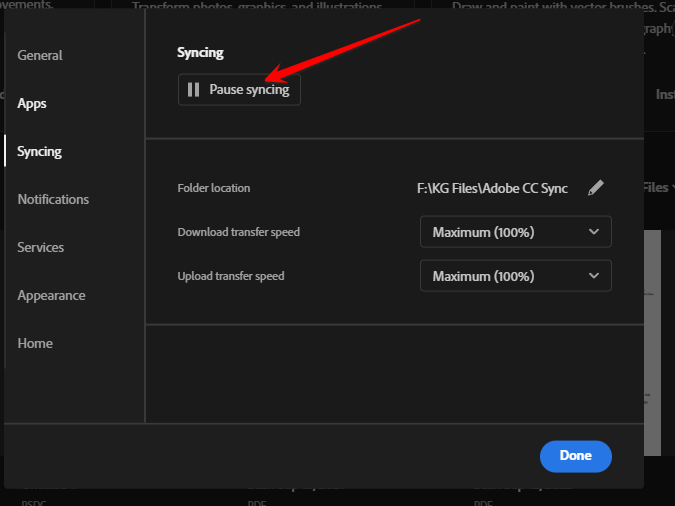
How do I "turn off file sync" in Adobe Creative Cloud desktop app?

Translate
Report
Community guidelines
Be kind and respectful, give credit to the original source of content, and search for duplicates before posting. Learn more
community guidelines
Community Expert ,
Feb 01, 2024 Feb 01, 2024


@alexeit20270339 


file>preferences>syncing


kglad_0-1706825186646.png


Translate
Report
Community guidelines
Be kind and respectful, give credit to the original source of content, and search for duplicates before posting. Learn more
community guidelines
Explorer ,
Feb 04, 2024 Feb 04, 2024

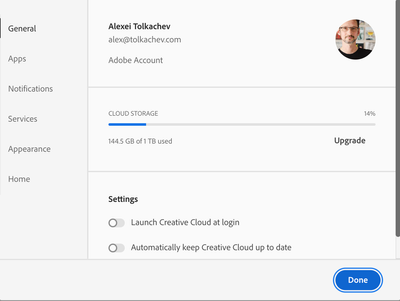
Not really 

alexeit20270339_0-1707074466895.png


Maybe Windows vs Mac. At any rate, I would like to understand what syncing in Creative Cloud desktop app have to do with syncing in Lightrooom. Is it the same syncing, different syncing, supporting syncing, etc.

Translate
Report
Community guidelines
Be kind and respectful, give credit to the original source of content, and search for duplicates before posting. Learn more
community guidelines
Community Expert ,
Feb 04, 2024 Feb 04, 2024
LATEST

no, the cc desktop app syncing is for your cc sync folder (which is ending or is already ended, anyway).


also, stopping syncing per the above wouldn't delete already synced files.

Translate
Report
Community guidelines
Be kind and respectful, give credit to the original source of content, and search for duplicates before posting. Learn more
community guidelines