


- Home
- Creative Cloud Services
- Discussions
- Re: Creative Cloud Files Not Syncing
- Re: Creative Cloud Files Not Syncing
Creative Cloud Files Not Syncing

Copy link to clipboard
Copied
Recently following an update to my CC app, my shared folder disappeared. It contained 8GBs of assets and I am curious to what happened. I created another folder for the shared service and started the sync, but nothing is syncing. It did copy my directory over, but none of the actual assets. It constantly says that it is syncing, but never syncs anything. I have located my files via the browser, but can only download them one at a time. Where did my files go? I also cannot change anything in my preferences. I have tried the following in order:
- Double checked to make sure that I have Sync turned on.
- Signed out and back in.
- Powered down the PC and restarted.
- I have deleted the Core Sync files as recommended in a previous forum.
Win 7 - Creative Cloud 2.2.0.129



 9
Replies
9
9
Replies
9




Copy link to clipboard
Copied
Hi,
Please mention the operating system of your computer.
Regards,
Bani
Copy link to clipboard
Copied
Windows 7 - Creative Cloud Version 2.2.0.129
Copy link to clipboard
Copied
Thank you.
Please try doing a clean installation of the Creative Cloud app as it seems to be an issue with the app :
1- TURN OFF FIREWALL of your security program
2- Check extensions of your browser if you have any browser protection tool installed disable them ( Ad-block Plus, internet security toolbars etc).
3- After that Sign out of Creative Cloud app > Launch Task Manager and close all adobe processes (eg- Creative Cloud, Core sync, CC library, Adobe Desktop Services, Adobe IPC broker, Adobe Crash daemon etc.)
4- Uninstall Creative Cloud Desktop Manager :Creative Cloud Help | Uninstall the Creative Cloud desktop app
5- Delete following folders :
C:\Program Files (x86)\Common Files\Adobe\OOBE
C:\Program Files (x86)\Common Files\Adobe\Adobe Application Manager
C:\Program Files (x86)\Adobe\Creative Cloud Folders
C:\Users\<user_name>\AppData\Local\Adobe\ AAM UPDATER and OOBE both
6- Run Adobe Cleaner tool : http://download.macromedia.com/SupportTools/Cleaner/win/AdobeCreativeCloudCleanerTool.exe
7- Click on the below link and download Creative Cloud Installer file and use the same to install the Creative Cloud Desktop application.
Download Adobe Creative Cloud apps | Free Adobe CC trial
Let us know if this helps.
Regards,
Bani

Copy link to clipboard
Copied
Hi,
Are you still experiencing this issue?.
Thanks
Warner
Copy link to clipboard
Copied
I am trying the previous steps later this afternoon.
Copy link to clipboard
Copied
Yes. I uninstalled the application, removed the folders as suggested and I am still experiencing the same results. If I try to move my Creative Cloud Files folder via the preferences it just says it syncing and never does anything. If I leave it in the default users location, it only loads the directory/folders I have set up, but none of the assets in the folders. Does this make sense?

Copy link to clipboard
Copied
I don't even get the option to move folders
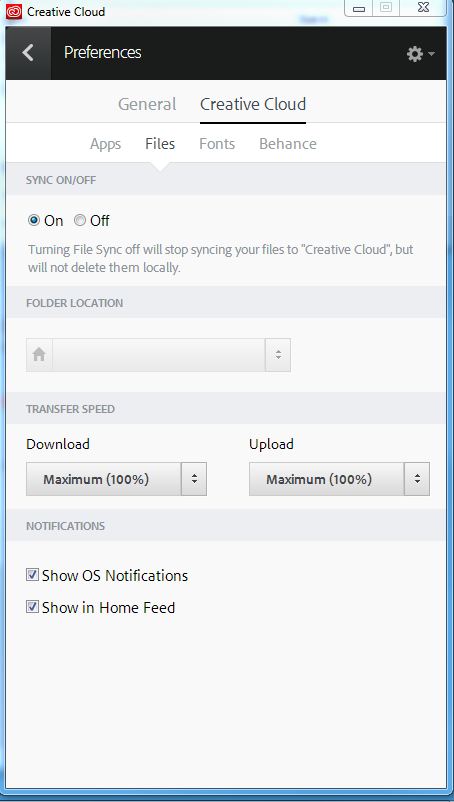

Copy link to clipboard
Copied
Hi:
Could you please send us your logs to investigate your issue? Please zip up this entire folder C:\Users\<username>\AppData\Roaming\CoreSync and send it to me at SyncForum-Communication@adobe.com
Note: The AppData folder is hidden by default. This document explains how to show that folder: http://helpx.adobe.com/x-productkb/global/show-hidden-files-folders-extensions.html
Please also note us the information as below:
Forum post link:
Adobe ID:
Country:
Type of internet connectivity (Ethernet/WiFi):
Using a proxy (Y/N):
Firewall (None/Corporate/Local):
Timezone of your computer:
Thanks.
Lin

Copy link to clipboard
Copied
I guess this was never resolved.
Looks like Adobe's way of hanging up on someone is to ask them for their logs and then never respond.
This syncing issue has been a problem for years, and Adobe has offered little to no resolution for it.


Find more inspiration, events, and resources on the new Adobe Community
Explore Now
 AdChoices