
chsquirrel
Inspiring
November 22, 2019
Question

Creative Cloud: green check marks for sync not showing on mac desktop

  • November 22, 2019
  • 4 replies
  • 4580 views

Since I last logged on I can no longer see any green check marks on my local files in Finder. Files are updating properly as I've checked them on the Creative Cloud web page. I've tried

• logging out and back in to Creative Cloud

• uninstalling and reinstalling Creative Cloud

• I've tried the solution at this post, checking that Core Sync is checked in System Preferences > Extensions > Finder Extensions, but I don't have a Core Sync check box to check
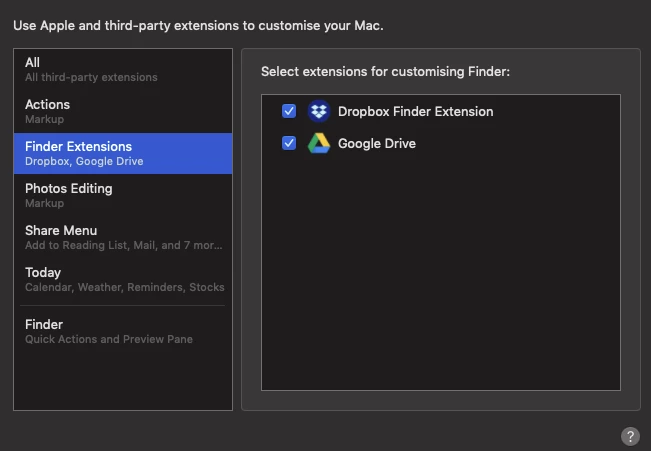


Does this mean Core Sync is not loading the extension somehow? any solution to this (or other solution)?

thanks in advance


Chris

---

Mac OS Mojave 10.14.6 on a Late 2014 Mac Mini

This topic has been closed for replies.

4 replies

Participating Frequently
December 13, 2019

Same problem here as described below: no more green check after upgrading, no "Core Sync" solution as possible since no CoreSync extension (was there one before?). So no more right click on file possible in order to get hyperlink für sending to client. Very annoying, everytime to browser etc. It does sync but no green arrow, no blue lines.

chsquirrel
Inspiring
December 13, 2019

Can any Adobe staff give us an update on if anything is being looked at about this?


thanks


Chris

adriankinloch
Participant
May 1, 2020

Thanks all for chipping in. I tried all the steps but no joy. Latest version of CC.

Model Name: iMac OS

10.15.3
Model Identifier: iMac14,2
Processor Name: Quad-Core Intel Core i5
Processor Speed: 3.2 GHz

Participating Frequently
December 12, 2019

Same issue for me, except my files aren't syncing either. Says they are, but my client and I are unable to see each other's updates. 


***UPDATE: Discovered that client had used a bracket in a folder name. Changing it to a hyphen corrected the syncing issue. Still no icon overlays or contextual menus though.***

Participating Frequently
December 3, 2019

I too am having this issue. Ever since creative cloud updated last month, my green check marks do not appear. I do not have the coresync checkbox in system preferences either. The only checkbox showing is "one drive" but it is unchecked and I do not use that. I can see on the web that the files are synced...but the check marks really helped me to see the progress and I've become dependent on them. 

Participant
December 4, 2019

Same deal here since updating CC. Files upload properly, but no checkmarks and "_Cloud documents.webloc" present in CC Files folder. 

Participating Frequently
November 22, 2019

Same here. Desktop Core Sync out of order. Since Nov 21th.

Found a _Cloud-Documents.webloc in folder Creative Cloud Files.


chsquirrel
Inspiring
November 25, 2019

Yep, that's exactly the point when the green tick marks disappeared for me, on the update when the _Cloud-Documents file appeared in the Creative Cloud Files folder