

Swandive stream
Inspiring
May 11, 2021
Question

Creative Cloud Libraries taking up lots of space on C Drive

  • May 11, 2021
  • 1 reply
  • 3479 views

My C Drive isn't that big (I use other drives for most files) but a lot of programs try to save everything on there thus rendering it full. CC has many "renditions" files which seem to be various vector images. I don't know if these are graphics I saved to CC Libraries but why are they being stored locally? I thought they'd be saved on the cloud not taking up space on the local drive.
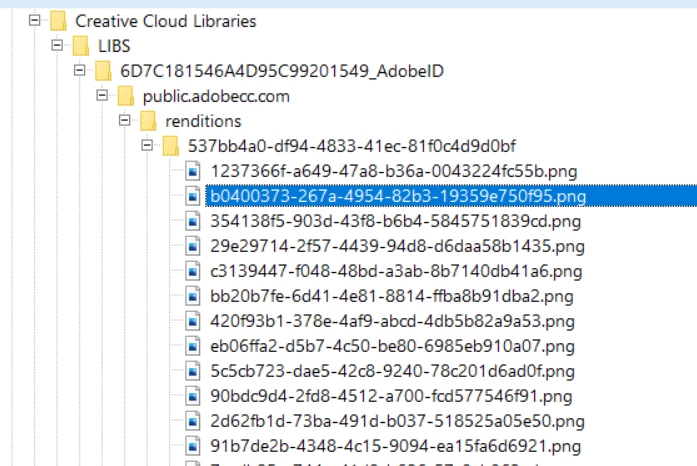
 

Folder as shown in WinDirStat

One of the files


This topic has been closed for replies.

1 reply

David__B
Adobe Employee
Adobe Employee
May 11, 2021

Hi Fastertrack,


Sorry to hear about your difficulties. A few additional questions

  • How large is your C drive?
  • How much drive space is being taken up by the Creative Cloud Libraries folder?


I'm not sure if I will be able to help but at least I can compare to usage my system.


Thanks,

- Dave


Swandive stream
Inspiring
May 12, 2021

It might be best if I show an overview of the drives:

C is 118GB as it's intended to be system only. A lot of programs don't allow for this multi-drives function though and I often have to re-route file saving. Libraries are taking up 3.95 GB. Adobe AppData total is 11.7 GB.

Swandive stream
Inspiring
May 13, 2021

That C drive is really too small for serious use. Many, many things demand space on C. You should keep at least 50GB free to avoid performance problems.


Thanks for your answer.

When I bought the PC it had two internal drives (one broken, gah). A small C Drive intended for OS only (SSD) and a larger (1TB) HDD drive for data. The trouble is most programs don't allow for this configuration so everything tries to save onto the same location as the system files. I have been trying to re-route files to the other drives with difficulty and I don't know how to move Documents, Pictures, etc, default directory.

I've been trying to clear space on C but a lot of files are generated so I haven't a clue what does what. It's stupid how programs and Windows don't really allow for this 2-drives setup given it isn't uncommon for new PCs since SSD is more expensive than HDD.


Not a clue what this is. I'm using WinDirStat to see file sizes on the drives. Virtually all of the files are either generated by Windows or a program and I don't how to safely clear things without breaking something.