
New Participant
April 12, 2020
Answered

Creative Cloud won't close

  • April 12, 2020
  • 2 replies
  • 12297 views

Hi, I've been having an issue with the creative cloud desktop app where it will not completely close. Normally I would close it by going File > Exit Creative Cloud. But now when I try to close, it comes up with this:
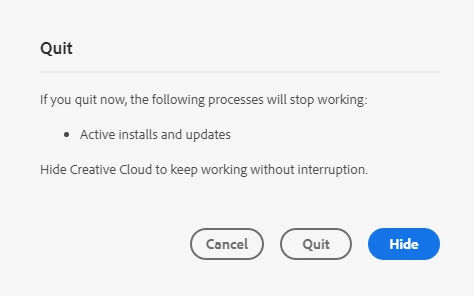
I cannot find any updates. I tried closing every creative cloud process in task manager and have disabled automatic startup of Creative Cloud. But it just automatically opens itself and opens about a minute after I close it as well. I tried pressing quit and hide, but it still pops back open. I tried going to uninstall and repairing it. It is quite annoying to constantly have it open and it gets in the way of other things. I was wondering if there was any way to fix this?

This topic has been closed for replies.
Correct answer Jeffrey_A_Wright

Sleekduck, my apologies for the confusion, the message you posted is the default message when you quit the Creative Cloud desktop app.  If you wish to not have the Creative Cloud desktop app running then use the Preferences, under the Gear icon, to turn off the option to open at startup.

2 replies

Participating Frequently
October 12, 2020

Stupidiest experience Adobe. F you.

Jeffrey_A_Wright
Community Manager
Jeffrey_A_WrightCommunity ManagerCorrect answer
Community Manager
April 13, 2020

Sleekduck, my apologies for the confusion, the message you posted is the default message when you quit the Creative Cloud desktop app.  If you wish to not have the Creative Cloud desktop app running then use the Preferences, under the Gear icon, to turn off the option to open at startup.

New Participant
August 19, 2022

I am having the same problem but I don't see the gear icon on the preferences page because none of the text loads in your App. 

Luckily, I just learned that the Quit button is the middle one from the above post, so now I can close the App.   Is there a Turn on Text preference?  Help!

New Participant
August 19, 2022

Now that I managed to Quit, my activity monitor shows the same Creative Cloud Processes still running.  Is this normal? Thanks.