Thanks and hopefully it will when I have the time to actually study it. This may sound strange to you but although I began on computers in the 1980s with a TRS80 programming from DOS everything, I am feeling more and more like the entire language is slipping right away now...Syncing I know, sounds logical. but what if you don't wish to sync? What if you just would prefer to have a safe storage?....I'm sorry I am just getting frustrated. Tech moves faster and creates an entire new way of thinking for us old timers and our minds are still stuck in that rut and not quite sponges any longer. So, I will read that and appreciate your bringing it to my attention.
God Bless
You can just use the storage without syncing.
Open the Creative Cloud desktop application, click on the gear icon to bring up the menu, and choose Preferences. In the Preferences dialog click on the Files tab. For Sync On / Off choose Off.
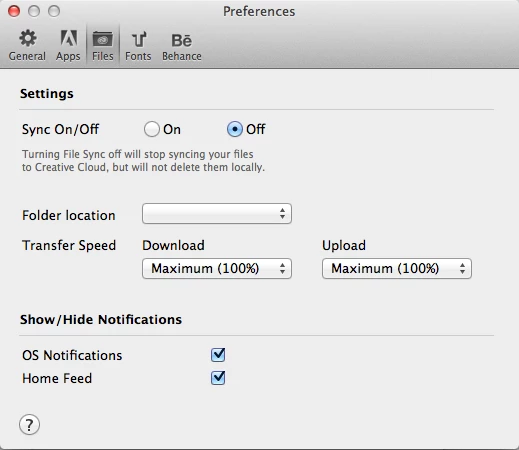
To upload files for storage you will use a web browser instead of sync. Open the Files page at https://creative.adobe.com/files. You can upload files using Upload from the Actions menu. Alternatively you can drag and drop files from Windows Explorer or Mac OS X Finder.


 AdChoices