
peterp80941136
Participant
April 13, 2016
Answered

Is there a way to delete all files in the Creative Cloud instead of one by one?

  • April 13, 2016
  • 1 reply
  • 465 views

Right now I am having to go through each photo and send it to archive and then delete it from the archive. There must be a better way, but for the life of me I haven't been able to work it out!?
This topic has been closed for replies.
Correct answer Ken G. Rice

Yes, you do not have to do this 1-by-1.

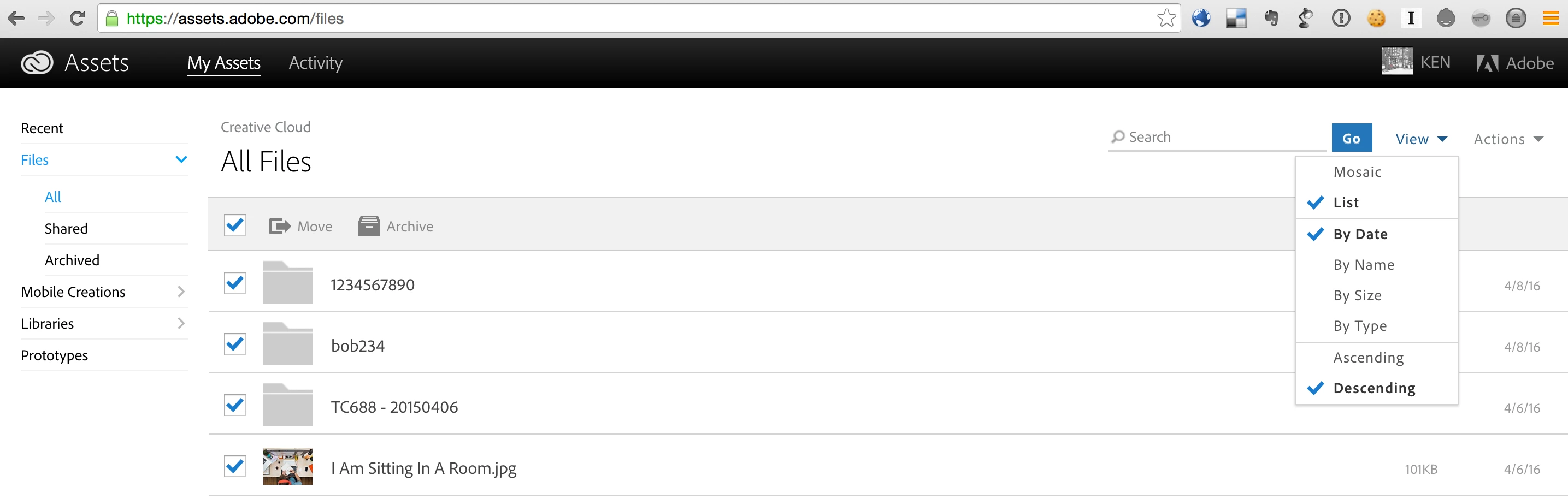
From the Files page at https://assets.adobe.com/files you want to switch the View from the default of Mosaic to List. You will then be able to select all of the photos and send them to the Archive. Then switch to the Archive and Permanently Delete the items.

1 reply

Ken G. Rice
Community Manager
Ken G. RiceCommunity ManagerCorrect answer
Community Manager
April 14, 2016

Yes, you do not have to do this 1-by-1.

From the Files page at https://assets.adobe.com/files you want to switch the View from the default of Mosaic to List. You will then be able to select all of the photos and send them to the Archive. Then switch to the Archive and Permanently Delete the items.