tristanra
Participant
April 12, 2016
Answered

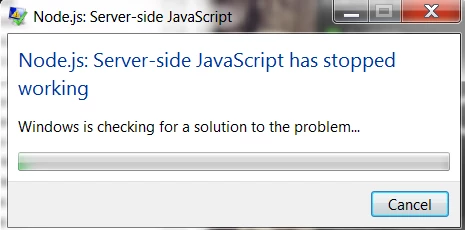
Node.js: Server-side JavaScript has stopped working.
  • April 12, 2016
  • 34 replies
  • 95458 views

Hello Everyone,

After the last Adobe Creative Cloud update. I receive this error every second that takes me out of the program I am currently in. (Indesign, Premiere, Aftereffects, Photoshop). I am currently at a stand still, where a similar problem happened less than a month ago with Error: "Evented I/O for V8 JavaScript has stopped working" .

How many problems can you cause with every update Adobe? Can you fix these before updating and how do I fix this one now since I literally slowed to a snails pace with this issue.

Thanks.
This topic has been closed for replies.
Correct answer atjain

Hi Tristan,

          We are terribly sorry for making you have to go through this. Here are some steps that should help solving the issue:

  • Open Start > Control Panel
  • Click on Programs
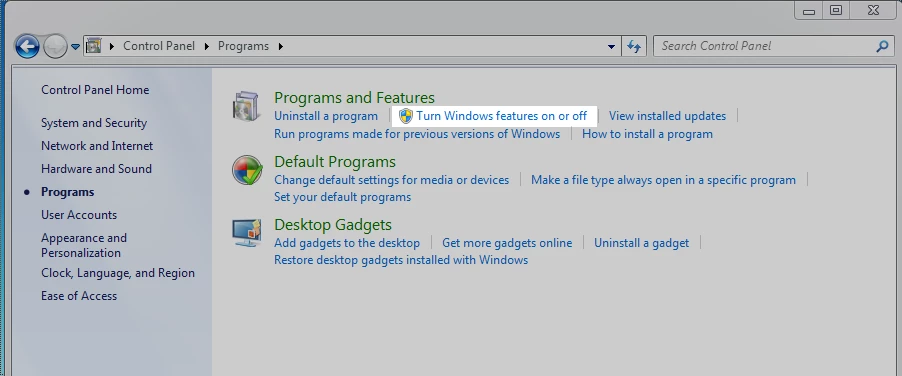
  • In the programs and features section click on 'Turn Windows Features on or off'
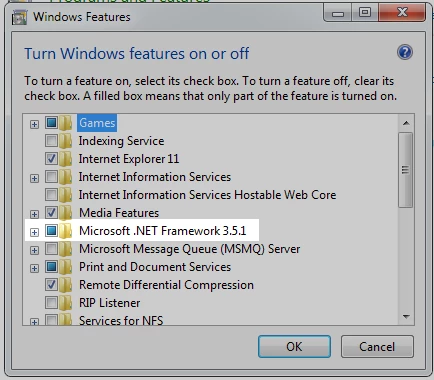
  • Make sure that Microsoft .NET Framework 3.5.1 is not unchecked (A check as well as a blue box as in the screenshot below is ok)

Please reply back to this thread in case you still face issues.

Thanks,

Atishay

Adobe CC Libraries Engineering

34 replies

Participant
April 17, 2016

Same issue here but deleting node.exe didn't resolve the issue (though node.exe is what is referenced in the details of the error).  Any other thoughts out there?  I tried stopping the creative cloud app from starting at login but that didn't help.

DMarcos
Participant
April 19, 2016

Perhaps Adobe applications have recreated the node.exe, try to check if it is still there, because without node.exe this error should no longer appear, try also check Windows Updade if you have all the updates installed.

Participant
April 19, 2016

I checked and there wasn’t a new instance of node.exe after I deleted it but somehow that error still shows up.

DMarcos
Participant
April 13, 2016

Windows 10 is apparently immune, Windows 7 SP1 is affected and I don't know about Windows 8

DMarcos
Participant
April 13, 2016

WORKAROUND: Backup and delete C:\Program Files (x86)\Adobe\Adobe Creative Cloud\CCLibrary\libs\node.exe

This is not recommended but will free you to go through this stupid error all the time

Blue Bear
Participating Frequently
April 13, 2016

Other than the obvious workaround benefit, what gets affected by deleting node.exe?

DMarcos
Participant
April 13, 2016

I couldn't tell you, for now didn't notice any difference but it is certain that even before deleting it the node.exe wasn't being any helpful because of this error

Blue Bear
Participating Frequently
April 13, 2016

I have the exact same issue.... this is absolutely ridiculous!