Known Participant
March 3, 2022
Answered

Problemas con Adobe Cloud - No sincroniza archivos

  • March 3, 2022
  • 2 replies
  • 3776 views

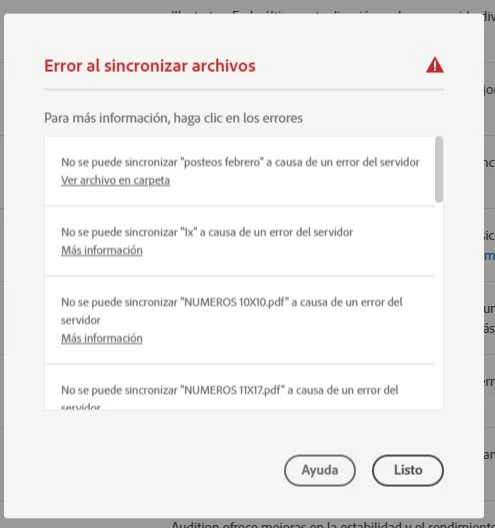
Buenos dias tengo el siguiente problema con Adobe Cloud, no me sincroniza mis archivos. Tengo el espacio de almacenamiento libre, y mi plan es de 1TB 
This topic has been closed for replies.
Correct answer Neelamk

Hi Diego,


Thank you for the log file. We understand your frustration. We have updated the log files to our engineering team who are working on the issue and trying their best to resolve it. From our end, we will let you know if there is any update from them. We would still recommend reaching out to and working with our support directly.
Please contact them here: https://helpx.adobe.com/contact.html?rghtup=autoOpen


Regards,

Neelam


Hi Diego,


Could you please check and confirm if the sync issue is resolved now.


Regards,

Neelam

2 replies

Participant
March 9, 2022

Tengo el mismo problema y ninguna de las soluciones funciona.

¿Qúe mas puedo hacer?

Neelamk
Legend
March 9, 2022

Hi There,


We are sorry to hear about all your difficulties with Adobe Cloud as it is not syncing your files.


Could you please share the Log file with us through location:

C:\Users\abseth\AppData\Local\Temp\CreativeCloud\CoreSync


Note: The AppData folder is hidden by default this doc shows how to show it if needed

http://helpx.adobe.com/x-productkb/global/show-hidden-files-folders-extensions.html


Please zip them up and send them to 

SyncForum-Communication@adobe.com with this forum URL in the email.


Check this link to collect the logs: https://helpx.adobe.com/creative-cloud/kb/cc-log-collector.html
Once you have the logs, please share the zip file with us.


Regards,

Neelam


Neelamk
Legend
March 10, 2022

Hi there,


Could you please check if the sync issue is resolved for you now .


Regards,

Neelam

Neelamk
Legend
March 3, 2022

Hi Diego,


We are sorry to hear about all your difficulties with Adobe Cloud as it is not syncing your files. Would you help us know if you are talking about the Creative Cloud Application? Also could you please help us understand more about your issue by providing the below information:

1. What operating system are you using?

2. Is this on your iPad or your computer?

3. What browser version are you using?

4. If iPad, What iOS version are you using?

5. Does the same thing occur in all browsers?

6. Has it always done this or is this something that just started happening recently?


Also, if it is Creative Cloud App sync issue try the steps outlined on this document and see if they resolve this issue: https://helpx.adobe.com/in/creative-cloud/kb/arent-my-files-syncing.html


Let us know how it goes.


Regards,

Neelam

Known Participant
March 3, 2022

Hola, gracias por responder, mas abajo le respondo sus preguntas

1. ¿Qué sistema operativo está utilizando?

Windows 10 Home 64 bits

2. ¿Está esto en su iPad o en su computadora?

Computadora

3. ¿Qué versión del navegador está utilizando?

Chrome ultima versión 

4. Si es iPad, ¿qué versión de iOS está utilizando?

5. ¿Ocurre lo mismo en todos los navegadores?

El problema ocurre al sincronizar mis archivos desde el programa de Adobe Creative Cloud. Si me conecto desde el navegador puedo usar bien. El inconveniente es que mis archivos no se actualizan en Creative Cloud Files del explorador de windows Adjunto imagen)

6. ¿Siempre ha hecho esto o es algo que acaba de comenzar a suceder recientemente?

Comenzo a suceder desde hoy 03/03/2022


Estuve observando el enlace que me envio, y el problema es el siguiente: 

Creo que ya espere lo suficiente...


Neelamk
Legend
March 9, 2022

Ahora mismo acabo de enviar el archivo log al mail que me indico.


Si, el problema de sincronización se suele dar al eliminar, cambiar nombre y a veces al modificar.


Hi Diego,


Could you please share the log file here as well?

Also, we would like to inform you if you've completed all of the troubleshooting mentioned in this discussion and this article https://helpx.adobe.com/creative-cloud/kb/arent-my-files-syncing.html and are continuing to have difficulties We would recommend reaching out to and working with our support directly.

 
If you receive an "Unable to sync files" or otherwise are unable to sync files to the Creative Cloud, try these file-naming guidelines and troubleshooting tips.
 
Welcome to Adobe Customer Care. Sign in to your account to contact us.
 
Regards,
Neelam
