Exit
  • Global community
    • Language:
      • Deutsch
      • English
      • Español
      • Français
      • Português
  • 日本語コミュニティ
  • 한국 커뮤니티
6

Remove Creative Cloud Files Personal Account folder

New Here ,
Feb 02, 2024 Feb 02, 2024

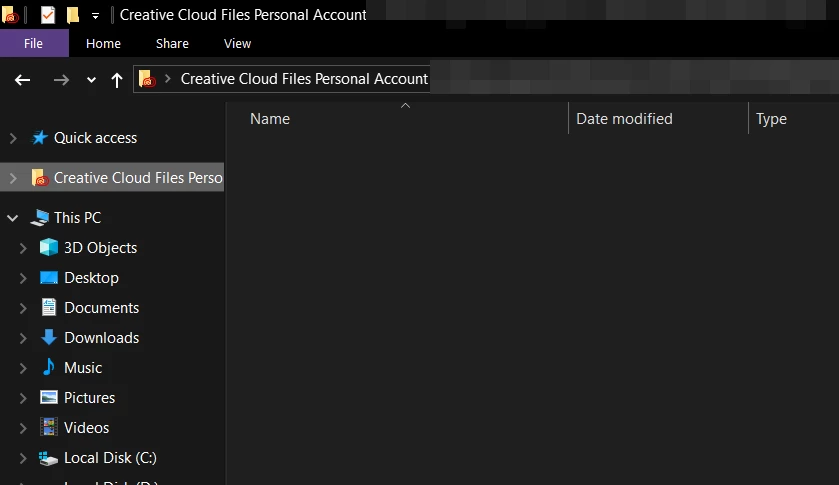
Why is this "Creative Cloud Files Personal Account" folder showing up on the windows explorer and how do I remove it? It just appeared on its own. I don't use the creative cloud stuff.

 

eXmeKJ43m3.png

TOPICS
File sync
15.0K
Translate
Report
Community guidelines
Be kind and respectful, give credit to the original source of content, and search for duplicates before posting. Learn more
community guidelines

correct answers 1 Correct answer

Community Expert , Feb 12, 2024 Feb 12, 2024


mac:

copy any important file to another folder and then delete Creative Cloud Files + <account type> + <profile_name> + <email> + <GUID> (for example: Creative Cloud Files Personal Account email@abc.com ####@AdobeID).


default location, Mac HD/Users/<Username>/Creative Cloud Files


windows:

Open the registry editor (regedit.exe) & naviagate to: HKEY_CURRENT_USER\Software\Microsoft\Windows\CurrentVersion\Explorer\Desktop\NameSpace You'll probably have two sub-keys. OneDrive's sub-key will

...
Translate
Community Expert ,
Feb 02, 2024 Feb 02, 2024

removing requires an regedit app (from adobe) and needs to be repeated with cc desktop app updates.


https://helpx.adobe.com/creative-cloud/kb/remove-cc-files-folder-shortcut-navigation-panel.html

Translate
Report
Community guidelines
Be kind and respectful, give credit to the original source of content, and search for duplicates before posting. Learn more
community guidelines
New Here ,
Feb 02, 2024 Feb 02, 2024

Wow, adobe sucks.


You're certainly right about removing registries, as that does work, but that is no a sufficient solution. I never asked for this, there should be a setting to disable it.

For anyone who wants to regedit, find a key with the folder name in here and delete the entry:

\HKEY_CURRENT_USER\SOFTWARE\Microsoft\Windows\CurrentVersion\Explorer\Desktop\NameSpace\

Translate
Report
Community guidelines
Be kind and respectful, give credit to the original source of content, and search for duplicates before posting. Learn more
community guidelines
Community Expert ,
Feb 02, 2024 Feb 02, 2024

i don't use file explorer (i like dual pane file browsing), but i just tested and see a cc files folder in the same location.  to test i deleted one of the folders inside that one without problem/reg editing.

Translate
Report
Community guidelines
Be kind and respectful, give credit to the original source of content, and search for duplicates before posting. Learn more
community guidelines
New Here ,
Feb 04, 2024 Feb 04, 2024

Thanks for finding this! it was driving me nuts. Even after I used Adobe's unPinCC tool, it still appeared. So finding this entry in regedit was the trick!


Translate
Report
Community guidelines
Be kind and respectful, give credit to the original source of content, and search for duplicates before posting. Learn more
community guidelines
Community Beginner ,
Feb 12, 2024 Feb 12, 2024

I dont get it can you explain what i have to do? Talk to me in Lamens terms please.

Translate
Report
Community guidelines
Be kind and respectful, give credit to the original source of content, and search for duplicates before posting. Learn more
community guidelines
Community Expert ,
Feb 12, 2024 Feb 12, 2024


mac:

copy any important file to another folder and then delete Creative Cloud Files + <account type> + <profile_name> + <email> + <GUID> (for example: Creative Cloud Files Personal Account email@abc.com ####@AdobeID).


default location, Mac HD/Users/<Username>/Creative Cloud Files


windows:

Open the registry editor (regedit.exe) & naviagate to: HKEY_CURRENT_USER\Software\Microsoft\Windows\CurrentVersion\Explorer\Desktop\NameSpace You'll probably have two sub-keys. OneDrive's sub-key will be nameed '{018D5C66-4533-4307-9B53-224DE2ED1FE6}' Delete the other one, that will be Creative Cloud.

Translate
Report
Community guidelines
Be kind and respectful, give credit to the original source of content, and search for duplicates before posting. Learn more
community guidelines
New Here ,
Feb 13, 2024 Feb 13, 2024

Thanks so much! I just noticed this on both my computers today and it drives me crazy. It was bad enough when it just said Creative Cloud. Now it has this ridiculous name with a GUID crapping up Explorer. Who thought that was a good idea. Why is there not a check box to turn it off. If I could use Adobe products wihtout the Creative Cloud nonsense, I surely would.

Translate
Report
Community guidelines
Be kind and respectful, give credit to the original source of content, and search for duplicates before posting. Learn more
community guidelines
Community Expert ,
Feb 13, 2024 Feb 13, 2024

@BadJoss13 


you're welcome 

Translate
Report
Community guidelines
Be kind and respectful, give credit to the original source of content, and search for duplicates before posting. Learn more
community guidelines
Explorer ,
Apr 29, 2024 Apr 29, 2024

I even had a long chat with Adobe staff at "The Photography Show" the other month who were shocked to see this issue, they could not understand why this shows up especially as they announced there "Discontinuation of Creative Cloud Synced files" from 1st Feb 2024. They were even more surprised about the fact this has been ongoing in one form or another since about 2015. I’m personally so annoyed by Adobe's total lack of respect to paying users over this if I knew how to permanently stop this by hacking the programs I would!!

"Freedom to speak is not permitted on Adobe forum."
Translate
Report
Community guidelines
Be kind and respectful, give credit to the original source of content, and search for duplicates before posting. Learn more
community guidelines
Community Expert ,
Apr 29, 2024 Apr 29, 2024
Translate
Report
Community guidelines
Be kind and respectful, give credit to the original source of content, and search for duplicates before posting. Learn more
community guidelines
Explorer ,
Apr 29, 2024 Apr 29, 2024

I tried using this about 9 years ago without any success, so much so if I start to type “r” for “regedit” into my windows start menu it’s there at the top and if click on that it opens at the correct point to edit “System.IsPinnedToNameSpaceTree” from 1 to 0.

"Freedom to speak is not permitted on Adobe forum."
Translate
Report
Community guidelines
Be kind and respectful, give credit to the original source of content, and search for duplicates before posting. Learn more
community guidelines
Community Expert ,
Apr 29, 2024 Apr 29, 2024

and who's disallowing your posts?

Translate
Report
Community guidelines
Be kind and respectful, give credit to the original source of content, and search for duplicates before posting. Learn more
community guidelines
Explorer ,
Apr 29, 2024 Apr 29, 2024

That must be the part of the signature I had when I first started bringing this up all them years ago, I had posts removed because I spoke out about Adobe. 

"Freedom to speak is not permitted on Adobe forum."
Translate
Report
Community guidelines
Be kind and respectful, give credit to the original source of content, and search for duplicates before posting. Learn more
community guidelines
Community Expert ,
Apr 29, 2024 Apr 29, 2024

mac:

copy any important file to another folder and then delete Creative Cloud Files + <account type> + <profile_name> + <email> + <GUID> (for example: Creative Cloud Files Personal Account email@abc.com ####@AdobeID).


default location, Mac HD/Users/<Username>/Creative Cloud Files


windows:

Open the registry editor (regedit.exe) & naviagate to: HKEY_CURRENT_USER\Software\Microsoft\Windows\CurrentVersion\Explorer\Desktop\NameSpace You'll probably have two sub-keys. OneDrive's sub-key will be nameed '{018D5C66-4533-4307-9B53-224DE2ED1FE6}' Delete the other one, that will be Creative Cloud.

Translate
Report
Community guidelines
Be kind and respectful, give credit to the original source of content, and search for duplicates before posting. Learn more
community guidelines
Explorer ,
Apr 29, 2024 Apr 29, 2024

I use Windows 10 and find opening regedit.exe & naviagate to: 
HKEY_CLASSES_ROOT\CLSID\{0E270DAA-1BE6-xxxx-xxxx-xxxxxxxxxxx}
and then change the System.IsPinnedToNameSpaceTree value from "1" to "0", by changing this it only returns after any Adobe updates.
 

"Freedom to speak is not permitted on Adobe forum."
Translate
Report
Community guidelines
Be kind and respectful, give credit to the original source of content, and search for duplicates before posting. Learn more
community guidelines
Community Expert ,
Apr 29, 2024 Apr 29, 2024

ok

Translate
Report
Community guidelines
Be kind and respectful, give credit to the original source of content, and search for duplicates before posting. Learn more
community guidelines
Community Beginner ,
Feb 19, 2024 Feb 19, 2024

This indeed works, however it comes back every time I restart windows. 

Translate
Report
Community guidelines
Be kind and respectful, give credit to the original source of content, and search for duplicates before posting. Learn more
community guidelines
Community Expert ,
Feb 19, 2024 Feb 19, 2024

then you may need to await a cc desktop app update.

Translate
Report
Community guidelines
Be kind and respectful, give credit to the original source of content, and search for duplicates before posting. Learn more
community guidelines
New Here ,
Feb 22, 2024 Feb 22, 2024

I'm on macOS and it comes back again too. That's annoying.

Translate
Report
Community guidelines
Be kind and respectful, give credit to the original source of content, and search for duplicates before posting. Learn more
community guidelines
Community Expert ,
Feb 22, 2024 Feb 22, 2024

sorry about that.

Translate
Report
Community guidelines
Be kind and respectful, give credit to the original source of content, and search for duplicates before posting. Learn more
community guidelines
Community Beginner ,
Feb 22, 2024 Feb 22, 2024

Try to pause syncing first on the Adobe CC app. Then delete the key. That's what I did and it hasn't come back yet.

Translate
Report
Community guidelines
Be kind and respectful, give credit to the original source of content, and search for duplicates before posting. Learn more
community guidelines
Community Beginner ,
Feb 22, 2024 Feb 22, 2024

THANKS, this solved my problem with this annoying folder that remained unused.

Translate
Report
Community guidelines
Be kind and respectful, give credit to the original source of content, and search for duplicates before posting. Learn more
community guidelines
Community Expert ,
Feb 22, 2024 Feb 22, 2024

you're welcome.

Translate
Report
Community guidelines
Be kind and respectful, give credit to the original source of content, and search for duplicates before posting. Learn more
community guidelines
Community Beginner ,
Aug 01, 2024 Aug 01, 2024

The Adobe Support sucks. There is this folder and if you click on it there is an error message. Dear Adobe TEAM, please tell me how I can delete this folder without changing the registry

Translate
Report
Community guidelines
Be kind and respectful, give credit to the original source of content, and search for duplicates before posting. Learn more
community guidelines