
Participant
August 25, 2015
Answered

Remove Old Creative Cloud files

  • August 25, 2015
  • 1 reply
  • 601 views

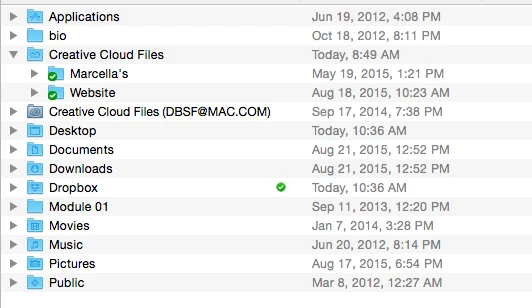
I've got this folder in my hard drive and am not sure about removing it (4.6GB). The last use date is from 2014 so it seems to be non-functional.

The active CC files have a bright blue folder icon and the older on seems to be darker blue. What does this indicate?

thanks,

David
This topic has been closed for replies.
Correct answer Ken G. Rice

You have at least two Adobe IDs - the one you are using to post in this forum, and the one in the screenshot. If you sign out and sign in with a different Adobe ID the file syncing will denote the account you are not signed in with like this.

1 reply

Ken G. Rice
Community Manager
Ken G. RiceCommunity ManagerCorrect answer
Community Manager
August 25, 2015

You have at least two Adobe IDs - the one you are using to post in this forum, and the one in the screenshot. If you sign out and sign in with a different Adobe ID the file syncing will denote the account you are not signed in with like this.

dbsfAuthor
Participant
August 25, 2015

Thank you Ken...I do have two accounts, one Pro and one through the Academy of Art but can't get Adobe to sort out the matter. So I'll tackle that next.

Good one!

D